


AutoCAD Software
Last Updated
Key Takeaways
Generated from the text of customer reviews
AutoCAD Software is 2D and 3D drafting software for technical design and documentation. It is mainly used by architecture, engineers, and construction professionals. Users consistently praise its precision and drafting versatility. However, the most common complaint is pricing, complexity, and heavy-file performance. Recently, AutoCAD added an AI-guided Autodesk Assistant and improved file-opening speeds by up to 11 times compared with AutoCAD 2025.
Our Verdict
AutoCAD software suits architecture, engineering, and construction teams that need precise 2D drafting more than parametric 3D modeling. Its pricing may be better suited to professionals who use it regularly rather than occasional users. We recommend it for teams that produce detailed technical drawings regularly.
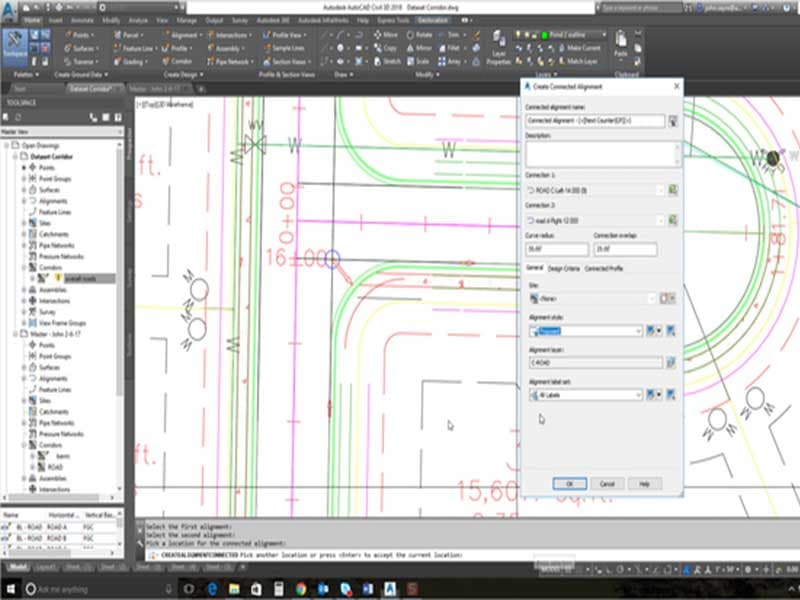
AutoCAD Software Specifications
- Multi-Track or Layer Support
- Hardware Acceleration (GPU/CPU)
- Plugin and Extension Compatibility
- Scripting and Automation Support
What Is AutoCAD Software?
AutoCAD software is a computer-aided design software developed by Autodesk. It is used to create precise drawings and models. The software gives professionals a single environment for 2D drafting and 3D modeling, from initial line work to a finished construction set. Specialized toolsets for architecture, mechanical design, electrical layout, and plant design sit inside the same license. This means a firm working across disciplines doesn't need separate software for each one.
Beyond this, the platform works across desktop, web, and mobile, so users can create and edit drawings from wherever they're working.
What Is AutoCAD Software Best For?
‘Smart Blocks’ stands out among different AutoCAD software features. this capability helps to place blocks automatically based on how similar blocks were positioned earlier in the drawing. It can also find and replace existing blocks across a file in one pass. Drafters skip manually repositioning or swapping blocks one at a time, especially on drawings with repeated elements like doors, fixtures, or symbols. This way, it helps teams working on large or repetitive drawings finish layout work quickly.
How Much Does AutoCAD Software Cost?
AutoCAD software pricing starts at $99/33 tokens for its Flex plan. Notable features included in this plan are access to 100+ products, user management with default group assignments, and a pool of tokens. The vendor structures its pricing into Subscription and Success plans as discussed below:
Subscription Plans:
- Monthly Subscription: $260/month
- Annual Subscription: $175/month, billed annually
- 3-Years Subscription: 6,285/one user
Success Plans:
- Business Plan: custom pricing
- Enterprise Plan: custom pricing
The platform also provides 15-days free trial.
Apart from the base fee, the users should also account for the following additional cost:
- Training And Certification: $350 to $1,150/user
- Custom Development And API Integration: $80 to $150+/hour
Users find the software’s price comparatively higher, particularly for small businesses, startups, and individual users accessing advanced features like sculpting or mesh modeling. However, some still find the price fair given its capability range.
Disclaimer: The pricing is subject to change.
AutoCAD Software Integrations
AutoCAD Software supports integration with several third-party systems such as:
- Codemill
- Dusty Robotics
- E-verse
- Esri
- IMAGNiT Technologies
- Hsbcad
- Matterpot
How Does AutoCAD Software Work?
Log in to AutoCAD with your Autodesk account credentials to access the platform and start using its features:
- Create or open a DWG file, then draft 2D geometry
- Build a 3D model from that same drawing when a project needs it
- Apply an industry-specific toolset without leaving the core application
- Automate repetitive tasks with ‘AutoLISP’ scripts or Autodesk AI's smart block replacement and layer detection
- Publish drawing sheets as PDFs directly to Autodesk Docs
- Ask the Autodesk Assistant inside the session for command help or troubleshooting
- Review multi-user event logs and version history to track project activity over time
Who Is AutoCAD Software For?
AutoCAD software is suitable for multiple industries, such as
- Architectures
- Engineers
- Designers
- Construction
- Real estate
AutoCAD Software Use Cases
Based on our assessment of AutoCAD software features and user feedback, following key scenarios highlights where this platform may be a suitable option:
Mechanical Engineers Refining 2D Drawings From 3D Assemblies
When a 3D assembly built in another program needs a specific 2D drawing adjusted rather than rebuilt from scratch. AutoCAD Software's DXF and DWG compatibility handles that edit directly. It opens the assembly's flattened 2D output with its line geometry and dimension values intact. Users mention that AutoCAD works well for importing and exporting DWG and DXF files used with SolidWorks and Adobe Illustrator.
Construction Teams Preparing Detailed Site Drawings
AutoCAD Software suits construction teams when a plan, elevation, section, or scheme drawing needs precise dimensions and detailed line work before it reaches the site. Its drafting tools handle documentation that contractors and site teams have to interpret without a second explanation once work starts. Reviewers have highlighted the platform’s utility for construction detailing and drafting.
Drainage Engineers Coordinating Pipe And Chamber Placement
Drainage engineers on multi-discipline sites can use AutoCAD Software to catch structural or architectural clashes. Its coordinate-based placement locks every pipe run and chamber to exact site plan values and overlaying a structural or architectural drawing on top of that layout shows any overlap directly on screen. This way, clashes surface during design instead of on-site. Users also note that AutoCAD supports clash coordination by overlaying drawings.
Architects Managing Changes Across Referenced Drawings
Architects working across several related drawings can use AutoCAD Software's external references (Xrefs) when a source drawing needs to appear in multiple project files without copying it into each one. A change made to the referenced drawing then updates automatically wherever that reference is placed. Users highlight Xrefs for keeping related drawings current during consultant coordination.
Is AutoCAD Software Right For You?
AutoCAD software may suit architects, engineers, and construction firms that need precise 2D drafting alongside 3D modeling. The platform also provides specialized toolsets that broaden its scope, with Architecture, Mechanical, Electrical, MEP, Plant 3D, Map 3D, and Raster Design available within AutoCAD Software.
For web and mobile versions, Autodesk states that files are stored in the AutoCAD Software cloud using Amazon S3 infrastructure, with access restricted to the file owner and people they share files with.
Besides this, its scope also extends into specialized engineering. AutoCAD Software 2027 includes the Electrical toolset, which contains more than 65,000 intelligent electrical symbols and tools for electrical control system documentation. Via Separations, Hirsch Bedner Associates (HBA), Heirloom are among notable clients.
Still deciding if AutoCAD software is the right call for your team? Reach out at (661) 384-7070 for further guidance.
AutoCAD Software Features
Geometry Cleanup
AutoCAD software scans a DWG file for common drafting errors, gaps, overshoots, undershoots, and misaligned angles, then suggests targeted fixes for each one. Drafters review and apply corrections instead of looking for errors manually across a large drawing.
Autodesk Assistant
Autodesk offers an AI assistant that answers command questions and offers in-context guidance. It is built directly into the drawing session. With Model Context Protocol support, it also reads drawing context and user intent to check CAD standards and run prompt-driven tasks.
Trace
The platform lays out a virtual sheet of tracing paper over a drawing, so collaborators can add comments and markups without touching the original file. Traces can be created on desktop, web, or mobile, then shared with the team for review.
AutoLISP
This feature runs custom automation scripts inside AutoCAD Software, supporting LSP, FAS, and VLX file types, and can pull from thousands of existing programs already written for AutoCAD Software-based software. Teams use it to automate repetitive drafting tasks and enforce CAD standards across a firm's drawings.
Markup Import And Markup Assist
Feedback from printed paper, PDFs, or mobile markups imports directly into a drawing instead of getting manually re-entered. Autodesk AI reads markup text for commands like move, copy, or delete and applies them automatically, so reviewed changes land in the file without redrawing each one.
Pros And Cons of AutoCAD Software
Pros
Provides precision for 3D modeling and technical drawing
Improves productivity with accurate dimensioning and measurement tools
Updates referenced drawing across multiple locations through X-ref
Cons
Editing 3D complex models can be challenging
May require strong hardware for smooth performance
AutoCAD Software Reviews
Total 25 reviews
4.6
All reviews are from verified customers
Rating Distribution
5
Stars64%
4
Stars32%
3
Stars4%
2
Stars0%
1
Stars0%
Share your experience
Engineering, 500+ employees
More than a year
“appropriate software for architectural design”
Pros
It's convenient for me because I can easily find and use functions. Also, it helps me express complex ideas in a straightforward way.
Cons
Basic functions were easy to find, but using additional functions and locating them was tough.
Rating Distribution
Ease of use
10
Value for money
10
Customer Support
9
Functionality
10
Engineering, 1-10 employees
Less than a year
“Excellent.”
Pros
I find the software easy to use on a daily basis, thanks to its uncomplicated and easy-to-navigate interface. This simplicity makes it highly accessible and efficient for regular tasks.
Cons
It's slow to open and finding commands is challenging.
Rating Distribution
Ease of use
10
Value for money
10
Customer Support
10
Functionality
10
Construction, 1-10 employees
More than a year
“Autocad Best Program for Architecture”
Pros
I like the benefit of being able to convert files into PDF.
Cons
The newest version feels much bulkier than the previous one.
Rating Distribution
Ease of use
10
Value for money
6
Customer Support
8
Functionality
8
Frequently Asked Questions
Does AutoCAD software offer an API?
Yes, it offers an API.
Who are the typical users of AutoCAD software?
AutoCAD software is mainly used by designers, architects, real estate professionals, construction developers, and engineers.
What types of pricing plans does AutoCAD software offer?
The vendor offers subscription and success plans, which start at $99/33 tokens for Flex plan. Subscription plans include Monthly Subscription ($260/month), Annual Subscription (175/month, billed annually), and 3-Years Subscription (6,285/one user). A 15-day free trial is also available. Get it touch for custom AutoCAD cost estimates.
Does AutoCAD Software have a mobile app?
Yes, it offers a mobile app that is available for iOS and Android devices.
What language does AutoCAD Software support?
AutoCAD software supports multiple languages such as English, German, French, Italian, Japanese, Korean, Russian, Polish, simplified Chinese, Czech, Hungarian, and Portuguese.
What other apps does AutoCAD Software integrate with?
The platform supports integrations with multiple third-party systems such as Codemill, Hsbcad, Dusty Robotics, Esri, E-Verse, and Matterpot.
What level of support does AutoCAD Software offer?
The software provides support through an online support, Autodesk Assistant, and knowledge base.