



Last Updated
Overview
ocenaudio is a completely free, beginner-friendly audio editor ideal for voiceovers and podcasting. Although the tool lacks an autosave feature, it runs smoothly on low-end hardware and supports quick edits with features like punch-in recording.
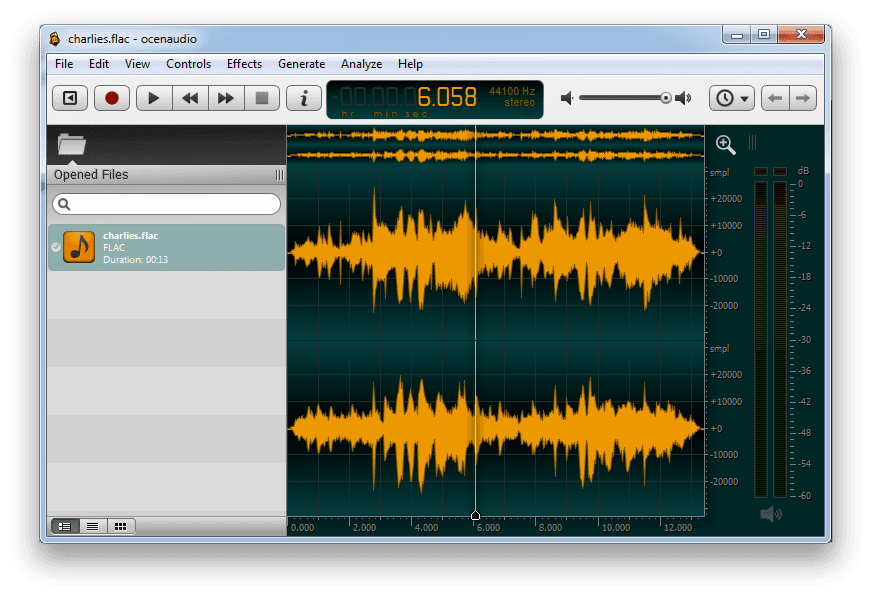
ocenaudio Specifications
- Multi-Format Import/Export
- Cross-Platform Compatibility
- Audio Mixing and Mastering Tools
- Multi-Track or Layer Support
ocenaudio Features
VST Plugins Support
ocenaudio supports VST (Virtual Studio Technology) plugins, allowing users to apply a range of audio effects. These plugins are available in the software’s real-time preview system, enabling users to hear adjustments immediately during configuration.
Real-time Preview Of Effects
With ocenaudio, effects like EQ, gain, and filters can be previewed in real-time. Users can adjust parameters while listening to the processed audio, making it easier to fine-tune results and deliver high-quality projects.
Cross-Platform Support
ocenaudio runs natively on Windows, macOS, and Linux with a consistent interface and feature set across all systems. Users can switch between systems without needing to relearn tools or workflows.
Fully Featured Spectrogram
The built-in spectrogram view provides detailed frequency analysis. Settings such as frequency bands, window size, and dynamic range can be adjusted in real time, providing users with precise control over how spectral content is displayed.
Effecient Editing Of Large Files
ocenaudio software is optimized for editing long audio files without overloading system memory. Basic operations, such as cutting, copying, and pasting files, remain responsive, even for hours of long recordings.
Pros And Cons of ocenaudio
Pros
Clean and easy-to-use interface
Lightweight and runs smoothly on low-spec machines
Reliable performance with minimal crashes
Cons
No autosave or recovery feature for interrupted recordings
Does not support plugin chaining or automation
ocenaudio Reviews
Total 5 reviews
4
All reviews are from verified customers
Rating Distribution
5
Stars20%
4
Stars60%
3
Stars20%
2
Stars0%
1
Stars0%
Share your experience
Silvio
Design, 11-50 employees
Less than a year
“A simple and professional audio editing software”
Pros
Oceanaudio is a very simple and easy to use software. With its user friendly interface, we can edit any audio track simply and use the available effects. Also you can remove noise or cut out parts of the track. The best thing is that it supports VST plugins which allows for smooth editing of large files.
Cons
I believe Ocenaudio is one of the best audio editors because of its simple, user-friendly interface and a wide range of features. The real time equalization effects and gain effects are in my opinion the best. So no complaints at all.
Rating Distribution
Ease of use
10
Value for money
10
Customer Support
10
Functionality
10
Cristina
Animation, 1-10 employees
More than a year
“The best free alternative to Adobe Audition”
Pros
I started using this when I knew almost nothing about audio editing and Adobe Audition felt like an impossible challenge. Nowadays I still keep it on my PC for quick recordings or edits without any hassle. It takes up very little space on my computer and does a lot of work. The punch-in recording feature is fantastic, saving lots of time and it is perfect for beginners.
Cons
Honestly I cannot find any flaws. It offers the best value for free and is much easier to use compared to the more complex Adobe Audition. As a DAW for basic to intermediate audio editing it is simply fantastic.
Rating Distribution
Ease of use
8
Value for money
8
Customer Support
8
Functionality
8
Anonymous
Information Technology and Services, 1-10 employees
Less than 6 months
“Really user-friendly tool”
Pros
Compared to other audio editing software like Audacity and Adobe Audition this tool is much simpler to use even for beginners. We can also work with multiple files simultaneously. Also it is a lightweight app that can run on nearly any PC.
Cons
There is no support for plugin integration and the number of effects is quite limited too.
Rating Distribution
Ease of use
6
Value for money
5
Customer Support
6
Functionality
5
Frequently Asked Questions
What other apps does ocenaudio integrate with?
Watch its free demo to learn about ocenaudio integration arrangements.
Does ocenaudio have a mobile app?
Yes, ocenaudio offers a mobile app for iOS devices.
What language does ocenaudio support?
ocenaudio supports English and Portuguese languages.
Does ocenaudio offer an API?
The official website of ocenaudio does not mention its API availability.
Who are the typical users of ocenaudio?
The typical users include podcasters, voiceover artists, educators, and beginners who need a simple and efficient audio editing tool.
What types of pricing plans does ocenaudio offer?
There are no ocenaudio price plans as it is an open-source program and completely free to use for everyone.
What level of support does ocenaudio offer?
ocenaudio provides support through a form submission.