


Last Updated
Overview
SmartBuild Post Frame streamlines the construction design process by offering automated 3D modeling, material takeoffs, and instant bidding in a single interface. While customization in certain layouts can be limited, its proposal-building feature enhances sales efficiency. It is ideal for construction teams and post-frame builders seeking precision-driven project execution.
SmartBuild Post Frame Specifications
- Real-Time Preview
- 3D Modeling and Rendering Capabilities
- Collaboration and Version Control Tools
- Asset Libraries and Preset Repositories
SmartBuild Post Frame Features
3D Post Frame Models
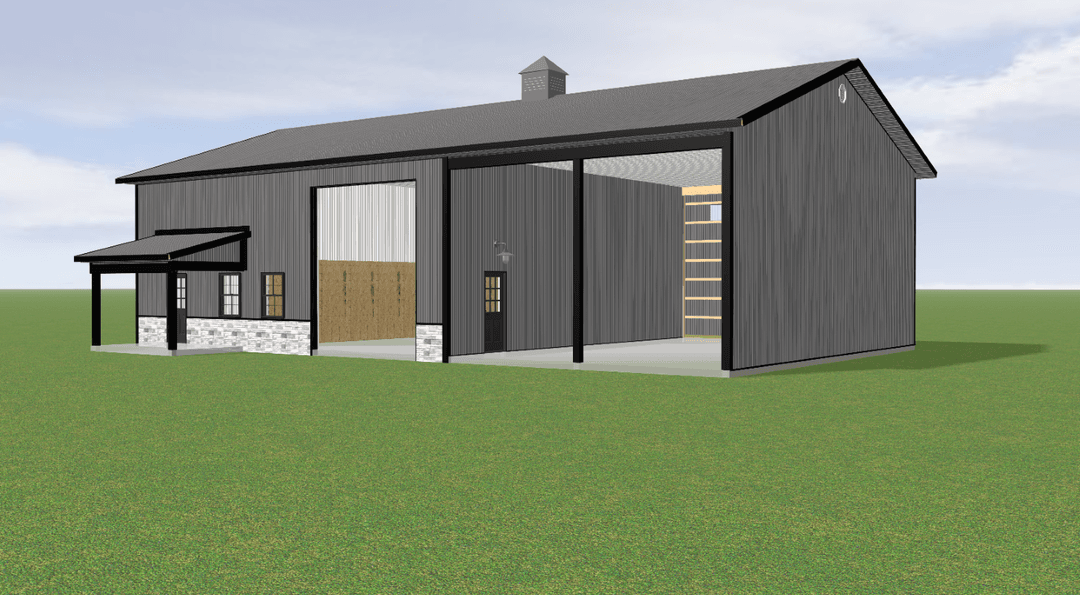
SmartBuid Post Frame features 3D modeling that enables users to design detailed pole barn layouts with precise dimensions and configurable options. It reduces manual drafting time while improving accuracy, helping builders quickly visualize structures.
Construction-Ready Drawings
SmartBuild automatically generates construction-ready drawings directly from design inputs. This ensures execution accuracy, allowing field teams to move from planning to construction faster while maintaining compliance and improving overall build reliability.
Material Lists Generation
The platform automatically generates comprehensive material lists based on design specifications. This minimizes manual takeoffs and ensures accurate cost estimation, enabling businesses to optimize inventory planning and boost efficiency across construction processes.
Proposal Building
Builders can turn complex designs into professional proposals faster. This streamlines the sales process by combining visuals, pricing, and specifications into client-ready documents. It speeds up the bidding process, helping contractors win more projects in less time.
Live Sale Conversations
This feature supports real-time design adjustments during client discussions, enabling interactive sales presentations. It helps businesses respond instantly to client preferences, improving engagement and increasing conversion rates by aligning proposals with customer expectations.
Pros And Cons of SmartBuild Post Frame
Pros
Efficient automated material takeoff generation
User-friendly web-based design interface
Accurate real-time structural 3D modeling
Cons
Documentation gaps may hinder user workflows
Extensive capabilities may initially overwhelm users
SmartBuild Post Frame Reviews
Total 4 reviews
5
All reviews are from verified customers
Rating Distribution
5
Stars100%
4
Stars0%
3
Stars0%
2
Stars0%
1
Stars0%
Share your experience
Small Business, 11-50 employees
“Quotes come back much faster”
Pros
Quoting complex barns takes a lot less time now and our pricing has become much more accurate. It's detailed enough to handle just about every custom barn configuration we need.
Cons
There really aren't many downsides but a few areas could use improvement like the graphics, certain features such as gutters and overall processing speed.
Rating Distribution
Ease of use
10
Value for money
9
Customer Support
10
Functionality
10
Small Business, 11-50 employees
“helpful tool!”
Pros
It's been really helpful for putting together designs and pricing out projects.
Cons
I just wish it separated siding and roofing costs instead of grouping them together and it would be even better if it could generate printable blueprints.
Rating Distribution
Ease of use
9
Value for money
8
Customer Support
10
Functionality
10
Small Business, 11-50 employees
“3D modeling gives real edge”
Pros
Working with SmartBuild PF is a big improvement over doing everything by hand. It's much more efficient and the 3D modeling is especially valuable when showing designs to customers. That feature really makes a difference.
Cons
Some of the finer details like stairs, fake trusses and certain customizations can become a bit complicated. There are times when handling custom changes seems somewhat confusing.
Rating Distribution
Ease of use
9
Value for money
10
Customer Support
9
Functionality
10
Frequently Asked Questions
Does SmartBuild Post Frame offer an API?
Yes, users can set up access to Smartbuild's API.
Does SmartBuild Post Frame have a mobile app?
SmartBuild Post Frame does not have a native mobile app but is accessible via web browsers on mobile devices, primarily for viewing projects in 3d. For actual designing, a larger device with a keyboard and mouse is required.
What types of pricing plans does SmartBuild Post Frame offer?
License Cost: Average cost per user is around $7,300. Implementation Fee: $1,800 one‑time. User Types: Sales team members, project managers, designers — anyone generating designs, outputs, or materials lists. Bulk Licensing: When purchasing 5 or more licenses, discounting may apply. Payment Plans: Payment plan options are available — please inquire for details Request a personalized SmartBuild Post Frame price quote for your business.
Who are the typical users of SmartBuild Post Frame?
Sales Team Members They use SmartBuild to design buildings during the sales process, generate instant pricing, and produce professional proposals. Project Managers They rely on SmartBuild for accurate materials lists, drawings, and take‑offs to keep jobs moving smoothly. Designers / Estimators Anyone responsible for creating building models, layouts, or material packages uses SmartBuild as their core tool.
What other apps does SmartBuild Post Frame integrate with?
Smartbuild current integrates with several tools, including but not limited too: Paradigm by Paragon, QB Metal Shop, CSM Synergy, StruxSure Plans, IdeaRoom.
What level of support does SmartBuild Post Frame offer?
It offers support via call, email, and tickets. A live support team is available during business hours for unlimited support - included in your plan.
What language does SmartBuild Post Frame support?
SmartBuild Post Frame is primarily available in English.