Last Updated
Key Takeaways
Generated from the text of customer reviews
OptimoRoute automatically plans the best routes and work schedules for drivers and field employees who need to visit many locations. Some users report shallow reporting for performance data, but live tracking still gives dispatchers real-time visibility into every driver's location. Recently, OptimoRoute added dynamic mid-route depot support for businesses running commercial, multi-day routes.
Our Verdict
OptimoRoute suits small-to-mid-sized businesses and regional enterprises running local fleets with highly complex, time-sensitive schedules. Pricing is per driver with no setup fees or contracts, but advanced features like multi-day routing and dynamic depots stay locked to the custom tier. We recommend OptimoRoute for delivery, courier, and field-service businesses that need to coordinate multiple drivers across multiple locations.
Overall Rating
Based on 213 users reviews
4.5
Rating Distribution
Positive
95%
Neutral
5%
Negative
0%
Starting Price
$39.00
per driver per month
OptimoRoute Specifications
- Scheduling & Dispatching
- Mobile Access
- GPS Tracking
- Reporting & Analytics
What Is OptimoRoute?
OptimoRoute is cloud-based route-planning and scheduling software for delivery businesses and mobile workforces. It helps companies plan the most efficient order for drivers or technicians to visit many locations, then sends the routes and job details directly to their phones. A business enters its delivery stops, customer appointments, or field-service jobs into OptimoRoute. The software then assigns the jobs to the most suitable driver and creates an efficient route for them.
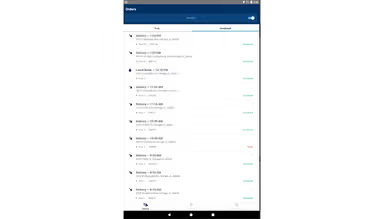
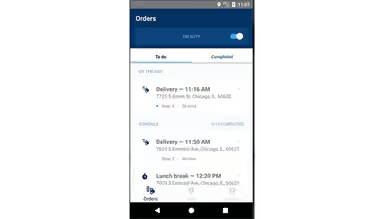
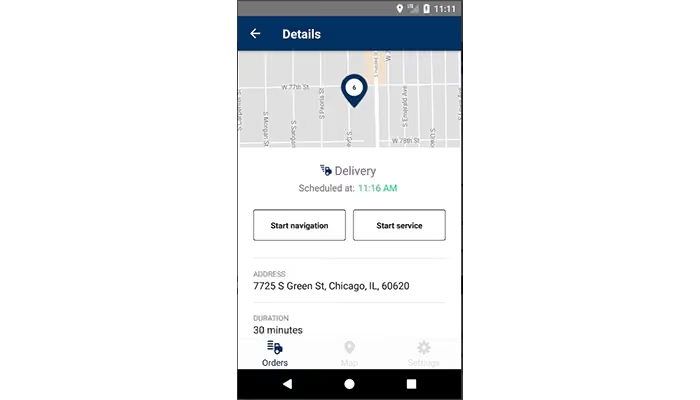
Drivers receive their daily route and job details on their mobile phones. If a delivery is canceled, a new job is added, or a driver is delayed, the dispatcher can update the plan and send the revised route to the driver. It is mainly used by delivery and courier companies, food, grocery, and meal-delivery businesses, field-service companies, HVAC, plumbing, electrical, repair, and maintenance businesses.
What Is OptimoRoute Best For?
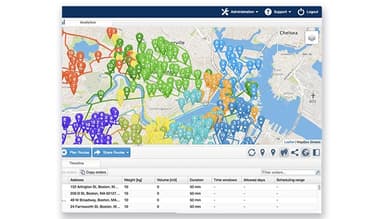
One of OptimoRoute’s most standout features is its intelligent drag-and-drop timeline with 'Best-Fit' automation. Most routing platforms let dispatchers manually reorder stops; OptimoRoute uses an underlying AI optimization engine that recalculates routes instantly when changes are made. For example, if a customer cancels a delivery and a new urgent order comes in, the dispatcher can drag that order onto an appropriate driver’s timeline. The platform then finds the best position for it in the route while respecting the driver’s schedule and the order’s delivery requirements. The dispatcher remains in control of who receives the job, while the software handles the complex route sequencing.
How Much Does OptimoRoute Cost?
OptimoRoute pricing starts at $39.00/driver/month for the Lite plan, which includes the mobile app for drivers, route history, live tracking, and support for up to 700 orders at once. Further pricing tiers of the software are as follows:
- Pro: $49.00/driver/month
- Custom: Custom pricing
A 30-day free trial is available, with access to Pro features. Annual billing is also available. There are no setup fees, contracts, or hidden charges; subscribers pay per driver and can cancel anytime.
Reviewers generally describe OptimoRoute's pricing as high compared to alternatives, with several noting costs doubled without warning over time. Many still consider it worth the premium given the fuel and driver-hour savings from route optimization, though a few mention that advanced features and deeper reporting sit behind pricier tiers.
Disclaimer: The pricing is subject to change.
OptimoRoute Integrations
The vendor integrates with ERP, order management, and CRM platforms through its Web Service API, including:
How Does OptimoRoute Work?
Here's how you can access the platform and start using its features:
- Log in to your account and configure driver profiles, skills, and vehicle details
- Import orders through an Excel, CSV, or TXT file, or add them manually
- Generate optimized routes for all drivers simultaneously, based on time windows, vehicle capacity, and other constraints
- Fine-tune routes manually using Drag & Drop before finalizing the plan
- Send finished routes directly to the Driver app, or export them to Excel or GPS devices
- Track drivers in real-time and reassign urgent orders to available drivers as needed
- Collect proof of delivery through digital signatures, photos, and barcode scanning from the field
- Review analytics and route summaries to spot top performers and areas for improvement
Who Is OptimoRoute For?
It is mainly used by businesses with employees who travel between many customer locations, including:
- Delivery and courier companies
- Meal-delivery businesses
- Retail-delivery teams
- Field-service companies
- HVAC
- Healthcare
OptimoRoute Use Cases
Based on our analysis of OptimoRoute features and platform capabilities, we have identified key scenarios where this software is a strong fit for:
Multi-Drop Last-Mile Retail And Food Delivery
E-commerce, local grocery stores, and food distributors have to deliver hundreds of perishable or time-sensitive orders daily across varying locations. The manual planning of these deliveries can be difficult because of strict time windows enforced by customers, limited capacity in transportation, and the need to ensure the freshness of food and timely deliveries. When, for whatever reason, a driver faces a traffic jam or drives across town again, food gets spoiled, ice cream melts, and customers have to make claims. The software can bulk-import all Excel orders, cluster deliveries together according to distance, and determine the right capacities of boxes for trucks to make sure that they are loaded as needed and never go back and forth.
On-Field HVAC, Plumbing, And Utility Maintenance
HVAC, plumbing, telecom, and home repair companies do not just deliver boxes; they dispatch personnel with highly varied certifications, tools, and license levels. A dispatcher cannot simply send the nearest driver if that driver lacks the specific technical skill required to repair a specialized system. What the software does is cross-reference the job requirements against driver profiles, automatically matching and routing only the qualified technician to the right job site.
Home Healthcare And Patient Transport
Healthcare organizations, in some cases, send caregivers, nurses, therapists, or medical staff to patients’ homes. Apart from that, non-emergency medical transport providers sometimes take patients to scheduled appointments. In both situations, timing matters more because this is not an ordinary delivery. One missed or late visit can affect treatment. Staff availability, patient schedules, vehicle suitability, and travel time must all be considered together. OptimoRoute organizes care visits and patient journeys into schedules that are easier for healthcare teams to manage.
Pickup-And-Return Services
This use case applies when the business must first collect something from a customer and later return it or deliver it to a different destination. Laundry and dry-cleaning businesses are a clear example: they collect garments, process them, and return the correct items to the right customer. It also applies to courier, repair, rental, and local transport operations. These businesses must know that an item was collected, keep it connected to the correct customer or destination, and make sure the return or onward delivery happens after the collection. Therefore, OptimoRoute keeps pickup and delivery work connected within the route plan.
Is OptimoRoute Right For You?
OptimoRoute is right for you if you operate a fleet of vehicles or a team of mobile technicians and struggle with the daily administrative chaos of manual scheduling, missing customer delivery windows, or wasting money on excessive fuel and driver overtime.
It also maintains an active SOC 2 Type 1 certification, which means an independent, third-party auditor has formally reviewed and verified the platform’s security controls, internal risk assessment protocols, and data protection policies. So, when your IT department or a big corporate client demands to know if their data is safe, you just hand them this certificate, and the deal moves forward.
Still not sure if OptimoRoute software is the right choice for you? Contact us at (661) 384-7070, and our team will help you decide based on your requirements.
OptimoRoute Features
Automated Planning
This feature allows a business to import many orders and automatically create efficient routes for its drivers. It considers customer locations, delivery times, driver working hours, vehicle capacity, and other rules when making the plan. This is useful because a dispatcher does not have to manually decide every driver’s route. Delivery companies, courier firms, and field-service businesses also benefit from it because they can schedule more jobs with less planning time.
Driver And Vehicle
OptimoRoute lets a business tell the system what each driver can do and what each vehicle can carry. For example, it can assign a refrigerator delivery to a refrigerated van or send an electrical job to a qualified electrician. Because of that, fleet managers can avoid assigning the wrong vehicle or worker to a job.
Realtime Route Modification
It permits a dispatcher to change routes after the day has started. They can add a new job, remove a canceled order, move work to another driver, or change the order of stops. Businesses with urgent deliveries, customer cancellations, driver absences, or changing schedules benefit the most from this feature.
Multi-Day Long-Haul Routes
OptimoRoute can plan a long-distance route that takes more than one day to complete. It can account for overnight stops and continue the route from where the driver stopped the previous day. This is valuable for transport managers and truck drivers because they can manage long journeys more clearly.
Pickup And Delivery
The software can plan work where an item must first be collected from one place and then delivered to another location. It keeps the pickup and delivery connected in the same route plan. Courier companies, collection services, transport businesses, and businesses moving goods between locations benefit from this feature.
Intelligent Drag And Drop Timeline
The platform shows drivers and jobs on a visual timeline. A dispatcher can move a job from one driver to another or change the job sequence by dragging and dropping it on the timeline. Dispatchers benefit from this because they can see the full schedule clearly and make changes quickly. Not only that, but it also benefits businesses with many drivers, deliveries, or service appointments because managing work in a spreadsheet is much harder.
Live Tracking And ETA
It has a real-time monitoring dashboard for dispatchers showing actual driver locations, progress indicators (who is on time, behind, or done), and instant vehicle reassignment capabilities for urgent or rush orders. Not only does this benefit dispatchers by giving them bird's-eye visibility into unexpected fleet challenges, but it also benefits customers, who receive more accurate arrival information.
Pros And Cons of OptimoRoute
Pros
Route optimization outperforms manual or competitor planning
API integration syncs orders directly into routing
Drag-and-drop editing for manual route adjustments
Cons
Reporting lacks depth for detailed data analysis
Cannot assign a second route to a driver same day
OptimoRoute Pricing
Disclaimer: The pricing details were last updated on Aug 07, 2026 from the vendor's website. Please contact us for a tailored pricing list.
OptimoRoute Reviews
Total 213 reviews
4.5
All reviews are from verified customers
Rating Distribution
5
Stars60%
4
Stars35%
3
Stars4%
2
Stars0%
1
Stars0%
Share your experience
Stijn
Food Production, 1-10 employees
“Effective for route planning”
Pros
We rely on its route planning which is very effective. Our drivers are mostly punctual and stick to the schedule and our customers really appreciate that.
Cons
I find that the system doesn't account for roadworks which throws off the scheduling. Often that information is necessary to create a workable schedule.
Rating Distribution
Ease of use
10
Value for money
10
Customer Support
10
Functionality
10
Zachary
Consumer Services, 1-10 employees
“Keeps getting better”
Pros
Its really user-friendly and keeps improving all the time. They seem to push major updates pretty regularly which I appreciate.
Cons
Because I only need it a few days each month, the pricing structure feels a bit heavy for my situation. I use the software only three to four days per month and I'd love an option to temporarily unlock higher-tier features or pay based on actual usage instead of committing to a more expensive plan.
Rating Distribution
Ease of use
7
Value for money
10
Customer Support
10
Functionality
10
Lily
Logistics & Supply Chain, 1-10 employees
“Reliable tool”
Pros
I've been using it every day for more than three years now and to me that already speaks volumes about its stability. It's consistently dependable, simple to use and has become a go-to tool in my daily operations.
Cons
That said, when there are last-minute route changes they sometimes reset pending orders and I find myself having to update each one manually which becomes tedious during particularly hectic shifts.
Rating Distribution
Ease of use
8
Value for money
8
Customer Support
8
Functionality
8
Frequently Asked Questions
Does OptimoRoute offer an API?
Yes, OptimoRoute offers an API.
Does OptimoRoute have a mobile app?
Yes, OptimoRoute offers a dedicated driver app available on both iOS and Android.
What language does OptimoRoute support?
OptimoRoute supports the English language, along with French, Spanish, Russian, Thai, and Croatian for the web app.
What types of pricing plans does OptimoRoute offer?
OptimoRoute pricing starts at $39.00/driver/month for the Lite plan. The Pro plan costs $49.00/driver/month, while Custom pricing is available for larger requirements. A 30-day free trial with Pro features is available. Contact us for a custom OptimoRoute price quote.
What other apps does OptimoRoute integrate with?
OptimoRoute software integrates with Salesforce, Shopify, Zoho, Oracle NetSuite, Microsoft Dynamics, and SAP.
Who are the typical users of OptimoRoute?
Typical users of OptimoRoute include delivery and logistics companies, field service businesses, and retail and eCommerce operations.
What level of support does OptimoRoute offer?
OptimoRoute offers support through phone and online channels.