


IntelliShift
Last Updated
Overview
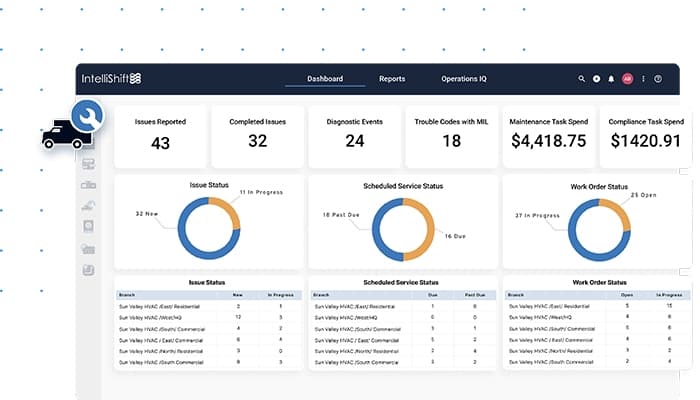
IntelliShift provides a robust platform for fleet, safety, and operations professionals to efficiently manage vehicles, drivers, and heavy equipment. It enhances safety and operational efficiency with next-gen technology. Though the maintenance module needs improvement, its user-friendly interface ensures accurate and accessible functionality.
IntelliShift Specifications
- Vehicle Tracking (GPS)
- Fuel Management
- Maintenance Scheduling
- Driver Management
IntelliShift Features
Driver Safety Management
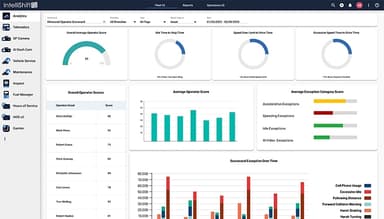
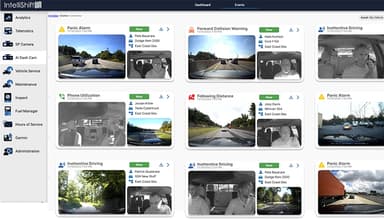
IntelliShift software provides a secure safety management platform that enhances fleet safety by promoting a safety-first culture, using tools like driver safety scorecards and AI-powered automation. It reduces risky behaviors, lowers insurance costs, boosts productivity, and retains drivers through trust and recognition.
GPS Fleet Tracking
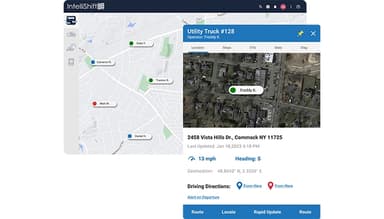
GPS Fleet Tracking simplifies fleet optimization by delivering tailored insights from 50+ sensor points. With customizable data, real-time visibility, quick installation, and ongoing support, it ensures faster results, streamlined operations, and guaranteed ROI for your fleet.
Asset Tracking
The solution optimizes asset utilization by providing real-time data on location, activity, and performance. It reduces unnecessary rentals, safeguards equipment with geofencing, and extends asset lifespan through preventive maintenance insights, ensuring operational efficiency and profitability.
Fleet Intelligence
The platform centralizes data management, offering intuitive drag-and-drop report building and pre-built dashboards for immediate insights. It integrates fleet, safety, and operational data with industry benchmarking, enhancing fleet performance and supporting business-wide decision-making.
Inspections
IntelliShift software's digital Inspections feature streamlines vehicle and equipment safety checks with customizable forms, real-time reporting, and compliance tracking. Failed inspections trigger maintenance workflows, while driver pairing ensures accurate reporting and improved compliance through the Inspect app.
Pros And Cons of IntelliShift
Pros
Visually appealing interface
Provides accurate and accessible features
Easy creation and updating of driver/vehicle information
Has the ability to track and view multiple vehicles seamlessly
Cons
Limited note space and difficulty saving administrative notes
The maintenance module is not intuitive
Phone support can be inconsistent
IntelliShift Reviews
Total 11 reviews
4.3
All reviews are from verified customers
Rating Distribution
5
Stars55%
4
Stars36%
3
Stars0%
2
Stars0%
1
Stars9%
Share your experience
Construction, 51-100 employees
More than a year
“Website needs serious improvement”
Pros
When the system is running at full speed, it is amazing. But we have run into so many issues that we are probably going to switch to a new company.
Cons
The response times are poor and reports take 30 seconds to load. Also the stop reports are inaccurate and the in vehicle software keeps failing to report stops and their durations correctly.
Rating Distribution
Ease of use
2
Value for money
2
Customer Support
4
Functionality
2
Oil & Energy, 11-50 employees
Less than a year
“Hands down the best GPS tracker”
Pros
I love the GPS tracking on the trucks as it is simply the best for keeping track of everything in real time. In short, my overall experience has been great and I would definitely recommend this to any company managing multiple trucks.
Cons
To me fleet activity tracking always feels a little off. It is not as accurate as I would like.
Rating Distribution
Ease of use
10
Value for money
10
Customer Support
10
Functionality
9
Construction, 51-100 employees
More than a year
“Good, but lack in a few areas”
Pros
IntelliShift app is really easy to use and I like being able to pull up the map. However at times, it feels like the app has more info than the web version.
Cons
As mentioned before the web version only shows stops but sometimes the app provides more info, which annoys me.
Rating Distribution
Ease of use
8
Value for money
6
Customer Support
6
Functionality
8
Frequently Asked Questions
Does IntelliShift software offer an API?
Yes, IntelliShift software provides API access.
What language does IntelliShift software support?
IntelliShift software supports English and Spanish.
Does IntelliShift software offer a mobile app?
Yes, IntelliShift software offers a mobile app for iOS and Android devices.
What other apps does IntelliShift software integrate with?
IntelliShift software integrates with various platforms, including 3Gtms, AUTOsist, Axon, BusWhere, Car IQ Pay, Comdata, Tranztec, MacroPoint, ESRI, and Wise Systems.
What types of pricing plans does IntelliShift software offer?
The IntelliShift pricing varies based on the size of the business and its requirements. To make an informed choice, request a detailed IntelliShift price estimate tailored to your needs.
Who are the typical users of IntelliShift software?
IntelliShift software is designed to support Fleet Managers, Safety Managers, Operations Leaders, and Owners in industries such as Construction, Utilities, Field Services, and Last-Mile Delivery.
What level of support does IntelliShift software offer?
IntelliShift software offers support through various channels, including 24/7 live representatives, phone support, email/help desk, chat, a knowledge base, and FAQs/forums.