


Avero
Last Updated
Overview
Avero helps hospitality teams turn POS information into practical Food and Beverage (F&B) insights across sales, labor, menus, and locations. While its focus is narrower than full hotel management suites, that specialization supports detailed operational analysis. Overall, Avero suits hospitality businesses seeking centralized F&B performance visibility and multi-location reporting.
Be the first one to leave a review!
No review found

Starting Price
$300
per location per year
Avero Specifications
- Reporting And Analytics
- Revenue And Rate Management
- Multi-Property Management
- Mobile Access And Contactless Services
What Is Avero?
Avero is a web-based business intelligence platform built specifically for restaurants, hotels, F&B, and casino F&B operators. Rather than replacing a Point-Of-Sale (POS) system, it helps businesses extract and standardize the data already flowing through it. Users can present the extracted data as actionable reports and dashboards.
The platform allows teams to replace paper shift notes with a searchable, mobile-accessible communication tool that helps keep managers aligned across shifts and locations.
For larger organizations, Avero provides an API for using standardized POS information in Excel and other business intelligence tools. This makes it relevant to operators that need more analysis than standard POS reporting provides.
What Is Avero Best For?
The platform is best known for its promotions and void-tracking capability, which gives operators visibility into how discount and comp codes are performing. It helps users measure metrics like redemptions per cover and promotional sales by hour, enabling managers to see whether a promotion is driving traffic. Users can also flag unusual patterns in void and comp activity, which can point to employee misuse rather than a menu issue. This makes the feature especially useful for restaurant groups and F&B operations running frequent promotions across multiple outlets, where manually auditing every discount code would be impractical.
How Much Does Avero Cost?
Avero cost starts at $300/location/year for the 'Essential' plan, which includes service team insights, labor insights, and hourly sales breakdown among many other features. Additional tiers are:
- Starter - Free
- Professional - $600/location/year
In addition to the base subscription costs, organizations should account for the following potential expenses:
- Implementation And Setup: $500–$3,000 per location for single-site/independent operators; $3,000–$15,000 for multi-location restaurant groups, or hotels with more complex configurations
- POS And System Integrations: $1,000–$10,000, depending on the number and complexity of POS, PMS, or gaming systems connected via the API & Integrations module
- Staff And Manager Training (Logbook, Service Team, Labor modules): $500–$5,000, based on the number of locations and staff onboarded
- Data Migration (historical sales, labor, and revenue data from legacy systems): $1,000–$5,000, depending on data volume and source system compatibility
Disclaimer: The pricing is subject to change.
Avero Integrations
The software supports integration with multiple systems, such as:
- Clover software
- Focus
- Fedelta
- Infrasys
- GoTab POS
How Does Avero Work?
Here's how you can get started with the software:
- Log into Avero account using your credentials
- Connect existing POS and time-and-attendance systems for automatic nightly data extraction
- Configure user roles and permissions so each team member sees the reports relevant to their position
- Create custom dashboards by selecting up to 20 metrics to track sales, labor, and promotions
- Review the daily ‘Logbook’ to check yesterday's sales, upcoming weather, and shift notes before service begins
- Track promotions and void codes to monitor discount usage and flag suspicious activity
- Compare performance across locations using ‘Group Analytics’ when managing multiple outlets
- Schedule automated email reports to deliver key metrics to stakeholders daily, weekly, or monthly
- Monitor labor costs and overtime in real time to adjust staffing before costs escalate
Who Is Avero For?
Avero serves the following:
- Full-service restaurants
- Quick-service restaurants
- Hotel F&B outlets
Avero Use Cases
Based on our analysis of user feedback and Avero features, we have identified key scenarios where this software is a good fit:
1. Hotel F&B Teams Managing Multiple Outlets Under One Property
Avero helps hotel F&B teams consolidate performance data across multiple outlets into one dashboard. Corporate and property-level managers can see which outlets are driving revenue, and which need attention without pulling separate reports from each point-of-sale terminal. This supports enterprise-wide F&B revenue management across large hotel properties. Its unified dashboard receives positive user reviews.
2. Full-Service Restaurants Reducing Food Waste Through Better Prep Planning
Kitchens that over-prep or under-prep based on guesswork can use Avero's 'Sales and Productivity' module to align food preparation with like-day sales history. Chefs and kitchen managers reference prior sales trends for comparable days of the week before deciding how much to prep. This can help reduce both waste and last-minute shortages.
3. Restaurant Managers Controlling Labor Costs and Overtime
Avero gives restaurant and hotel F&B managers real-time visibility into overtime and scheduling patterns. This allows them to identify potential labor-cost issues before payroll closes. Managers can use payroll reports and hour-by-hour labor breakdowns to spot rising overtime and adjust staffing before excess hours translate into higher payroll costs.
4. Restaurant Groups Standardizing Reporting Across Mixed POS Systems
Multi-unit restaurant groups that run different point-of-sale systems at different locations can use Avero's Group Analytics to bring standardized reporting into a single view. The platform helps users aggregate and reconcile data across POS platforms, so leadership can compare like-for-like performance without manually normalizing item codes or sales categories. This is especially useful for groups that have grown through acquisition and inherited inconsistent back-office systems. Reviewers particularly appreciate its real-time data insights.
Is Avero Right For You?
Avero is worth consideration for organizations managing F&B operations and seeking to standardize reporting without replacing their existing POS. It helps businesses encrypt POS data nightly during extraction and rely on the PCI compliance already built into a client's point-of-sale system. The software's customer base includes Gramercy Tavern and Four Seasons properties.
As restaurant groups continue consolidating operations across mismatched POS systems, Avero's ability to standardize that data into one comparable view remains directly relevant to where the industry is heading.
Rising operating and labor costs continue to pressure hotel profitability in 2026. AHLA reports that labor costs and cost of goods remain among the leading financial concerns for hotel operators. Avero addresses this challenge by giving hotel F&B teams visibility into sales, labor costs, overtime, staffing levels, and hourly demand. Its historical labor insights help operators plan staffing around expected demand, while group analytics enable comparison across properties and outlets.
Not sure if Avero meets your requirements? Contact us at (661) 384-7070 today.
Avero Features
Menu Optimization
The software's menu optimization tools enable teams to analyze product mix data to reveal which items sell well and which quietly drag down average check. Operators can compare performance by day, category, and outlet, then adjust pricing, placement, or portioning. All these checks can be done based on actual sales patterns rather than guesswork, improving margin without a full menu overhaul.
Events And Issues Documentation
With Avero's Logbook, managers can document customer complaints, employee incidents, and equipment repairs in one searchable record instead of scattered notebooks or texts. Users can also tie all entries to the outlet and shifts where it happened. This capability helps new managers reference prior incidents quickly, spot recurring issues, and keep decisions consistent across shifts and properties.
Customization
Avero lets each property build logbook templates and dashboards around its own workflow instead of adapting to a fixed layout. Teams can choose which fields, metrics, and topics appear for each user's role and keep formats consistent across a group. Managers can also tailor them property by property and automate delivery links, so reports can be delivered to the right inboxes daily.
POS Data Collection
The platform allows teams to pull and standardize data from more than 40 supported POS and time-and-attendance systems every night. This means multi-unit operators can keep a single, continuous data history even after switching to POS providers. Additionally, users can compare outlets on equal terms instead of reconciling mismatched item codes and formats manually.
Group Analytics
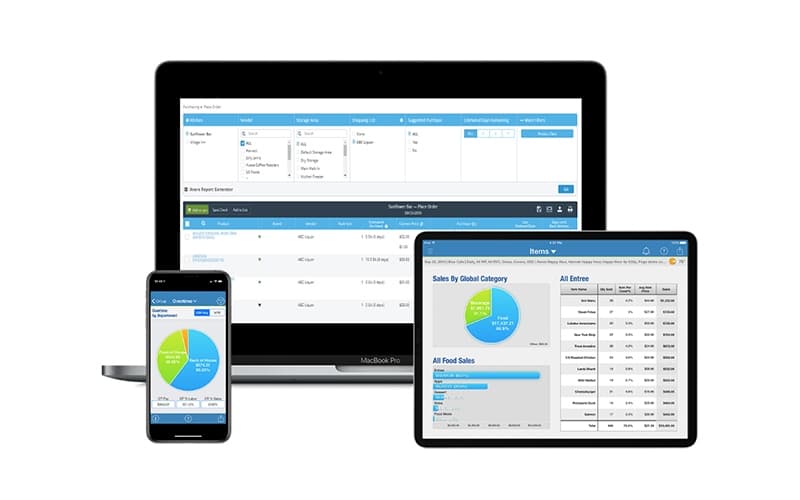
Avero helps teams turn raw sales and labor data into dashboards operators can view from anywhere, on any device, with one login. Managers can move from a portfolio-wide summary down to a single check or employee in a few clicks and spot outliers. Plus, businesses can apply what is working elsewhere, and monitor performance while away from a property.
Pros And Cons of Avero
Pros
Email reports help teams surface key business data, supporting faster decisions
Mobile logbook access keeps managers informed beyond the desk
Historical performance tracking enables more informed financial reviews
Period-based sales data reveals item trends for better decisions
In-app training guidance simplifies adoption of new functions
Cons
Lack of dashboard templates can increase setup time for teams
Limited multi-item check searches can slow transaction investigations
Limited data customization can restrict alignment with POS structures
Avero Pricing
Starter | Essentials | Professional |
|---|---|---|
$0 per year | $300 per location per year | $600 per location per year |
|
|
|
Disclaimer: The pricing details were last updated on Oct 12, 2026 from the vendor's website. Please contact us for a tailored pricing list.
Avero Reviews

No reviews yet!
Be the first to review this product
Frequently Asked Questions
What level of support does Avero offer?
The platform offers email support.
Does Avero offer an API?
Yes, it offers an API.
Who are the typical users of Avero?
Various businesses, including hotel F&B outlets, full-service restaurants, nightlife venues, and quick-service restaurants benefit from Avero.
What languages does Avero support?
Avero software is primarily available in English.
What types of pricing plans does Avero offer?
The software offers three plans: Starter (Free), Essentials ($300/location/year), and Professional ($600/location/year). You can request a personalized Avero price quote now.
What other apps does Avero integrate with?
The platform supports integration with multiple third-party systems, such as Fedelta, Clover, GoTab POS, Focus, and Infrasys.
Does Avero have a mobile app?
Yes, it offers a mobile application for both Android and iOS devices.