


Resy OS
Last Updated
Overview
Resy OS is a restaurant reservation platform for managing bookings and guest flow. Some reviewers find that its availability algorithm does not always reflect a restaurant’s actual capacity. However, users value its backend controls for managing reservations and the ability to work from a computer instead of an iPad.
Be the first one to leave a review!
No review found

Starting Price
$289
per month


Resy OS Specifications
- Reservations And Booking
- Guest Management And CRM
- Reporting And Analytics
- Integration And API Support
What Is Resy OS?
Resy OS is a reservation and table management platform designed for restaurants, hotels, wineries, and hospitality groups. It offers a suite of tools including online booking, walk-in waitlists, floor plan management, and guest profiles to help hospitality businesses run daily.
service more smoothly. By centralizing reservations, guest history, and staff permissions in one dashboard, the platform helps operators track VIPs, manage seating, and coordinate service across single or multiple locations. Backed by American Express, it also connects businesses with a large base of diners already using the Resy app to discover and book tables.
What Is Resy OS Best For?
The platform stands out for its 'Notify' feature, which automatically alerts waitlisted guests the moment a cancellation opens up a table. Combined with real-time walk-in and reservation management, this can help restaurants keep seats filled throughout a shift instead of losing them to last-minute cancellations.
How Much Does Resy OS Cost?
Resy OS pricing starts at $289/month for its Platform tier, which covers core reservation and table management with POS integration. Additional pricing tiers of the software are:
- Essential: $289/month
- Platform 360: $459/month
- Premium: $459/month
In addition to the base subscription cost, organizations should also account for additional considerations. These include:
- Prepayment And Event Fees: 2%–3%/transaction on the Essential and Premium tiers for prepaid reservations and ticketed events, on top of standard payment processing fees
- Hardware Acquisition: Around $750–$1,500/location
Reviewers offer mixed feedback on pricing. Some note the flat-rate structure and low per-cover fees as good value. Others mention rising costs over time, including a jump in the monthly subscription and added POS integration fees.
Disclaimer: The pricing is subject to change.
Resy OS Integrations
The software supports integration with multiple systems and platforms, such as:
How Does Resy OS Work?
Here's how you can access the platform and use its features:
- Log in to your Resy OS account and complete onboarding with the Resy team
- Set up your venue's floor plan, table types, and service schedule in the dashboard
- Connect payment processing and, if applicable, your existing POS system
- List available reservation types, walk-in waitlist options, and ticketed events
- Accept and manage reservations and walk-ins in real time from the web dashboard or app
- Use Notify to automatically alert guests when a table opens up after a cancellation
- Review guest profiles and analytics to track preferences, VIPs, and covers over time
Who Is Resy OS For?
The platform serves a wide range of hospitality businesses that need reservation and guest management tools, including:
- Restaurants and bars
- Hotels
- Wineries
- Hospitality groups
Resy OS Use Cases
Based on our analysis of Resy OS's current tools and offerings, we have identified the following key business scenarios where it is well suited:
Restaurants Turning Cancellations Into Filled Tables
Restaurants use Notify to let guests join a digital waitlist and get an automatic alert the moment their preferred day and time opens up from a cancellation. This keeps books full through every service shift without staff having to manually re-call a waitlist. Guests also find out about openings faster than a phone call would reach them, which keeps them engaged with the venue.
Hotels Coordinating Dining Alongside Guest Stays
Hotels use Resy OS to manage on-property restaurant and bar reservations alongside their broader guest experience, giving front desk and F&B teams a shared view of table availability. This can help hotel restaurants stay organized during high-occupancy periods without relying on a separate paper or phone-based booking process.
Hospitality Groups Standardizing Service Across Locations
Multi-location hospitality groups use Resy OS to run reservations, waitlists, and guest profiles the same way across every venue, so managers can move between locations without learning a new system. Centralized guest history also helps staff recognize repeat guests and VIPs no matter which location they're dining at.
Fine-Dining And Event-Driven Venues Managing Prepaid Experiences
Venues running ticketed dinners, tastings, or prepaid experiences use the Essential and Premium tiers to handle deposits and prepayments directly through the reservation flow. This reduces no-shows on high-value bookings and gives operators more certainty when planning staffing and inventory for an event.
Is Resy OS Right For You?
If you're a restaurant, hotel, or hospitality group that wants to manage reservations, guest communication, and dining experiences through one platform while keeping day-to-day operations organized, Resy OS is worth considering.
Resy OS is also backed by American Express, giving venues access to American Express® Card Members and a network of diners who value quality hospitality experiences. Its guest insight and CRM tools also support the hospitality industry's growing focus on personalized guest experience and using guest data to build stronger relationships. For businesses handling payment information, Resy uses a PCI-compliant third-party payment processor.
Still doubtful if Resy OS is the right fit for you? Connect with us at (661) 384-7070 for further guidance.
Resy OS Features
Table Management
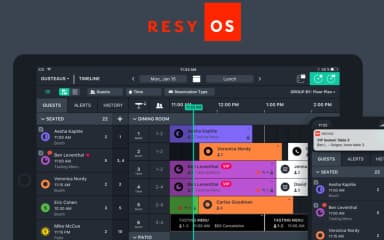
The platform gives staff a live view of the floor, letting them assign, move, and combine tables as service progresses. Hosts can build out custom floor plans by room, section, or seating area to match how a venue operates during a shift. Staff can adjust seating in real time as walk-ins and reservations come in.
Reservations
Resy OS centralizes online, phone, and walk-in bookings into one list instead of splitting them across separate tools. Staff can view, modify, or cancel reservations in real time, and guests can book directly without calling the restaurant. Availability updates across the list as bookings are made or changed.
Walk-In Waitlists
Guests without a reservation can join a digital waitlist and receive a notification as their table nears readiness. Staff can toggle the online waitlist on or off depending on current floor capacity. The waitlist runs alongside the standard reservation list rather than as a separate process.
Events
The platform lets venues set up ticketed dinners, tastings, or other experiences alongside standard table reservations. Operators can set structure, pricing, and capacity for each event through the same system used for daily bookings. Event bookings and standard reservations are managed from the same dashboard.
Advanced Analytics Dashboard
Operators can view data on covers, table turnover, and guest demand trends. The dashboard also surfaces VIP guests and repeat visitors based on booking history. This data is presented alongside the standard reservation and guest management views.
Customizable Guest Communications
Venues can send tailored, branded messages to guests at different points in their journey, from booking confirmation to post-visit follow-up. Message templates can be adjusted to match the venue's own tone and branding. Staff can also send one-off updates, such as a kitchen delay, to guests with an upcoming reservation.
Pros And Cons of Resy OS
Pros
Creates a smooth reservation experience with detailed guest profiles for a more personalized dining experience
Highly customizable to different business needs and easy to use
Wide restaurant partner network with personalized recommendations for diners
Quick reservation changes with automatic text message reminders
Simple, intuitive layout that's easy to adjust to from older platforms
Cons
Unseating a table takes several clicks and swipes
Online reservation toggles don't always hold their setting
The reservation grid doesn't self-correct
Resy OS Pricing
Platform | Essential | Platform 360 | Premium |
|---|---|---|---|
$289 per month | $289 per month | $459 per month | $459 per month |
|
|
|
|
Disclaimer: The pricing details were last updated on Sep 25, 2026 from the vendor's website. Please contact us for a tailored pricing list.
Resy OS Reviews

No reviews yet!
Be the first to review this product
Frequently Asked Questions
What other apps does Resy OS integrate with?
The software supports integration with multiple systems and platforms, including Toast POS, Square, Lightspeed, Squirrel, and Loyalist.
What languages does Resy OS support?
Resy OS software primarily supports the English language.
What level of support does Resy OS offer?
The vendor offers support via resources, contact form, chat, email, and a help desk, with on-demand phone support included on the Premium tier.
Does Resy OS offer an API?
Yes, Resy OS offers an API.
Does Resy OS have a mobile app?
Yes, the software offers a mobile app for iOS devices.
What types of pricing plans does Resy OS offer?
Resy OS has four pricing tiers: Platform and Essential each start at $289/month, while Platform 360 and Premium are priced at $459/month. Essential and Premium are powered by Tock and carry a prepayment fee. Get a tailored Resy OS cost estimate.
Who are the typical users of Resy OS?
Resy OS features are used by restaurants, hotels, wineries, and hospitality groups that need reservation, waitlist, and guest management tools.