


WhatsUp Gold
Last Updated
Overview
WhatsUp Gold helps give IT teams one place to keep tabs on their network, systems, and security. Although the initial configuration can be a little difficult, the software helps teams spot problems before they turn into bigger issues. Overall, it is a good fit for organizations that need reliable monitoring without dealing with multiple tools.
Overall Rating
Based on 1 users reviews
4
Rating Distribution
Positive
100%
Neutral
0%
Negative
0%
Starting Price
$1229
per year

WhatsUp Gold Specifications
- Remote Monitoring And Management
- Reporting And Analytics
- Security And Compliance
- AI-Driven Root Cause Analysis
What Is WhatsUp Gold?
WhatsUp Gold, by Progress Software, is an IT monitoring tool that maps out system networks, manages logs, tracks traffic, and flags potential security threats. It provides these capabilities through a centralized dashboard, along with automated configuration backups and network traffic analytics. These tools help IT teams monitor performance, troubleshoot issues, and maintain visibility across their infrastructure. It’s built for hybrid environments that include both on-premises and cloud infrastructure.
What Is WhatsUp Gold Best For?
WhatsUp Gold stands out for how it handles log management. Users can collect, search, and archive logs for all devices right from the main network interface. It also enables customization of retention periods and storage locations, which is useful if there are strict compliance rules to follow. This helps organizations save a lot of manual troubleshooting time.
How Much Does WhatsUp Gold Cost?
The WhatsUp Gold cost starts at $1229/year for 50 devices for its Infrastructure Performance and Traffic Monitoring package. This basic plan, known as Business, offers features such as single installation of the software, email support, and certificate discovery and monitoring. The vendor also offers the following pricing plans for this package:
- Enterprise: Starting at $2049/year for 50 devices
- Enterprise Plus: Starting at $3469/year for 50 devices
- Enterprise Scale: Custom pricing
The Network Detection and Response package also offers four plans:
- Business: Starting at $2990/year for 300 connected devices
- Enterprise: Starting at $3290/year for 300 connected devices
- Enterprise Plus: Starting at $3590/year for 300 connected devices
- Enterprise Scale: Custom pricing
In addition to the base licensing costs, organizations should account for the following potential expenses:
- Implementation: Around $2,000–$10,000 for SMBs; Approximately $5,000–$18,000 for enterprise environments (may cover installation, network discovery configuration, and dashboard setup for on-premises or hybrid environments)
- Infrastructure Setup (On-Premises): Estimated to be $1,000–$8,000 (Server provisioning, storage, and database configuration, depending on environment scale)
- Training And Onboarding: Around $1,000–$6,000 (Required for configuring monitoring profiles, alerts, reporting, and automation workflows)
- Integration Costs: Approximately $2,000–$12,000 (Integration with tools like Microsoft Azure, or other enterprise systems, depending on scope)
- Multi-Site Deployment Costs: Estimated to be $3,000–$15,000+ (Separate licensed instances or distributed monitoring setups for multiple locations)
Most reviewers consider WhatsUp Gold good value for hybrid and on-premises network monitoring, with features that hold up well against comparable tools on cost. Smaller organizations, however, often flag that that costs can add up with add-on modules.
Disclaimer: The pricing is subject to change.
WhatsUp Gold Integrations
WhatsUp Gold supports integration with a variety of devices and platforms, including:
- Microsoft Azure
- Slack software
- Microsoft Teams
- Salesforce
- Office 365
How Does WhatsUp Gold Work?
Here's how IT teams can access the platform and move through monitoring workflows:
- Download and install WhatsUp Gold on a Windows server, then log in to the centralized dashboard
- Run automated network discovery to scan your environment and build an interactive Layer 2/3 topology map of all connected devices and resources
- Review the auto-generated map to confirm discovered assets and understand connectivity across on-premises and cloud environments
- Configure monitoring thresholds for each device or resource type, covering metrics like bandwidth utilization, latency, and availability
- Set up alert policies to notify your team via email, SMS, or Slack when devices go down or thresholds are breached
- Use the log management module to collect Windows event logs and syslogs, then configure searches and alerts tied to specific log events
- Monitor live network traffic using NetFlow, IPFIX, or sFlow data to track bandwidth usage and flag unusual connections
- Generate reports on device availability, application performance, and traffic trends to support capacity planning and compliance needs
Who Is WhatsUp Gold For?
The platform caters to businesses across various industries and sectors, including:
- Healthcare
- Education
- Federal government
- State and local government
WhatsUp Gold Use Cases
Based on our analysis of WhatsUp Gold’s current capabilities and user reviews, we have identified the following key scenarios where this tool works well:
1. IT Teams Requiring Proactive Network Outage Detection
The software is a good fit for infrastructure managers who struggle with delayed awareness of system failures and downtime. Based on user feedback, internal teams use the system to receive immediate text or email alerts during an outage. This capability enables technical personnel to resolve device failures before end users report performance issues.
2. Mid-Sized Organizations Seeking Rapid Deployment Out-Of-The-Box
WhatsUp Gold is a good fit for mid-sized organizations that need to get network monitoring up and running quickly without lengthy implementation projects. It helps IT administrators who face long, complex configuration cycles when launching new tracking software. This is particularly valuable for organizations with lean IT resources that need a practical solution they can adopt and start using with minimal disruption.
3. Network Engineers Looking For Custom Live Status Dashboards
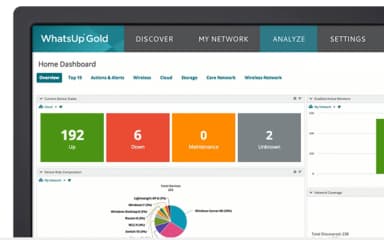
Network engineers use WhatsUp Gold to maintain visibility across servers, network devices, and critical infrastructure from a centralized location. User reviews highlight that administrators can customize dashboards to isolate exact infrastructure metrics. The software helps teams quickly understand system status and respond to issues throughout the workday.
4. Hybrid Infrastructure Teams Balancing Multi-Device Bandwidth Constraints
The software is well-suited for administrators who manage physical hardware alongside virtual machines and need performance clarity. User feedback shows that teams apply WhatsUp Gold’s protocols to track specific interface loads and device ports. This helps engineers check bandwidth consumption across switches and firewalls from a single window.
Is WhatsUp Gold Right For You?
If your IT team manages a hybrid environment that includes both on-premises and cloud infrastructure, WhatsUp Gold provides end-to-end visibility into network traffic, bandwidth, and application performance. This helps organizations move from reactive monitoring to predictive operations.
It also supports compliance requirements, including GDPR, HIPAA, and FISMA, through enhanced credential security with customer-specific encryption keys and zero-trust alignment. If consistent service quality and proactive troubleshooting across complex environments are priorities, WhatsUp Gold is worth taking a look at.
Still not sure if WhatsUp Gold is right for you? Connect with us at (661) 384-7070 for further guidance.
WhatsUp Gold Features
Application Monitoring
WhatsUp Gold watches key applications to make sure they're running properly. If something slows down or stops working, it flags the issue and helps figure out what went wrong. It also shows a summary of how things are performing over time.
Threat Hunting
The software’s threat hunting tool keeps a check on networks around the clock. It automatically flags any unusual activity before it can become a serious problem. Its scoring and prioritizing threats help teams keep an update about what has happened and what to do next.
Network Mapping
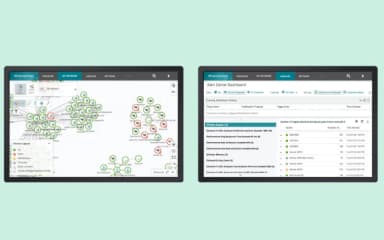
WhatsUp Gold draws a live map of networks, showing how all devices and systems are connected. The map updates on its own as things change, so users always have an accurate picture of what's in their environment and how it fits together.
Network Reporting Tools
The platform pulls together data on how the network is performing and turns it into clear reports and dashboards. Users can schedule reports, adjust to what they show, and share them with both technical and non-technical people without needing to reformat anything.
Virtualization Monitoring Tools
WhatsUp Gold helps organizations run virtual machines through platforms like VMware or Hyper-V. It tracks how they're performing, how many resources they are using, and gives alerts if something goes wrong anywhere in that virtual setup.
Pros And Cons of WhatsUp Gold
Pros
Quickly pinpoints root cause with log search
Alerts are customizable and reliable
Offers clear graphical network map view
Has a simple way to add and remove devices
Scans and tracks asset uptime effectively
Cons
Initial configuration may take some time
Web interface can be slow sometimes
May not detect some device firmware changes
WhatsUp Gold Pricing
Business | Enterprise | Enterprise Plus | Enterprise Scale |
|---|---|---|---|
$1229per year | $2049per year | $3469per year | Custom |
|
|
|
|
Disclaimer: The pricing details were last updated on Sep 25, 2026 from the vendor's website. Please contact us for a tailored pricing list.
WhatsUp Gold Reviews
Total 1 reviews
4
All reviews are from verified customers
Rating Distribution
5
Stars0%
4
Stars100%
3
Stars0%
2
Stars0%
1
Stars0%
Share your experience
Enterprise, 500+ employees
“Provides market insights”
Pros
The market intelligence reports and sales playbooks were really useful and I genuinely appreciated the insights they provided.
Cons
No major complaints overall though the UI and navigation could definitely be improved.
Rating Distribution
Ease of use
7
Value for money
10
Customer Support
9
Functionality
9
Frequently Asked Questions
What other apps does WhatsUp Gold integrate with?
WhatsUp Gold software integrates with a range of platforms, including Office 365, Slack, Microsoft Teams, and Microsoft Azure.
What types of pricing plans does WhatsUp Gold offer?
WhatsUp Gold pricing starts at $1,229/year for 50 devices under its Infrastructure Performance and Traffic Monitoring package. Higher-tier plans include Enterprise ($2,049/year) and Enterprise Plus ($3,469/year) for 50 devices, while Enterprise Scale is available with custom pricing. For the Network Detection and Response package, pricing starts at $2,990/year for 300 connected devices. Enterprise plans begin at $3,290/year, Enterprise Plus at $3,590/year, and Enterprise Scale is available through custom pricing. Request a detailed WhatsUp Gold price breakdown for your organization today.
What language does WhatsUp Gold support?
WhatsUp Gold supports multiple languages, including German, French, Spanish, Italian, Portuguese, English, Japanese, and Chinese (traditional).
Does WhatsUp Gold offer an API?
Yes, WhatsUp Gold offers an API.
Does WhatsUp Gold have a mobile app?
No, WhatsUp Gold does not offer a dedicated mobile application.
Who are the typical users of WhatsUp Gold?
The typical users of WhatsUp Gold features are from a range of industries and sectors, including healthcare, education, federal government, and state and local government.
What level of support does WhatsUp Gold offer?
WhatsUp Gold offers support through phone, email, online contact form, knowledge base, blog, videos, webinars, events, FAQs, eBooks, training, documentation, and community forums.