


Custody X Change
Last Updated
Overview
Custody X Change helps separated parents and legal professionals build custody schedules, parenting plans, and parenting time reports without starting from scratch. Co-parenting messaging works only when the other parent also subscribes, but every other tool can be used solo, with professional printouts for negotiations and hearings.
Be the first one to leave a review!
No review found

Starting Price
$10
per month



Custody X Change Specifications
- Document Management
- Client Management (CRM)
- Time Tracking
- Court Calendaring & Scheduling
What Is Custody X Change?
Custody X Change is family law software for separated parents and legal professionals who handle custody arrangements. It has a visual calendar for setting up parenting schedules and templates for writing parenting plans. Reports show custody details for review, while a journal lets parents document co-parenting events. Parents can also track child-related expenses, exchange messages that flag hostile wording, and use every tool alone or with the co-parent. The software helps document family arrangements, though it does not take the place of legal advice.
What Is Custody X Change Best For?
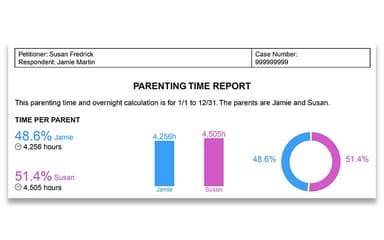
If you need proof of how custody time is actually divided, Custody X Change stands out for its parenting time calculator, which shows the difference between planned and actual time with each parent. Late arrivals and canceled visits can be logged without changing the agreed schedule. Reports show these differences for custody discussions or court review.
How Much Does Custody X Change Cost?
The Custody X Change pricing varies for both parents and legal professionals starting at $10/month. These two packages go as follows:
Parents:
- Bronze: $10/month
- Gold: $20/month
Legal Professionals:
- Pro Bronze: $20/month
- Pro Gold: $40/month
Other additional costs that influence the final price may include:
- Additional User Licenses: Budgets around $10–$20/month/extra user, depending on the plan and group discount
- Payment Fees: Allows almost 0–3% for possible card processing or currency conversion fees; these are not confirmed software charges
- Subscription Renewals: Budget for recurring fees. Resubscription after a lapse may cost more if prices have changed
Disclaimer: The pricing is subject to change.
Custody X Change Integrations
Custody X Change syncs with Family Law software and popular calendars like:
- Google Calendar
- Microsoft Outlook
How Does Custody X Change Work?
Parents and legal professionals can follow the following steps to set up and manage custody arrangements in Custody X Change:
- Log in to open saved custody calendars and records
- Set up a schedule with a template and change the terms to reflect the agreed arrangement
- Calculate parenting time by hours or overnights for the chosen period
- Log schedule changes such as late pickups or canceled visits to keep track of actual parenting time
- Prepare a parenting plan that sets out custody terms and parental responsibilities
- Keep records of co-parenting events in the journal and enter child-related expenses
- Share calendars with co-parents, children, or legal professionals, and print reports or save them as PDFs
- Message the other parent through the built-in system, which flags potentially hostile wording and keeps a record of conversations
Who Is Custody X Change For?
Custody X Change suits the following users who need to organize custody arrangements or manage family law cases:
- Divorced or separated parents
- Parents preparing for custody proceedings
- Family law attorneys
- Family law mediators
- Judges and court staff
Custody X Change Use Cases
Based on the capabilities of Custody X Change, here are some scenarios where it is a good fit:
A Family Law Attorney Drafting Custody Proposals For Clients
Family law attorneys can draft parenting plans with clients and map out proposed custody schedules in Custody X Change. The visual calendar shows how changes to holidays, exchange days, or overnight visits affect each parent's scheduled time. Attorneys can review the reports during settlement talks or include them in materials prepared for court.
A Family Law Practice Reviewing Custody Records Before A Hearing
In contested custody cases, attorneys can link their accounts to client records and examine journal entries and parenting time reports. Journal entries are searchable and support attachments. Messages can be filtered by topic and exported for review. This gives attorneys a record of past events and communication to consult alongside their client's account.
A Mediator Comparing Proposed Parenting Arrangements
Mediators can compare proposed custody schedules in Custody X Change using visual calendars and parenting time calculations. If parents disagree about holidays or weekday exchanges, the mediator can adjust the schedule to see how each parent's time would change. These comparisons support discussion, but the software cannot determine which arrangement is legally appropriate.
A Legal Professional Verifying Parenting Time For Child Support Calculations
Child support formulas may use parenting hours or overnight totals, depending on local rules. Custody X Change calculates these figures from the proposed schedule and accounts for holidays and special occasions. Its Family Law Software integration transfers the data to the child support application. The final amount depends on local requirements and each parent's financial information.
Is Custody X Change Right For You?
Custody X Change suits parents who need to create custody schedules, document actual parenting time, and track child-related expenses. Its private journal and reporting tools help organize records for lawyer consultations or court proceedings. However, parents who primarily need co-parent communication must consider that in-app messaging requires linked accounts and separate paid subscriptions for both parents.
Family law firms can use professional accounts to manage client information, share case data with team members, and prepare custody agreements using reusable templates. Separate staff logins and encryption for stored and transmitted data address access control and confidentiality. Its parenting plans have been accepted by courts in all 50 U.S. states, although acceptance of a particular plan depends on the court's requirements and the circumstances of the case.
Still doubtful if Custody X Change is the right fit for you? Get in touch at (661) 384-7070, and we will help you make an informed decision.
Custody X Change Features
Parenting Plans
Custody X Change guides users through a template to write parenting plans. Parents can set out living arrangements and decision-making responsibilities for their child. They can also define holiday schedules and other custody terms. Plans can be printed or exported for legal review.
Custody Schedules
Users can start with a custody schedule template or build their own. The calendar accommodates regular visits and holiday rotations. Users can also change exchange times or create a separate calendar to compare proposed arrangements.
Court-Related Reports
Custody X Change creates printable parenting plans and reports from saved records. Users can select details about parenting time or expenses for legal review. Reports can also include journal entries and messages. Court requirements for format and acceptance vary by jurisdiction.
Expense Tracking
Parents can record child-related costs and payments in the expense tracker. The software calculates what each parent owes and groups expenses into reports. Invoices can be printed or emailed, and records can be exported to Excel. This feature requires a Gold subscription.
Messaging System
The messaging system stores conversations between co-parents. It flags potentially hostile wording and can highlight it in message reports. Users can search or label conversations before printing or exporting them. Sent messages cannot be edited or deleted.
Pros And Cons of Custody X Change
Pros
Detailed templates for parenting plans and custody agreements
Messaging system flags potentially hostile wording
Parenting time calculations and customizable custody schedules
May help parents limit some mediation and legal preparation costs
May help parents limit some mediation and legal preparation costs
Cons
Mobile apps must be installed outside Apple and Google app stores
Keyword-based hostility alerts may miss context or misread tone
Parents may need to share exported reports separately when not using linked accounts
Custody X Change Pricing
Bronze (Parents) | Gold (Parents) | Pro Bronze (Legal Professionals) | Pro Gold (Legal Professionals) |
|---|---|---|---|
$10 per month | $20 per month | $20 per month | $40 per month |
|
|
|
|
Disclaimer: The pricing details were last updated on Sep 25, 2026 from the vendor's website. Please contact us for a tailored pricing list.
Custody X Change Reviews

No reviews yet!
Be the first to review this product
Frequently Asked Questions
Can attorneys manage a large number of custody cases in Custody X Change?
Yes. Legal professionals can manage client cases through linked accounts and review shared records. This lets attorneys access case information without keeping every detail in separate files.
Can paralegals access the same case information as attorneys?
Yes. Attorneys can create professional groups to share client data with colleagues. Each member gets an individual login, and additional professionals may qualify for discounted subscriptions.
Can Custody X Change generate parenting plans for court proceedings?
The parenting plan generator includes customizable provisions. Attorneys can print or export plans and reports as PDFs, but they should check local court rules before filing them.
Do attorneys need to buy a separate subscription for each client?
No. Attorneys can link their professional accounts to client accounts and access shared case information. Eligible clients may receive one year of free access through this arrangement. Attorneys still pay for their own subscriptions.
Does my co-parent need to subscribe to Custody X Change?
No. You can use Custody X Change independently to create parenting plans, manage custody schedules, and track parenting time. However, both parents need subscriptions to link accounts and use in-app messaging.
Can judges use Custody X Change to review custody arrangements?
Judges and eligible court staff can request free Pro Gold access from the vendor. This allows them to review custody calendars and parenting plans. The software does not replace court procedures or judicial judgment.
Can I get a refund, and what happens to my data?
Yes. You can request a full refund within 30 days of purchase through the app’s contact page. Refunds and account closure permanently delete your data. If your subscription expires without account closure, your data remains available if you resubscribe.
How does it compare with OurFamilyWizard or TalkingParents?
Custody X Change focuses on parenting plan creation, custody schedule calculations, and actual parenting time tracking. OurFamilyWizard offers recorded calls and location check-ins, while TalkingParents provides recorded and transcribed calls. Custody X Change also lets you work independently without linking your co-parent’s account.