



Last Updated
Key Takeaways
Generated from the text of customer reviews
Little Green Light is a cloud-based donor management software for nonprofits. Users have praised its cost-effectiveness, but some note that Little Green Light has no dedicated mobile app, and using the web platform on a mobile browser can feel cumbersome, particularly for reports and multi-step tasks. LGL recently revamped its email builder to include percentage sizing of images and one-click Acknowledge sends.
Our Verdict
Little Green Light is a reliable choice for medium- to large nonprofits looking for reliable donor tracking on a budget. The per-contact pricing is reasonable for small to medium organizations but increases with the size of an organization, which reviewers say is fair. It is a practical option for cost-sensitive nonprofit operations.
Overall Rating
Based on 24 users reviews
4.8
Rating Distribution
Positive
100%
Neutral
0%
Negative
0%
Starting Price
$45
per month
Little Green Light Specifications
- Donor Management
- Fundraising Tools
- Volunteer Management
- Grant Management
What Is Little Green Light?
Little Green Light is a cloud-based donor management solution designed for fundraising programs. It consolidates donor records, gift history, campaign tracking, and online giving into a single system. This consolidation reduces the need for fundraising staff to manage separate systems for donor records, email appeals, and gift tracking. If a development director, bookkeeper, and volunteer coordinator each log gifts separately, gift records may be duplicated and giving history becomes unclear.
What Is Little Green Light Best For?
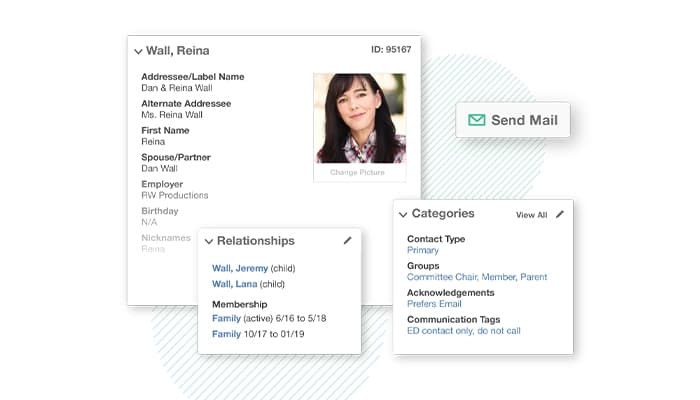
Little Green Light's relationship management feature focuses on one-page constituent profiles that connect giving history, membership status, and volunteer activity in one place. It is suited to small development teams that serve donors who do more than one of the following: give, volunteer regularly, and are active or lapsed members. Staff can see if a volunteer renewal is due, check logged volunteer hours, and create a volunteer statement without digging through a spreadsheet.
How Much Does Little Green Light Cost?
Little Green Light costs $45/month for up to 2,500 constituents. Little Green Light accounts can have up to 200,000 constituent records. The price increases based on the number of constituents as follows:
- $60/month (up to 5,000 constituents)
- $75/month (up to 10,000 constituents)
- $90/month (up to 20,000 constituents)
- $105/month (up to 30,000 constituents)
- $120/month (up to 40,000 constituents)
- $135/month (up to 50,000 constituents)
Users can add $15/month for each additional 10,000-constituent tier. Online donation processing runs separately, starting at 2.2% + $0.30/transaction, paid directly to the payment processor. A 30-day free trial on all accounts is also available.
Other than the base subscription, the following factors can potentially add to the actual costs:
- Optional Setup And Data Migration Consulting: Approximately $1,000–$6,000 one-time
- Third-Party Integration Subscriptions: Approximately $20–$300+/month/service
Generally, reviewers find Little Green Light's pricing fair for medium-sized nonprofits, but some mention that fees can increase with the number of constituents, which impacts the value for larger organizations.
Disclaimer: The pricing is subject to change.
Little Green Light Integrations
Little Green Light software has integration arrangements with a variety of apps, including:
How Does Little Green Light Work?
Getting started with Little Green Light usually looks like this:
- Log in to your account and create your organization profile
- Check your Account Settings, Fiscal Year Start Date, Salutation Preferences, and Currency
- Move existing donor data in three steps: Prepare your spreadsheet, upload and map the fields, review, and save
- Assign team members with varying access rights (viewers to full administrators)
- Document constituent relations (who gave to whom, how they were contacted, etc)
- Monitor gifts, pledges, and recurring donations and automatically send gifts of acknowledgements
- Gather online donations with a customizable form on your site
- Create and schedule built-in or custom reports to be delivered to your inbox
- Integrate with existing tools, such as QuickBooks Online, Mailchimp, or Stripe
Who Is Little Green Light For?
Little Green Light is successfully used across different nonprofit organizations, such as:
- Animal Care/Shelters
- Arts and Culture
- K-12 Schools
- Social Services
- Land Trusts
- Libraries
Little Green Light Use Cases
Based on user feedback and our analysis of Little Green Light features and capabilities, we have put together a list of scenarios that are a good fit for specific operational buyers:
Nonprofits Sending Year-End Appeal Letters To Segmented Donor Lists
Nonprofit staff typically don't want to write the exact same letter to every donor that they have a record of; a major donor and a first-time giver should be asked for different things. LGL's mail-merge feature integrates personalized letters, labels, and envelopes directly from segments in the database, and keeps track of who received which version. Small teams running annual campaigns can reduce the copy/paste mistakes that come with coordinating in Word and Excel.
Membership Organizations Tracking Renewal Cycles Across Multiple Tiers
Many museums, alumni associations, and the like offer multiple tiers of membership simultaneously, each having a different membership renewal date and respective benefit package. Rather than creating a manual filter, teams build a saved list in LGL, using the list creation and management feature, to retrieve a list of active members, lapsed members, or anyone who's about to renew in the next 30 days. Those names are then automatically added to a renewal mailing list or a phone call list, and no one gets lost between renewals.
Organizations Migrating Off Spreadsheets Or A Legacy Donor Database
When a nonprofit organization outgrows Excel, or no longer can afford a database, they typically have gift history in various formats. Those spreadsheet columns are directly mapped to constituent and gift fields in Little Green Light's import tool, and the export function maintains that portability for future use, which is often important for smaller organizations that don't have dedicated IT staff. Finance and development teams can create a clean, accurate donor list on their own.
Nonprofits Running Event-Based Or Peer-To-Peer Fundraising Campaigns
Giving-day campaigns, galas, and walkathons create a surge of one-time and repeat donations that must be deposited into the appropriate constituent record promptly. LGL Forms allows staff to create a branded donation page for the event, link it to Stripe or PayPal, and automatically add each gift to the donor's profile. That means that teams without a dedicated finance team will not have to manually reconcile data from a payment processor to the donor database.
Is Little Green Light Right For You?
Little Green Light might be worth considering if your team doesn’t need the overhead of enterprise software or if you are a team with a donor database that has outgrown the ability of one person to handle it. LGL adheres to the EU-U.S. Data Privacy Framework, as well as its extensions in the UK and Switzerland, which is important if donors or employees reside across the Atlantic. Groups such as Every Child Fed, Habitat for Humanity of Cape Cod, and Craven Literacy Council have used the platform to streamline donor databases, tidy up years of donor data, and gain a better understanding of their fundraising.
Still weighing your options? Contact our expert team at (661) 384-7070 for further assistance.
Little Green Light Features
Donor/Fundraising Management
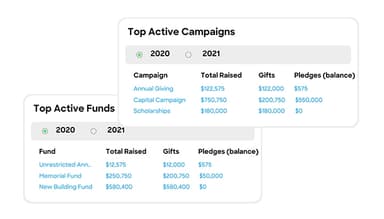
This feature stores every gift a donor has made, along with pledges and recurring donations, inside their constituent record. Staff can log campaign details alongside each gift, so each donation ties back to the specific appeal or event that generated it. Acknowledgments and receipts generate directly from this same record, without switching to a separate tool.
Built-In And Custom Reporting
The platform offers a set of pre-loaded reports covering common needs like summaries and donor activities. Beyond those, users can build custom reports from scratch, pulling specific fields and filters relevant to their organization. Reports can also be scheduled to run automatically and land in a staff member's inbox on a set cadence.
Import And Export Data
The import tool maps existing spreadsheet columns to LGL's constituent and gift fields during setup or ongoing data entry. Migration starts by prepping the data, then uploading and mapping fields, and finally reviewing before saving. Full export capabilities let organizations pull their data back out in a portable format at any time.
Customizable Dashboards
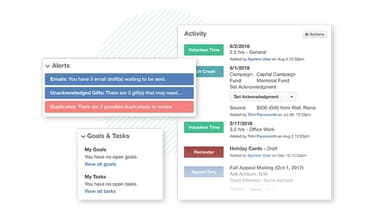
The dashboard displays fundraising totals, notifications, and other account activity in real time as soon as a user logs in. Each user can customize the widgets and information to be displayed according to what is relevant to them. This allows staff to have a snapshot view, rather than having to dig through separate reports first.
Pros And Cons of Little Green Light
Pros
Constituent profiles combine history, relationships, and volunteer/membership status in one view
Offers reliable reporting and filters that allow for specific list building
Features can be customized and are modular, so they can be scaled up according to the needs of the organization
Customizable mailing allows for tailored communications depending on donor relation
Helps track grant proposals, enabling oversight of projects from start to end
Cons
Limited export options for comparing data side-by-side
Email functionality is basic and may require third-party tools for full campaigns
Acknowledgement letters do not offer the option to add event type
Little Green Light Reviews
Total 24 reviews
4.8
All reviews are from verified customers
Rating Distribution
5
Stars83%
4
Stars17%
3
Stars0%
2
Stars0%
1
Stars0%
Share your experience
Non-Profit Organization Management, 1-10 employees
Less than 6 months
“Very budget-friendly with strong reporting”
Pros
We moved away from DonorPerfect and chose Little Green Light for our organization. In my experience it is very budget-friendly like roughly one third the price which makes it accessible even for the smallest nonprofits like ours. Also it is easy to use, offers strong reporting and provides a lot of customization. LGL also maintains a great knowledge base, runs live remote Q&A sessions and replies quickly to email support.
Cons
The interface is quite basic and lacking in visual cues, so it is sometimes hard to tell one screen apart from another. That said, it's a minor gripe and I am being picky.
Rating Distribution
Ease of use
10
Value for money
10
Customer Support
10
Functionality
10
Civic & Social Organization, 1-10 employees
More than a year
“Most user friendly crm headache reliever”
Pros
By far this is the most user friendly CRM I have worked with. It takes the headache out of organizing by keeping up with our donor records and makes maintenance incredibly simple. It also syncs seamlessly with QuickBooks which really streamlines entering gifts. Their customer support has been excellent too. Overall I feel it delivers strong value for the cost so yes it's absolutely worth every dollar we spent.
Cons
Honestly I cannot come up with a single thing I dislike about it. After using it for five years, I have never had a single bad experience.
Rating Distribution
Ease of use
10
Value for money
10
Customer Support
10
Functionality
10
Entertainment, 1-10 employees
Less than a year
“thoughtfully designed software”
Pros
It runs smoothly, is thoughtfully designed and addresses parts of donor management I did not even realize were a thing.
Cons
I do not think it lacks anything or needs fixing of any kind like the saying goes, it simply works.
Rating Distribution
Ease of use
10
Value for money
10
Customer Support
10
Functionality
10
Frequently Asked Questions
Does Little Green Light have a mobile app?
No, Little Green Light does not have a mobile app.
Does Little Green Light offer an API?
Yes, Little Green Light provides an API.
What language does Little Green Light support?
Little Green Light supports only the English language.
What types of pricing plans does Little Green Light offer?
Little Green Light price starts at $45/month for up to 2,500 constituents, $60/month for up to 5,000 constituents, and $75/month for up to 10,000. For each additional tier of 10,000 constituents, $15/month is charged. Request a custom Little Green Light pricing estimate according to your requirements.
Who are the typical users of Little Green Light?
The typical users of Little Green Light are primarily nonprofit organizations of any type, such as social services, land trusts, care/shelters, libraries, and arts and culture foundations.
What other apps does Little Green Light integrate with?
Little Green Light integrates with PayPal, Stripe, WooCommerce, Zapier, MailChimp, QuickBooks Online Plus, and WealthEngine.
What level of support does Little Green Light offer?
Little Green Light offers support through email/helpdesk, FAQs/forums, and a knowledge base.