


User Interviews
Last Updated
Be the first one to leave a review!
No review found

Starting Price
$41
per session
User Interviews Specifications
- Data Visualization
- Customizable Dashboards
- Data Analysis and Reporting
- Cloud-based Access
What Is User Interviews?
User Interviews is a cloud-based recruitment platform that connects companies and researchers with targeted participants for consumer and B2B research studies. The software combines features like research panels, audience targeting, AI Assistance, insights, surveys, reports, and collaboration. It lets businesses and researchers screen participants, automate scheduling, and utilize AI-powered matching and fraud detection. As a result, teams can recruit highly skilled, verified participants faster to improve study quality.
What Is User Interviews Best For?
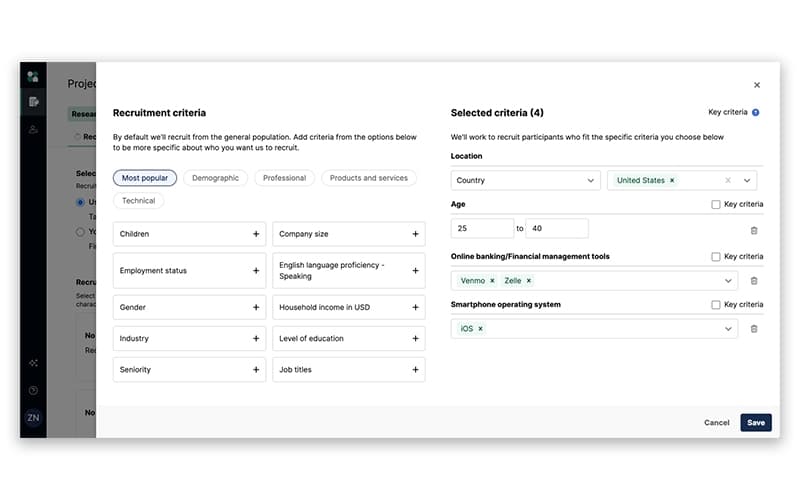
User Interviews stands out for its Participant Recruitment feature. It supports research teams in locating and identifying qualified participants through its list of up to 7.5 million participants. These have been categorized by demographic, professional, and technical criteria. The platform allows researchers to target audiences with a niche. They can also use advanced surveys and quotas to screen applicants and use AI-powered matching to find suitable candidates. It also combines scheduling and incentives into its recruitment process.
How Much Does User Interviews Cost?
User Interviews pricing starts at $41/session under its Essential plan for up to 60 sessions. The plan is billed annually. The vendor also offers two other pricing options:
- Pay As You Go: $49/session
- Custom Plan: Starts at 250 Sessions
The software also features a Research Hub module with Workflow and CRM plans. Workflow plan starts at 3 seats, and CRM plan starts at 1,000 contacts. Both plans are available at custom pricing.
In addition to the base subscription cost, organizations should keep the following potential hidden costs in mind:
- Participant Incentives: $20-$300/study participant – Budget associated with respondent compensation, study duration, audience requirements, and research complexity
- Advanced B2B Targeting: $26-$70/session – For specialized professional audience targeting
- Premium Screening And Research Operations: $500-$2,500/year – Caused by more advanced screening, panel-management workflows, governance, and research operations support
- Enterprise Onboarding And Support: $1,000-$5,000 – Due to larger deployments that may need custom onboarding, security reviews, dedicated customer success, and research support
Reviewers typically view User Interviews as valuable when fast access to qualified participants reduces the time and effort normally required for recruitment and research operations.
Disclaimer: The pricing is subject to change.
User Interviews Integrations
The platform offers integration with several third-party apps, including:
- Census
- Maze
- Lookback
- Zoom
- SurveyMonkey software
- Alchemer
- Ballpark
How Does User Interviews Work?
After completion of the onboarding process, here’s how you can get started with User Interviews:
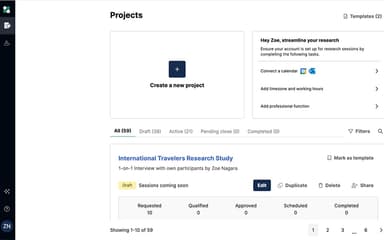
- Review your available research projects and activities by accessing the main workspace after successful login
- View ongoing studies, participant activity, recruitment progress, and other research-related information by navigating through the dashboard
- Create a research project and adjust its study requirements, participant types, and research objectives
- Identify and recruit participants who match the study’s requirements by predefining relevant audience targeting criteria
- Launch surveys and other research activities once the appropriate target audience and study requirements have been configured
- Organize research findings and narrow down key information from collected responses by utilizing AI Assistance and insights capabilities
- Share research information with your team members to collaborate and coordinate work effectively within the platform
- Route the completed research findings and reports to the specific users and stakeholders for further analysis and decision-making
Who Is User Interviews For?
User Interviews is used mainly by professionals across various industries, including:
- Technology
- Financial
- Insurance
- Healthcare
- Government
User Interviews Use Cases
Based on our analysis of User Interviews' features, capabilities, and marketing positioning, we have identified its real-world use cases:
Recruiting Specific B2B Professionals For Product Research
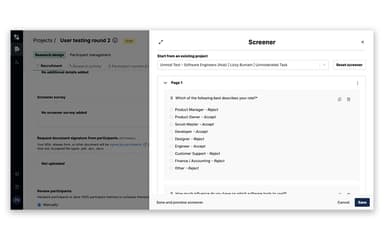
Product and UX teams often need feedback from a narrowly defined professional group, such as IT managers, healthcare administrators, and finance professionals, but struggle to find enough qualified participants by means of their existing customer lists. User Interviews tackle this with Audience Targeting and the participant panel that allows researchers to target professional segments, demographics, consumer behaviors, and niche audiences. Researchers utilize screener surveys with skip logic, advanced question types, and automatic qualifications to filter applicants against the study’s requirements before scheduling them.
Validating A New Product Feature Before Development
For product teams launching a new feature, direct feedback from target users before committing engineering resources is important. This is especially true when internal assumptions about users have not been validated. Through User Review’s support for unmoderated and moderated studies, including surveys and interviews, researchers can collect both qualitative and quantitative feedback from selected participants. It allows the team to recruit users to match predefined criteria, conduct the research, and use the resulting responses to test assumptions before moving forward with the feature.
Running Repeated Research With An Existing Customer Panel
Rebuilding the participant pool and recruitment criteria for each individual study is a difficult task for research teams that consistently study the same customer population. With User Interview’s Own-Panel capabilities, teams can build customer panels with dynamic segments, invite rules, and data integration for ongoing outreach. Researchers can organize recurring studies around defined customer groups rather than starting participant recruitment from scratch each time. This is particularly relevant for teams conducting continuous product research and maintaining an ongoing customer feedback program.
Coordinating Moderated Research Across A Distributed Research Team
Distributed UX research teams running multiple interviews may encounter scheduling conflicts when researchers, moderators, observers, participants, and calendars are managed separately. User Interviews integrates with Google Calendar and Microsoft Outlook, supporting team scheduling, calendar preferences, moderator assignment, observer management, and rescheduling flows. As a result, research teams can coordinate participant sessions within the recruitment workflow, rather than manually reconciling schedules across separate systems.
Standardizing Screening For Frequent Research Studies
When organizations conduct research across multiple projects, they may find that researchers repeatedly rebuild screening questionnaires and recruitment workflows, creating inconsistencies between studies. User Interviews solves this through screener survey templates, coupled with skip logic, advanced question types, and automatic qualification, allowing teams to reuse structured screening approaches while adapting them to individual studies.
Is User Interviews Right For You?
For organizations that need to recruit participants, manage segmented studies, and coordinate research across UX, product, and research operations teams, User Interviews can be a strong fit. With quota tools that let you set targets across demographic criteria, it is particularly useful for teams running high-volume or multi-segment research.
The platform also supports research teams that need closer collaboration between researchers, product teams, and stakeholders. Its project notes, collaborative drafts, observer sign-up, team rules, templates, and automated scheduling allow multiple people across teams to contribute to a study. This is done without having to rely on disconnected modes of communication.
For teams that are primarily looking for a general-purpose survey of analytics, project management, or a recruitment platform, it might not be as useful. However, its AI-automated procedures and SOC Type II, ISO 27001, and ISO 27701 certifications make it a worthwhile investment.
Still unsure about User Interviews? Contact our customer support team at (661) 384-7070 to get help in making the right decision.
User Interviews Features
AI Assistant
User Interviews features an ‘AI Assistant’ that allows researchers to describe their ideal participants to instantly generate targeted recruitment criteria and screener questions. It analyzes interviews by breaking down sessions, surfacing observations, and answering questions about transcripts with sourced insights. As a result, research teams can quickly move from participant recruitment to grounded analysis while retaining human review and control over the final results.
Reports
This feature allows research teams to track spending, activity, and research impact through dedicated Budgeting, Operations, and Research Impact reports. It allows teams to break down research costs by project or team, monitor the research pipeline and participant sourcing, and filter or export dashboards for further analysis. Research Ops teams can manage budgets, spot trends across projects, and give stakeholders evidence of research value as a result.
Quotas
With Recruitment Quotas, researchers can set participant targets across multiple criteria like age, gender, region, device usage, or customer type. Teams can monitor each segment in real-time, filter participants by quota, and use automatic gating to stop recruitment when a target is full. Through built-in waitlists and notifications, newly available spots can be filled, and maintaining a balanced sample in high-volume or multi-segment studies becomes possible.
Collaboration
User Interviews provides its users with collaboration tools that allow them to invite teammates and stakeholders to review project details like screeners, incentives, participant emails, and research drafts before launch. Functionalities like project notes, templates, roles and permissions, automatic scheduling, and observer sign-up allow teams to coordinate research from a shared workspace. Thus, feedback approvals, scheduling, and participant management are kept within one workflow instead of being spread across separate tools.
Pros And Cons of User Interviews
Pros
Allows users to tailor studies to research needs
Removes administrative work through automated payments
Standardizes screening and recruitment workflows through its templates
Cons
Some advanced functionalities may be missing
Some users might face difficulties with collaboration
User Interviews Pricing
Pay As You Go Plan | Essential Plan | Custom Plan | Workflow Plan | CRM Plan |
|---|---|---|---|---|
$49 per session | $41 per session | Custom pricing | Custom pricing | Custom pricing |
|
|
|
|
|
Disclaimer: The pricing details were last updated on Sep 25, 2026 from the vendor's website. Please contact us for a tailored pricing list.
User Interviews Reviews

No reviews yet!
Be the first to review this product
Frequently Asked Questions
What language does User Interviews support?
The platform offers support in the English language.
Who are the typical users of User Interviews?
User Interviews is mainly used by professionals in technology, financial services, insurance, healthcare, and government to recruit participants and conduct research studies.
Does User Interviews offer an API?
Yes, User Interviews does offer an API.
What other apps does User Interviews integrate with?
The platform integrates with platforms like Zoom, SurveyMonkey, and Census.
Does User Interviews have a mobile app?
User Interviews software does not have a mobile app.
What types of pricing plans does User Interviews offer?
User Interviews price starts at $41/session for the Essential plan, billed annually. A Pay As You Go option costs $49/session, while Custom pricing starts at 250 sessions. Its Research Hub Workflow and CRM plans are also available at custom pricing. Request a custom User Interviews pricing quote today!
What level of support does User Interviews offer?
User Interviews offers support through its Help Center.