

Last Updated
Overview
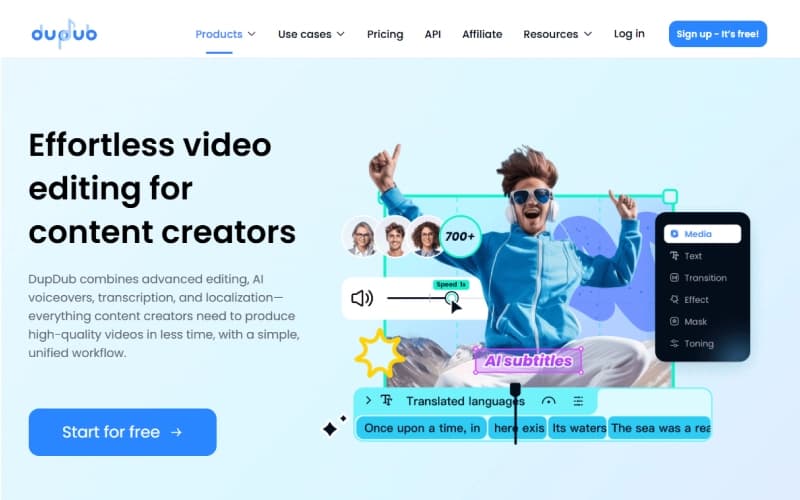
DupDub offers an AI-powered content creation platform that streamlines video production, voiceovers, and text-to-speech workflows. While its advanced features can be overwhelming for users managing small projects, its extensive multilingual support, realistic AI voices, and avatar capabilities make it a powerful solution for content creators and marketers.

DupDub Specifications
- Text To Speech & Speech To Text
- Multi-Language Support
- Natural Language Dialogue
- Smart Data Discovery
DupDub Features
AI Voiceovers
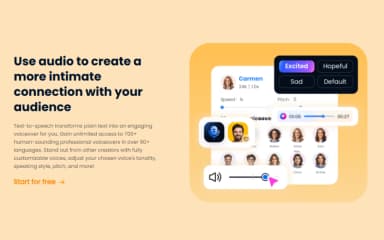
DupDub offers ultra-realistic AI voiceovers that allow users to add professional-quality narration to videos and audio projects. The software provides natural-sounding tones suitable for multiple contexts, enabling creators to enhance engagement without hiring external voice actors.
Languages And Accents
The platform supports dubbing videos in over 90 languages and accents by simply entering text. This feature helps creators reach global audiences with localized content while maintaining high audio quality, ensuring messages are clearly conveyed across diverse linguistic markets.
Voice Cloning
The software enables users to clone their own voice, creating unique and personalized audio content. By capturing individual speech patterns, DupDub allows consistent branding across videos, enhancing memorability and delivering a distinctive auditory experience for viewers and listeners.
AI Writing
DupDub includes an AI writing assistant to help users generate high-quality content efficiently. The platform produces creative and coherent text for scripts, captions, or descriptions, streamlining content production while maintaining professional language and tone for various audiences.
Transcription
The platform converts audio and video files or links into accurate text quickly. DupDub’s transcription feature assists in creating subtitles, captions, and written records for videos, making content more accessible and easier to repurpose across multiple formats and channels.
YouTube Downloader
DupDub includes a YouTube Downloader that allows users to easily extract and download video content for reuse in editing, transcription, or repurposing workflows. This feature helps creators and marketers quickly access existing YouTube videos, enabling them to generate scripts, subtitles, or translated versions without manually recording or sourcing media files.
AI Subtitles
The platform’s AI Subtitles feature automatically generates accurate, time-synced captions for video content in multiple languages. It helps creators improve accessibility, boost viewer engagement, and localize videos for global audiences without manual transcription or editing. Users can easily edit, style, and export subtitles to match different platforms and content requirements.
Video Editing
Built-in video editing tools allow users to refine, trim, and enhance their content within a single workspace. This feature enables seamless adjustments to visuals, audio, and timing, helping creators polish videos, sync voiceovers, and add subtitles or effects without relying on external editing software.
Pros And Cons of DupDub
Pros
Extensive multilingual voice options covering over 90 languages
Ultra-realistic, expressive AI voiceovers with emotion
AI avatars with natural lip-sync and motion
Cons
Emphasis option not available for selected voices
Requires internet connection for real-time processing and editing
DupDub Pricing
Free | Personal | Professional | Ultimate | Scale | Business |
|---|---|---|---|---|---|
$0 per month | $15 per month | $40 per month | $150 per month | $300 per month | Custom Pricing |
|
|
|
|
|
|
Disclaimer: The pricing details were last updated on Aug 18, 2026 from the vendor's website. Please contact us for a tailored pricing list.
DupDub Reviews
Total 1 reviews
5
All reviews are from verified customers
Rating Distribution
5
Stars100%
4
Stars0%
3
Stars0%
2
Stars0%
1
Stars0%
Share your experience
Ye L.
Education Management, N/A employees
“handy all in one video workflow”
Pros
It's really convenient being able to transcribe other videos, add voiceovers and handle the editing all in one place at the same time.
Cons
The pricing could be a concern for some and the AI avatar feature still has room for improvement.
Rating Distribution
Ease of use
10
Value for money
10
Customer Support
10
Functionality
10
Frequently Asked Questions
What types of pricing plans does DupDub offer?
DupDub price starts at $15/month for the Personal plan and includes a Free plan as well. Other paid plans, Professional and Ultimate, range from $40/month to $150/month respectively. Business focused plans start at $300/month, and custom plans are also available. For users who prefer not to subscribe, DupDub also offers a pay-as-you-go option starting at $68 for 500 lifetime credits. Get a customized DupDub cost estimate today!
What language does DupDub support?
DupDub software supports over 90 languages and accents, allowing users to create multilingual voiceovers, AI dubbing, and localized video content for a global audience. This includes major languages such as English, Spanish, French, German, and many more.
Does DupDub have a mobile app?
Yes, DupDub offers a dedicated mobile app for both iOS and Android.
Who are the typical users of DupDub?
DupDub features are used by content creators, marketers, educators, and businesses producing audio and video content.
What level of support does DupDub offer?
DupDub provides support via email, a Discord community, and an online contact form.
Does DupDub offer an API?
Yes, DupDub offers an API.
What other apps does DupDub integrate with?
DupDub integrates with platforms including ChatGPT and Canva.