


Last Updated
Overview
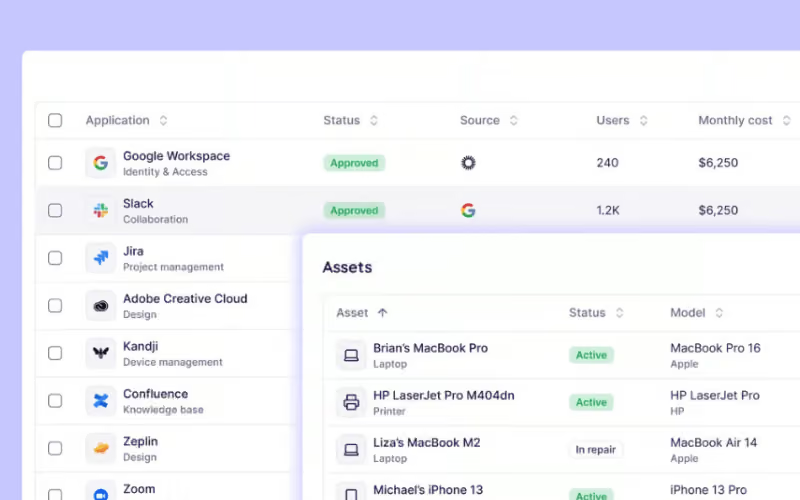
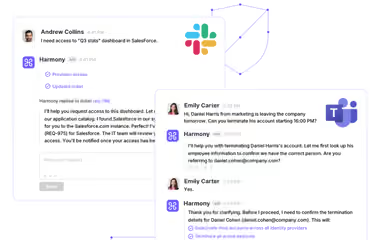
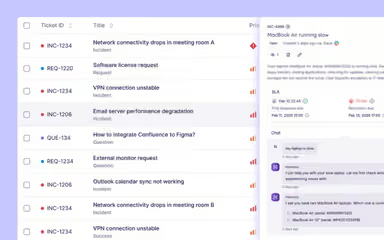
Harmony helps enterprise IT, HR, legal, and finance teams automate workflows with AI-driven helpdesk agents, proactive automation, and a generative knowledge base. While it offers limited built-in training features, it streamlines ticket resolution, device monitoring, and employee onboarding, making it reliable for mid to large organizations seeking efficient service management.
Harmony Specifications
- Natural Language Dialogue
- Automation
- Predictive Capabilities
- Context Awareness
Harmony Features
AI Agents Workforce
The platform provides 100+ production-ready AI agents that can be deployed immediately. These agents handle routine tasks efficiently, reducing manual workload for IT and operational teams. Users can start automating workflows within hours, accelerating response times and operational efficiency.
Customizable Agent Workflows
This feature allows agents to be tailored to your organization’s specific tools, policies, and workflows. Customization ensures that automation aligns with internal processes and compliance requirements. Teams can adjust agents as business needs evolve without relying on external support.
Multi-Desk Support
Harmony software spans multiple departments, including IT, HR, Legal, and Finance. By consolidating cross-functional support, it reduces the need for separate tools in each department. This integration enhances visibility, coordination, and accountability across teams.
Proactive Automation
The platform agents act on signals rather than waiting for tickets to arrive. This proactive approach helps prevent issues before they escalate, improving overall system reliability. Organizations can maintain smoother operations with less reactive staff intervention.
Pros And Cons of Harmony
Pros
Centralized monitoring of workflows
Real‑time reporting and data access
Clear overview of user activity and status
Cons
Minor occasional system errors reported
Login licenses may restrict some workflows
Harmony Reviews
Total 15 reviews
4.9
All reviews are from verified customers
Rating Distribution
5
Stars87%
4
Stars13%
3
Stars0%
2
Stars0%
1
Stars0%
Share your experience
Guy T.
Automotive, 101-500 employees
Less than 6 months
“accessible and smooth ITSM”
Pros
It's not often an ITSM app manages to feel both sophisticated and simple at the same time but this one really does. Right from the start the interface feels accessible and smooth so even more complex tasks come across as surprisingly easy.
Cons
It is still evolving and a few features haven't been fully completed yet. It looks like those are planned for future updates so they're likely still on the way.
Rating Distribution
Ease of use
10
Value for money
10
Customer Support
10
Functionality
10
Stav E.
Computer Software, 101-500 employees
Less than a year
“smart AI and time-saving automations”
Pros
One of the best parts has been their AI agent which can handle user issues before they ever reach the support team. The automations are also really strong and save us a lot of time!
Cons
At the moment it is missing reporting features and those would be really helpful for weekly or monthly reviews of tickets, recurring issues and figuring out how to prevent them.
Rating Distribution
Ease of use
10
Value for money
10
Customer Support
10
Functionality
9
Aleksandr V.
Information Technology and Services, 11-50 employees
Less than 6 months
“all-in-one IT visibility”
Pros
Getting this up and running was pretty quick, I was able to connect the full tech stack in about 30 to 60 minutes and the system feels very user friendly overall! Having asset management and ITSM in one place is incredibly useful because it gives complete context around the assets each employee has. The peripheral accessory discovery and the AI IT support assistant are also standout features that save a lot of time.
Cons
The one limitation right now is the lack of auto discovery with spend management systems. Still it doesn't feel like a major issue and I'd expect that gap to be addressed soon. In the meantime you can just upload PDF invoices and the platform maps all the data automatically.
Rating Distribution
Ease of use
10
Value for money
10
Customer Support
10
Functionality
10
Frequently Asked Questions
Does Harmony offer an API?
No, Harmony does not offer an API.
Does Harmony have a mobile app?
No, Harmony does not offer a dedicated mobile app.
What language does Harmony support?
Harmony primarily supports English.
What types of pricing plans does Harmony offer?
Harmony price plan ranges from $100 to $250/user/month, based on industry benchmarks for similar AI-driven enterprise service management solutions. Get a detailed Harmony cost breakdown tailored to your specific requirements.
What level of support does Harmony offer?
Harmony offers support through blogs.
What other apps does Harmony integrate with?
Harmony supports integration with platforms, such as GitHub, monday.com software, Zendesk, Microsoft SharePoint, and Microsoft Teams.
Who are the typical users of Harmony?
Harmony features are used by organizations across industries and sectors, including healthcare, education, professional services, manufacturing, information technology, financial services, and retail and e‑commerce.