



Last Updated
Key Takeaways
Generated from the text of customer reviews
Our Verdict
Overall Rating
Based on 1 users reviews
5
Rating Distribution
Positive
100%
Neutral
0%
Negative
0%
Starting Price
$30
per month per user
Polycam Specifications
- Visual Recognition
- Automation
- Defect Detection Using Image Analysis
- Natural Language Dialogue
Polycam Features
Spatial Capture
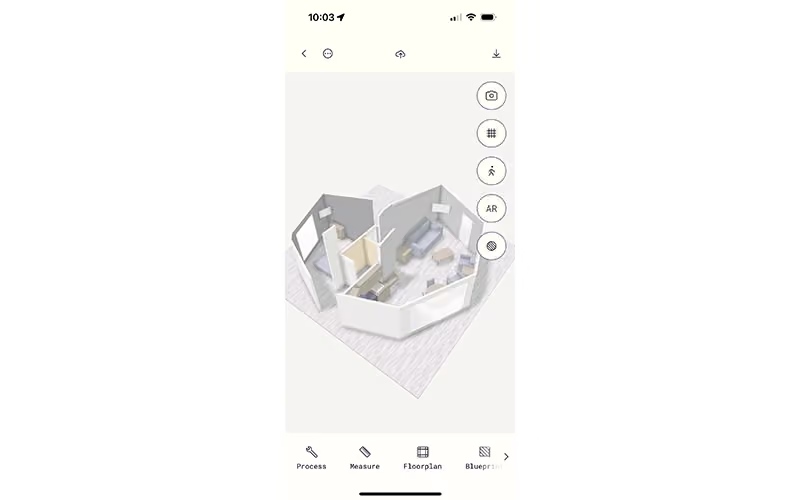
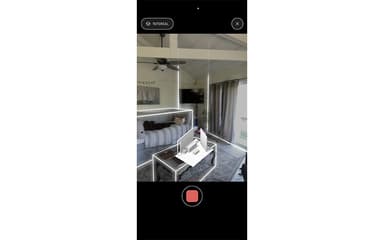
This feature lets you scan an entire indoor or outdoor space, such as a room, apartment, office, building area, or construction site. You move through the area with your device, and Polycam creates a digital 3D version of the space. The capture can include a photorealistic model, a 3D room plan, measurements, and a 2D floor plan. It benefits architects, interior designers, contractors, property inspectors, facilities teams, and real-estate professionals because they need an accurate digital record of a physical space.
Object Capture
Polycam creates a highly detailed, photorealistic 3D 'digital twin' mesh of small-to-medium physical items. You take a series of photos or videos of an item (like a piece of furniture, a statue, or a product) from multiple angles. Polycam’s cloud servers then stitch those images together into a 3D asset using photogrammetry and advanced Gaussian splatting. It provides a rapid way to generate realistic digital inventory or virtual props without building them from scratch in design software.
AI Capture
AI Capture uses Polycam’s AI-assisted capture process to turn photographs and spatial data into usable 3D content. It helps the software understand the depth, shape, surfaces, and layout of what the user has captured. In simple terms, this is the part of Polycam that helps transform ordinary images or sensor data into a 3D digital result rather than leaving the user with only flat photographs. This is valuable for concept artists, marketing teams, and hobbyists who want to quickly mock up a prototype asset without doing a full 360-degree photography scan.
Drone/Aerial
The software lets users upload drone footage or aerial images and process them into large-scale 3D models of outdoor areas. It is designed for capturing places that are too large, unsafe, or impractical to scan by walking around with a phone. For example, it can be used to digitally capture a construction site, building exterior, land area, roof, infrastructure project, or outdoor facility. It permits inspection of large infrastructure sites safely from the ground and accurate mapping of terrain structures.
Virtual Walkthrough
This feature compiles spatial scans into an immersive, interactive 3D tour that users can navigate online. It stitches together point clouds, spatial geometry, and 360-degree imagery, creating a web-hosted link where remote viewers can click around to virtually explore an indoor environment. This feature benefits real estate agents and facility managers because it lets them provide realistic, interactive digital site tours to prospective buyers or remote inspection teams without hosting an in-person visit.
Floor Plans
The platform turns a scan of an interior space into a clear 2D floor plan. It can show the layout of rooms, walls, doors, windows, room dimensions, and calculated areas. This means that instead of measuring every wall with a tape measure and redrawing the space later, the user can capture the room and create a floor-plan record before leaving the site.
Pros And Cons of Polycam
Pros
Supports multiple scanning methods, including LiDAR and photogrammetry
Offers a broad range of export formats for 3D workflows
Useful for quick room, object, and floor-plan captures
Cons
Complex or small objects may require additional editing to produce usable models
Some users have shown concerns about trial cancellations and unexpected subscription charges
Polycam Pricing
Free | Basic | Business | Enterprise |
|---|---|---|---|
$0 | $30 per month | $25 per month per user (billed yearly at $300 per year) | $1,200 per seat per year |
|
|
|
|
Disclaimer: The pricing details were last updated on Aug 18, 2026 from the vendor's website. Please contact us for a tailored pricing list.
Polycam Reviews
Total 1 reviews
5
All reviews are from verified customers
Rating Distribution
5
Stars100%
4
Stars0%
3
Stars0%
2
Stars0%
1
Stars0%
Share your experience
Jacob
Small-Business, 11-50 employees
“fantastic sharing and export options”
Pros
One of the best parts of the platform is the social side of it and I really appreciate how many different file types it lets me export.
Cons
One thing I'd still love to see is a dedicated PC/Mac app so I could create models locally.
Rating Distribution
Ease of use
10
Value for money
10
Customer Support
10
Functionality
10
Frequently Asked Questions
Who are the typical users of Polycam?
Typical users of Polycam include professionals in architecture, engineering, construction, real estate, and enterprise organizations.
Does Polycam offer an API?
Yes, Polycam provides an API.
What level of support does Polycam offer?
Polycam offers support through phone, live chat, and online channels.
What language does Polycam support?
Polycam offers support in the English language.
Does Polycam have a mobile app?
Yes, Polycam software offers a mobile app available on both Android and iOS devices.
What types of pricing plans does Polycam offer?
Polycam offers a Free plan at $0/month, while paid plans start at $30/month/user for the Basic plan. Business costs $400/user/year, and Enterprise costs $1,200/seat/year. A 7-day free trial is available for Basic and Business annual plans. Contact us for a custom Polycam price quote.
What other apps does Polycam integrate with?
Polycam integrates with Revit, AutoCAD, Rhino, and SketchUp.