


Wordsmith
Last Updated
Overview
Wordsmith is a powerful legal AI platform that automates contract review and accelerates legal workflows. Although initial customization is needed to align with proprietary playbooks. Once configured, Wordsmith streamlines routine legal tasks, enabling legal teams to focus on strategic, high-value work with greater speed and efficiency.
Wordsmith Specifications
- Natural Language Dialogue
- Smart Data Discovery
- Text To Speech & Speech To Text
- Automation
What Is Wordsmith?
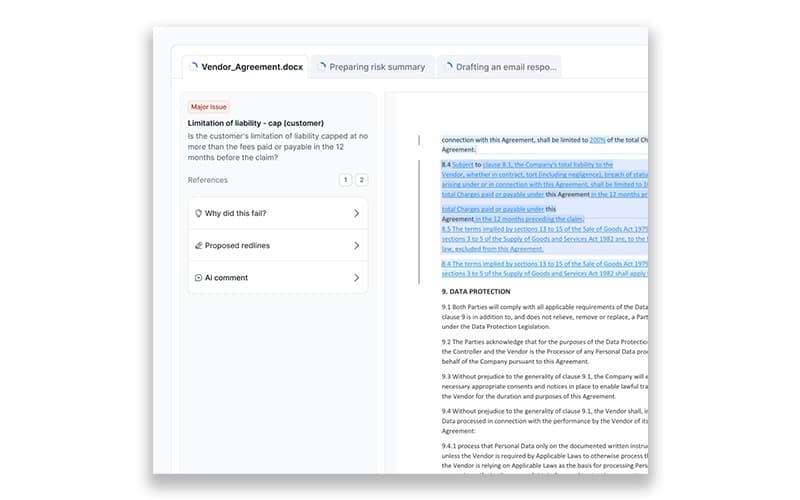
Wordsmith software is a legal workflow automation solution powered by artificial intelligence. It transforms in-house legal departments into business accelerators by automating repetitive and high-volume tasks such as contract review, drafting, and document analysis. The platform provides intuitive tools designed for both legal and non-legal teams (like procurement, HR, and sales) to handle legal requests, detect risks, and manage document lifecycles directly within familiar applications like Microsoft Word and Slack.
Wordsmith Pricing
Wordsmith pricing consists of two plans:
- Individual: $450/user/month
- Enterprise: Custom pricing
Disclaimer: The pricing is subject to change.
Wordsmith Integrations
Wordsmith integrates with different software, including:
- Slack software
- Google Drive
- Notion software
Who Is Wordsmith For?
Wordsmith is for professionals in the following sectors
- In‑house legal teams
- General counsels
- Legal companies
Is Wordsmith Right For You?
Wordsmith software enables organizations to turn their in-house legal department into a revenue engine by reducing administrative bottlenecks and accelerating response times. The platform uses intelligent agents trained on a company's custom policies and provides multi-document support with features like redlining and citation referencing. This focus on customized automation and precise document handling ensures legal compliance and allows teams to strategically dedicate their time to high-value, non-routine legal matters.
Still not sure about Wordsmith? Contact our support team at (661) 384-7070 for further guidance.
Wordsmith Features
Transcription And Citations
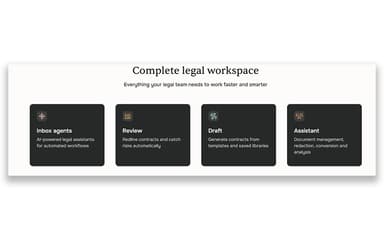
Wordsmith’s Assistant transcribes audio, handwritten notes, and documents into editable text. It includes in-line citations, letting users trace AI-generated content back to its source. This ensures transparency, reduces manual effort, and supports faster, more accurate legal drafting across diverse document types.
Contract Intake And Triage
The review module supports structured contract intake by detecting document type, parties, and risk indicators. It auto-triages files for legal teams, enabling them to prioritize high-risk contracts. This streamlines workflows, minimizes delays, and boosts productivity in high-volume review scenarios.
AI-Powered Legal Agents
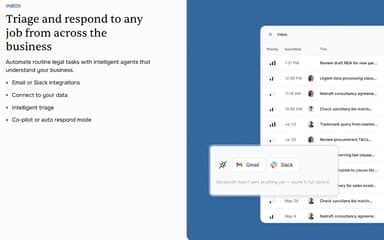
Wordsmith Agents are workflow bots that handle legal request intake via Slack, email, or portals. They automatically assign tasks or escalate them based on predefined logic. This reduces repetitive tasks, ensures faster response times, and keeps teams focused on complex legal issues.
Contract Analysis Reports
Reports allow legal teams to generate AI-driven summaries and risk insights from contracts or datasets. It extracts clauses, compares terms, and highlights deviations. This dramatically speeds up due diligence processes, turning hours of manual work into structured, review-ready output in minutes.
NDA Automation
Wordsmith features NDA tool that comes with pre-built playbooks based on market standards. Teams can customize logic, markup rules, and fallback positions for rapid review and approval. It simplifies NDA handling while maintaining compliance with internal policies and legal best practices.
Pros And Cons of Wordsmith
Pros
Significantly reduces legal team workload on routine contract tasks
Brings consistency with playbooks and rules, lowering risk
Automatically updates narratives as the underlying data changes
Cons
Full power may exceed needs of small departments
Requires customized playbook implementation
Wordsmith Reviews
Total 11 reviews
4.5
All reviews are from verified customers
Rating Distribution
5
Stars55%
4
Stars36%
3
Stars9%
2
Stars0%
1
Stars0%
Share your experience
Mid Market, 51-100 employees
“Solid output quality”
Pros
I'm on Wordsmith every day, often several times a day, both for client work and for running my own practice. The interface feels user-friendly and I appreciate that it gives multiple ways to work with it. The output quality is consistently strong and I rarely run into errors. One big win is that I can use it through the email assistant, the Word integration or straight from Slack, depending on where I'm already working. Support has also been genuinely fast and helpful and the team keeps rolling out useful new features at a really impressive pace.
Cons
No tool is perfect, of course since I'm a lawyer, I still review everything anyway so spotting the occasional mistake is actually a good thing because it keeps me from getting overconfident with AI. That said, compared with other legal AI tools I've tried, Wordsmith is the least error-prone. The main area for improvement is the playbooks implementation, the workspaces concept is solid but I'd love to see a workflow builder with if/then options added on top.
Rating Distribution
Ease of use
10
Value for money
10
Customer Support
10
Functionality
8
Mid Market, 51-100 employees
“built specifically for lawyers”
Pros
Using it has made a real difference in my day-to-day work. It's very user-friendly and has been incredibly helpful for the tasks I handle regularly. I really appreciate that it was built specifically with lawyers in mind. The support from the Wordsmith team during implementation was excellent and they made the whole process feel clear and hassle-free. They're also very responsive so whenever something comes up, it gets handled quickly. I use Wordsmith every single day and I'm also happy they introduced the Omnea integration since we use that at Preply as well.
Cons
Honestly there's not much to complain about. It also keeps improving all the time.
Rating Distribution
Ease of use
10
Value for money
10
Customer Support
10
Functionality
10
Small Business, 1-10 employees
“Multilingual content creation made smooth”
Pros
It is incredibly handy for the content creators on my team who need to produce lots of different content types in multiple languages. The user interface is simple to grasp, even when you're switching tasks. What really stands out is how natural the output feels, when you provide the data, the writing comes back sounding like a human actually crafted it, not like generic filler.
Cons
Setting it up takes a little time at the beginning but once everything is configured, the payoff is absolutely worth it. After that, the benefits feel really substantial.
Rating Distribution
Ease of use
9
Value for money
7
Customer Support
9
Functionality
8
Frequently Asked Questions
What language does Wordsmith support?
Wordsmith software supports document translation across over 30 languages, making it suitable for international legal workflows.
Does Wordsmith have a mobile app?
No, Wordsmith does not offer a mobile app.
Who are the typical users of Wordsmith?
Wordsmith is designed for in-house legal teams, general counsels, and legal companies looking for an efficient legal document solution.
What other apps does Wordsmith integrate with?
Wordsmith integrates with Slack, Google Drive, and Notion.
What types of pricing plans does Wordsmith offer?
Wordsmith offers two pricing plans. The Individual plan costs $450 per user per month, while the Enterprise plan is available with custom pricing tailored to your organization’s needs. Request a Wordsmith cost quote.
Does Wordsmith offer an API?
Yes, Wordsmith offers an API.
What level of support does Wordsmith offer?
The software includes Wordsmith academy, with support accessible via phone, email, live support.