


Cisco Jabber
Last Updated
Overview
Cisco Jabber provides a unified platform for messaging, voice, and video, simplifying enterprise workflows. While its interface may feel slightly dated, its robust security and seamless desktop integration empower teams to collaborate effectively from anywhere. Overall, Cisco Jabber’s integrated communication tools make it a compelling choice for enterprise collaboration.


Cisco Jabber Specifications
- Call Recording
- Call Transfer And Conferencing
- Call Routing
- Cloud-Based Calling
Cisco Jabber Features
Enterprise Instant Messaging
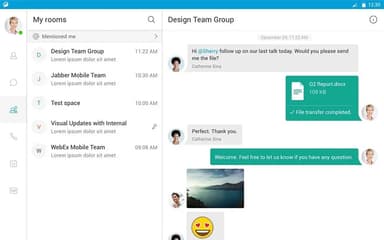
This feature provides secure, real-time chat capabilities including personal and group messaging rooms powered by the XMPP protocol. Users can share files instantly and maintain a persistent chat history to ensure that critical project information remains accessible across the entire team.
High-Definition Voice And Video
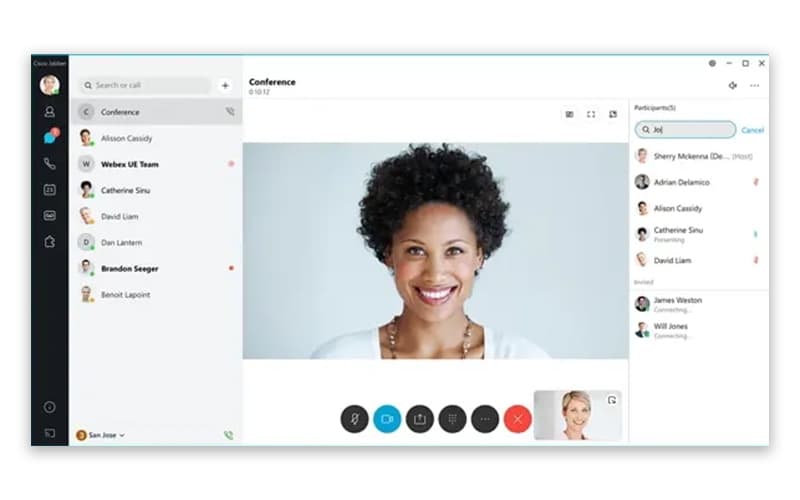
Leveraging the power of Cisco Unified Communications Manager, this tool delivers business-quality 720p video and wideband audio directly to the desktop. It functions as a flexible softphone, allowing users to control desk phones or make calls from mobile devices seamlessly.
Real-Time Presence Information
The presence indicator allows users to view the availability of colleagues, showing whether they are away, in a meeting, or on a call. This transparency reduces communication delays by helping staff choose the most effective time and method for reaching out.
Interactive Desktop Sharing
Users can instantly share their screens with others to facilitate collaborative document editing and technical troubleshooting. This capability is compatible with various video endpoints, enabling clear visual communication during multiparty calls without the need to switch to external presentation tools.
Seamless Webex Escalation
The software permits a smooth transition from a simple chat to a full Webex meeting with a single click. This integration ensures that teams can scale their collaboration from basic text to complex multiparty video conferencing and web meetings effortlessly.
Pros And Cons of Cisco Jabber
Pros
Minimal training required for intuitive user adoption
Ensures professional privacy during all outgoing calls
Distinct ringtones simplify work call identification
Cons
Performance issues on low-bandwidth internet connections
Work calls merge with personal mobile history
Cisco Jabber Reviews
Total 72 reviews
4.2
All reviews are from verified customers
Rating Distribution
5
Stars46%
4
Stars39%
3
Stars7%
2
Stars6%
1
Stars3%
Share your experience
Pharmaceuticals, 500+ employees
More than a year
“all in one communication powerhouse”
Pros
Having everything in one place makes this incredibly useful. It brings together pretty much every modern communication channel in a single app, including group chats, direct messaging, video meetings, one on one calls, casual audio conversations and even chats with external partners or customers. The range of ways you can use it feels almost endless.
Cons
It still has room for improvement even though it clearly has the potential to be truly helpful. Adding features such as a calendar or a dedicated file sharing view would make a big difference. It would also benefit from a clearer overall layout and a smoother workflow when moving between different workspaces.
Rating Distribution
Ease of use
9
Value for money
9
Customer Support
9
Functionality
9
Telecommunications, 51-100 employees
Less than a year
“feature packed calling experience”
Pros
It stands out to me for its phone style interface which feels very complete and familiar to use. It also offers a wide range of features so it covers pretty much everything I need in one place.
Cons
At times, it can feel a bit laggy and the call quality is not always consistent since it can vary from time to time.
Rating Distribution
Ease of use
8
Value for money
7
Customer Support
7
Functionality
8
Education Management, 500+ employees
More than a year
“Outdated interface”
Pros
Calling has been dependable and both voice and video calls are usually stable. It also works well with desk phone systems through CUCM and the call quality stays consistent when the network is properly configured.
Cons
The interface feels outdated especially compared with Teams, Webex and Zoom. It's also not as user friendly as those newer platforms.
Rating Distribution
Ease of use
3
Value for money
5
Customer Support
5
Functionality
5
Frequently Asked Questions
What level of support does Cisco Jabber offer?
Cisco Jabber offers expert support via phone.
What other apps does Cisco Jabber integrate with?
Cisco Jabber integrates with Cisco Webex, Slack, Microsoft Teams, and VDI.
What types of pricing plans does Cisco Jabber offer?
Cisco Jabber price varies based on integration level and required features with an estimated range of £50 – £100/per/year. Get a detailed Cisco Jabber cost breakdown tailored to your specific requirements.
Who are the typical users of Cisco Jabber?
Typical users are in IT, healthcare, finance, education, manufacturing, government, and professional services.
What language does Cisco Jabber support?
The platform supports multiple languages.
Does Cisco Jabber offer an API?
No, Cisco Jabber does not offer an API.
Does Cisco Jabber have a mobile app?
Yes, Cisco Jabber does offer a dedicated mobile app for iOS and Android users.