


Binder CMMS
Last Updated
Overview
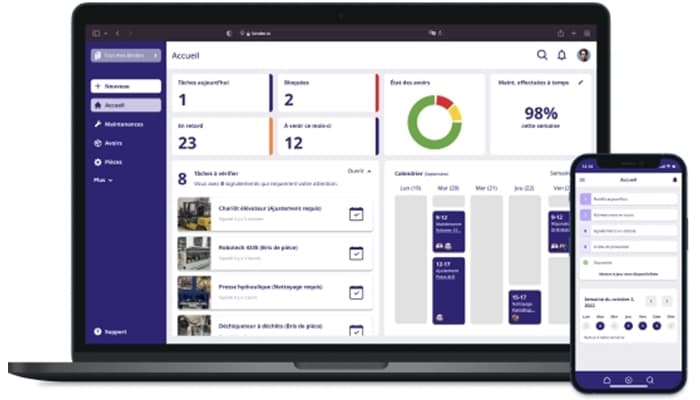
Binder CMMS is a software solution that optimizes industrial equipment maintenance by reducing downtime, extending machine lifespan, and improving efficiency. It streamlines maintenance processes and automates task management and resource tracking but requires regular training updates to ensure effective utilization and maximum operational benefits.
Binder CMMS Specifications
- Work Order Management
- Maintenance Logs
- Purchasing
- Incident Management
Binder CMMS Features
Work Schedules
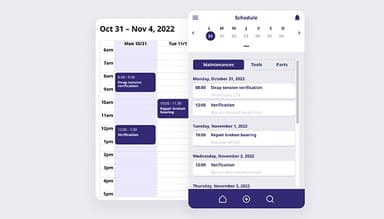
One-click scheduling enhances efficiency by enabling quick adjustments through advanced calendar features. Maintenance schedules seamlessly integrate with work calendars like Outlook or Google, ensuring better organization, streamlined planning, and improved operational workflow.
Work Order Generation
Binder CMMS helps generate work orders automatically, eliminating the need to send manual emails or reminders to colleagues. This process saves time while ensuring tasks are properly assigned, scheduled, and efficiently managed within the system.
Dynamic Forms
Dynamic forms can be created effortlessly, providing clear instructions for completing tasks. The platform's data entry fields allow efficient logging of equipment details, ensuring compliance with certification standards and maintaining accurate records for future reference.
Reporting
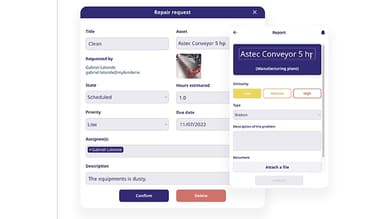
Binder tags on equipment enable rapid reporting of breakdowns or anomalies to the maintenance team. Scanning the equipment and completing a form ensures instant notifications, allowing swift task assignment based on criticality level.
Maintenance Tracking
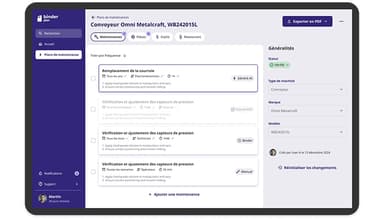
Binder CMMS' unique logbook system provides a comprehensive maintenance and asset history record. This data helps optimize asset lifecycles. Designed for simplicity, the logbook ensures easy access to essential information without requiring training.
Pros And Cons of Binder CMMS
Pros
User-friendly interface for beginners
Digitalizes maintenance processes, eliminating spreadsheets
Automates task management and resource tracking
Offers a logbook system for maintenance history tracking
Cons
Continuous training is essential to maximize the benefits of the software
Limited customization options for specific needs according to some users
Binder CMMS Reviews
Total 1 reviews
5
All reviews are from verified customers
Rating Distribution
5
Stars100%
4
Stars0%
3
Stars0%
2
Stars0%
1
Stars0%
Share your experience
Photography, 1-50 employees
“An affordable CMMS with powerful features”
Pros
What I love most are the flexible forms and the efficient scheduling tools. They have completely transformed the industry, streamlining workflows and helping me save a significant amount of time.
Cons
I haven't used it long enough to come across anything I dislike.
Rating Distribution
Ease of use
10
Value for money
10
Customer Support
10
Functionality
10
Frequently Asked Questions
What pricing plans does Binder CMMS offer?
Binder CMMS offers three feature-rich pricing plans: Starter, Professional, and Business. A 30-day free trial is offered. Users should feel free to request a personalized Binder CMMS price structure.
Who is Binder CMMS typically used by?
Binder CMMS is primarily used for maintenance management in the food and beverage and industrial equipment sectors.
What languages does Binder CMMS support?
Binder CMMS supports English.
Does Binder CMMS support mobile devices?
Binder CMMS offers a mobile application that is compatible with various mobile devices.
Does Binder CMMS have an API?
No, Binder CMMS does not offer API access.
What other apps does Binder CMMS integrate with?
Binder CMMS integrates with Stripe, Google, and Microsoft Outlook.
What level of support does the Binder CMMS offer?
Binder CMMS offers support through phone, email/help desk, and 24/7 (live rep).