



Last Updated
Key Takeaways
Generated from the text of customer reviews
Kizen is an agentic orchestration platform for organizations in insurance, financial services, and healthcare. Users cite its customization for different workflows as a strength, while initial difficulty navigating the platform remains a common concern. In April 2026, Kizen introduced an AI assistant for insurance agents designed to reduce post-call administrative work.
Our Verdict
Kizen is best suited to mid-sized and larger organizations with complex, process-heavy operations and a need for greater automation. Its pricing may be difficult to justify for smaller teams. We recommend it for organizations that need a configurable platform to support AI-assisted business processes across departments.
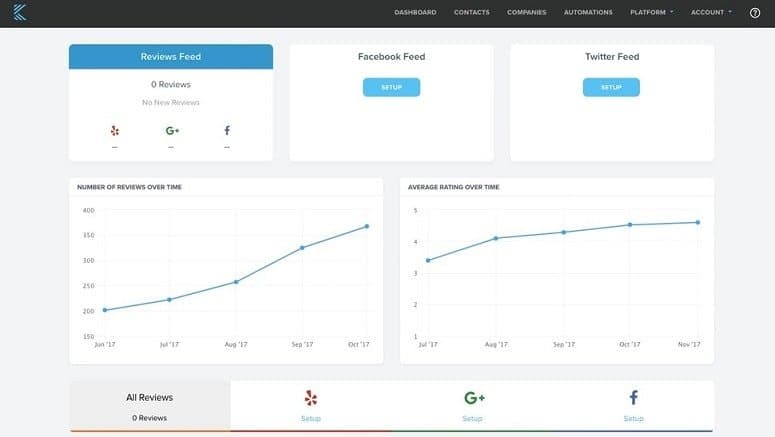
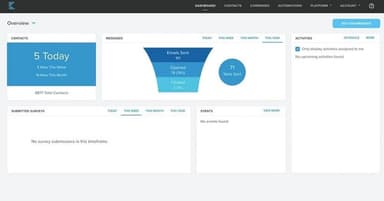
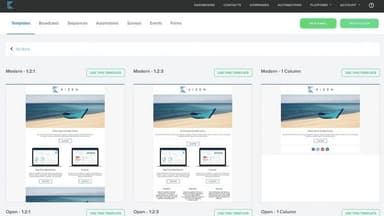
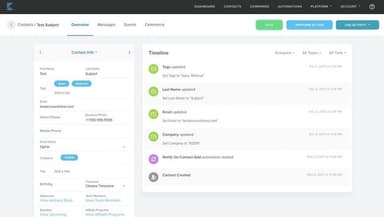
Kizen Specifications
- Contact Management
- Lead Management
- Opportunity Management
- Sales Forecasting
What Is Kizen?
Kizen is an AI-native CRM for orchestrating agents, automating business processes, and building custom applications. It is used by organizations in various industries to manage complex and document-heavy operations.
Teams can build and monitor AI-driven processes, then adjust them as business requirements change. Its application builder also lets organizations create internal tools without extensive custom development.
What Is Kizen Best For?
The platform stands out for its 'AI Document Classification and Extraction' feature, which makes it suitable for organizations that handle large volumes of complex documents, particularly lenders and financial institutions. Its AI can classify more than 1,000 document types, extract relevant information, and check data across files and connected systems for inconsistencies. This makes it particularly useful for teams that spend significant time reviewing, sorting, and validating documents before they can move a process forward.
How Much Does Kizen Cost?
Kizen pricing is estimated to start at $49/user/month, according to industry benchmarks. The final quote may change for every organization depending upon the customizations, integrations, and number of users.
In addition to the base subscription costs, organizations should account for the following expenses:
- Implementation: $2,500–$50,000 (one-time)
- Data Migration: $1,500–$40,000 (one-time)
- Training And Onboarding: $1,000–$15,000 (one-time)
- Custom Workflow: $5,000– $100,000
User reviews generally describe Kizen's pricing as high for small businesses and smaller teams. Many users find the cost justified given its automation capabilities and ROI, while smaller agencies and businesses with larger teams frequently flag affordability concerns as the price scales up.
Disclaimer: Pricing references are based on publicly available third-party information and industry benchmarks. Actual costs may vary.
Kizen Integrations
The software supports integration with multiple systems and platforms, such as:
- Twilio software
- Zoom Beta
- Amazon SES
- Connecture
- MySQL
- Snowflake
- SunFire
How Does Kizen Work?
Log in to your Kizen software account and follow the given steps to benefit from its features:
- Set up workflows by defining the business processes and rules that AI agents will follow
- Connect existing systems and data sources so records and activities stay synced across the platform
- Build custom applications or CRM structures using the app builder, with minimal custom coding
- Automate document processing by having AI agents classify, extract, and route information from files
- Monitor agent activity by reviewing workflow performance, accuracy, and token usage
- Route exceptions to team members when items fall below a set confidence threshold
- Manage records and communications through the CRM, including customer interactions and pipeline updates
- Generate reports and dashboards to track operational metrics across teams
Who Is Kizen For?
Kizen is suitable for industries and sectors, including:
- Insurance
- Healthcare
- Financial services
Kizen Use Cases
Based on our analysis of user reviews and Kizen features, we have identified key scenarios where this software is a good fit for organizations:
1. Insurance Agencies And FMOs Managing Contracting And Commissions
Insurance agencies and FMOs with large downline networks need to keep agent contracting, hierarchies, and commission payments aligned across multiple carriers. Kizen can track contracting requests, validate agent and hierarchy information, and calculate commission overrides across multiple levels. This gives teams a clearer record of producer status and payments while reducing reconciliation work.
2. Lenders And Financial Institutions Automating Document-Heavy Underwriting
Underwriters can spend significant time sorting loan packages, extracting information, and checking figures across borrower documents. Kizen can classify more than 1,000 document types, extract relevant data, and identify inconsistencies across files and loan systems. Low-confidence results can be routed to reviewers, allowing lending teams to reserve manual review for exceptions. Users particularly appreciate how the platform helps keep their database clean.
3. Healthcare Organizations Coordinating Patient Care
Kizen can analyze patient and claims information to flag higher-risk patients and support outreach, referrals, coding, and follow-up activities. For healthcare teams managing large patient populations, this can help surface care gaps and administrative tasks that need attention without relying on separate manual processes.
4. Insurance Agencies Managing Producer And Client Relationships
Insurance agencies can use Kizen to manage producer onboarding, client records, follow-ups, and renewal opportunities as their books of business grow. Its CRM can automatically capture information from meetings and connected tools, while AI assistants can recommend next actions and help prepare follow-up communications. This gives agencies more visibility across producer and client activity.
5. Sales And Go-To-Market Teams Monitoring Deal Risk
Kizen software helps capture follow-ups, commitments, and other deal details from customer interactions, then flags patterns that may indicate stalled or at-risk opportunities. Missing stakeholders and unresolved commitments can signal where a deal needs attention. This helps sales reps prioritize opportunities that may require intervention.
Is Kizen Right For You?
CRM platforms are increasingly moving beyond storing customer records toward AI agents that can interpret data, update records, and handle routine tasks. Kizen follows this shift with an AI-native CRM and agentic assistants that work across customer and business processes.
In April 2026, it introduced an AI assistant for insurance agents that can summarize calls, recommend follow-ups, update CRM records, and draft customer communications. These capabilities are particularly relevant to organizations that manage regulated, document-heavy processes and need AI assistance alongside human oversight. So, if you are an insurance agency, financial institution, or healthcare organization, Kizen could be a strong fit.
It is trusted by notable clients like Pinnacle Financial Services, AmeriLife, and Gordon Marketing. On the security front, the platform meets ISO 27001, SOC 2 Type II, HIPAA, and FedRAMP compliance standards.
Still unsure about Kizen? Connect with us at (661) 384-7070 for further guidance.
Kizen Features
Contracting CoPilot
Kizen checks agent licensing details against carrier and state requirements before a request is submitted. It tracks contracting status in real time and keeps agent information aligned with Ready-to-Sell records and carrier rosters. As agents are added, their hierarchies are built automatically, while exceptions can be routed for review based on configurable rules.
Commissions CoPilot
The platform uses contracting records, agent hierarchies, and policy data to calculate commissions and overrides at each level. It helps generate commission statements and payment summaries while flagging transactions that may contain discrepancies. When an agency's contract level changes, the associated commission structure can be updated without requiring teams to recalculate payments manually.
Agent And Agency Portal
This feature gives agents and agencies a shared view of the information they need to manage their business. Users can check commissions, production metrics, licensing, certifications, contract requests, unpaid policies, and Ready-to-Sell status. Customizable dashboards provide different views of activity based on each user's operational needs.
Agent CRM
The platform brings prospect and client information into one record and captures interactions as they happen. Based on those interactions, teams can trigger follow-up activities, create outreach emails, and manage automated sales sequences. The CRM also identifies cross-sell opportunities and keeps customer information synchronized with connected systems to reduce duplicate updates.
Application Builder
Kizen features an application builder that lets teams describe an application in natural language. It can help generate the underlying business application, APIs, database structure, and supporting code. It can be used to create internal tools, customer portals, custom CRM applications, and automated processes. Generated applications support role-based permissions and real-time data synchronization and can be deployed in the cloud.
Pros And Cons of Kizen
Pros
Speeds up insurance contracting and commission processing
Makes business information easier to find and manage
Reduces delays caused by manual document handling
Gives teams greater visibility into operational performance
Helps sales teams respond before deals lose momentum
Cons
Interface can feel overwhelming during initial use
Setting up email templates could take up some time
Integration with some platforms can be challenging
Kizen Reviews
Total 37 reviews
4.4
All reviews are from verified customers
Rating Distribution
5
Stars46%
4
Stars43%
3
Stars11%
2
Stars0%
1
Stars0%
Share your experience
Small Business, 11-50 employees
“very user-friendly”
Pros
Really easy for everyone to use. The interface just feels natural and user-friendly.
Cons
The marketing could be better. They need to reach a broader audience across different age groups.
Rating Distribution
Ease of use
9
Value for money
9
Customer Support
9
Functionality
9
Mid Market, 51-100 employees
“Automation tools create engaging email campaigns”
Pros
I appreciate the marketing automation features that let me set up email campaigns to keep customers engaged. The reporting and tracking capabilities give me solid sales insights and I love how customizable the workflows and business charts are for my specific needs. The integration tools make it easy to connect with my e-commerce platform too.
Cons
Integration process can be really tricky and causes problems when trying to connect with other software and platforms.
Rating Distribution
Ease of use
8
Value for money
8
Customer Support
8
Functionality
7
Small Business, 11-50 employees
“Improved our external communication”
Pros
The automation features and data tracking capabilities have really improved our external communications while maintaining consistent branding. Having that activity log creates accountability that's improved our overall quality.
Cons
Managing the automation features requires skills that are tough to handle internally and we still need help from our Kizen account manager to make adjustments.
Rating Distribution
Ease of use
10
Value for money
10
Customer Support
10
Functionality
8
Frequently Asked Questions
Does Kizen offer an API?
Yes, Kizen offers an API.
Does Kizen have a mobile app?
Yes, Kizen offers a Voice Assistant app for Android users.
What language does Kizen support?
Kizen software primarily supports English.
What types of pricing plans does Kizen offer?
Kizen pricing is estimated to start at $49/user/month, based on industry benchmarks for comparable agentic AI orchestration and AI-native CRM platforms. Get a detailed Kizen cost breakdown to make an informed decision.
What other apps does Kizen integrate with?
Kizen integrates with Okta, Google Calendar, and Twilio, among various other platforms.
Who are the typical users of Kizen?
Kizen features are used by insurance agencies, financial institutions, healthcare organizations, enterprise developers, sales teams, and operations teams managing regulated and document-heavy workflows.
What level of support does Kizen offer?
Kizen offers support via a ticketing system and a knowledge base.