


QByte.ai
Last Updated
Overview
QByte.ai offers a unified platform for managing preventive and reactive maintenance, asset tracking, and team training. Although some users note that its graph tools could be more configurable, its real-time monitoring and AI-driven insights significantly enhance operational efficiency and asset longevity. QByte.ai is known for its real-time monitoring and automation.
QByte.ai Specifications
- Work Order Management
- Maintenance Logs
- Purchasing
- Incident Management
What Is QByte.ai?
QByte.ai is a cloud-based maintenance and asset management platform for various industries, such as manufacturing, energy, and logistics. It helps organizations reduce unplanned downtime, meet compliance standards, and improve workforce efficiency. With its AI-driven insights, the software enables businesses to optimize maintenance workflows, extend asset lifespan, and enhance operational decision-making. The platform also supports training initiatives, ensuring that teams manage equipment and processes proficiently. While its robust capabilities may require some onboarding time, its long-term impact on efficiency and cost reduction makes QByte.ai suitable for companies looking to modernize maintenance and asset management.
QByte.ai Pricing
The QByte.ai cost ranges in the following three packages:
- Starter: $0/month
- Premium: $55/per user/month
- Enterprise: Custom quotes
Disclaimer: The pricing is subject to change.
QByte.ai Integrations
QByte.ai integrates with several apps of each business, such as:
- Microsoft Teams
- Slack
- Gmail
- Outlook
Who Is QByte.ai For?
The software is for businesses of all sizes across various industries, such as:
- Food and beverages
- Facility management
- Property management
- Hospitality
- Travel and logistics
- Manufacturing
Is QByte.ai Right For You?
QByte.ai helps businesses reduce downtime, extend asset lifespan, and improve compliance with automated maintenance workflows. Its AI-driven insights enhance decision-making, while real-time tracking boosts operational efficiency. The platform also streamlines workforce training, ensuring teams stay skilled. It also minimizes costs, optimizes resource allocation, and enhances long-term reliability for industrial and operational teams. In this regard, QByte.ai remains a top-notch choice for hundreds of businesses, such as Sodexo Group and Cleveland Clinic.
Still not sure about QByte.ai software? Contact our support team at (661) 384-7070; they will help you with further assistance to make the best decision.
QByte.ai Features
Inspection
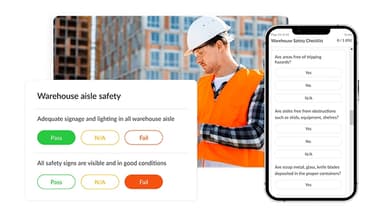
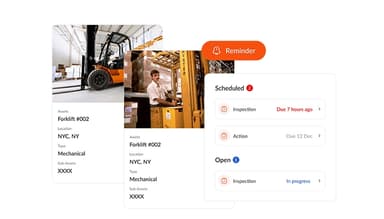
QByte.ai enables users to schedule and track safety inspections, ensuring no critical checks are missed. The real-time alerts for overdue inspections promote accountability and operational excellence. This systematic approach enhances safety compliance and streamlines preventive maintenance efforts.
Training
The platform offers AI-driven training modules with interactive quizzes and real-time feedback. This feature empowers maintenance teams to enhance their skills, minimize risks, and ensure adherence to top safety standards. Moreover, seamless integration into daily workflows boosts performance and knowledge retention.
Work Order Management
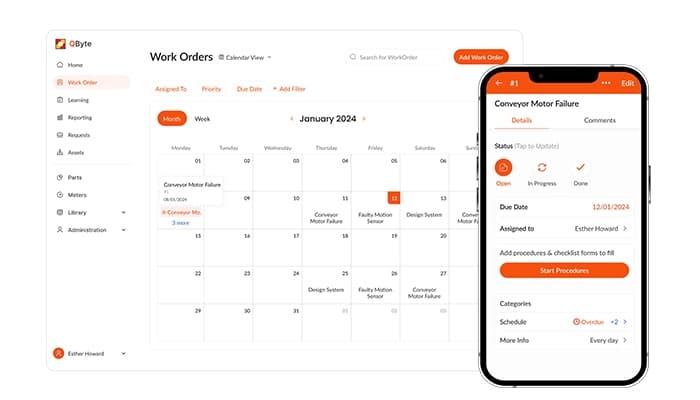
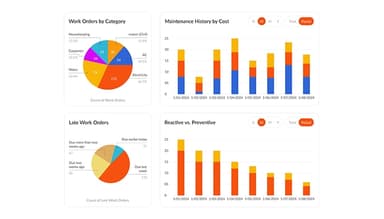
QByte.ai streamlines work order management by enabling easy creation, assignment, and tracking of tasks. This efficiency reduces downtime and enhances productivity. The AI assistant provides instant insights, charts, and data for operational leaders and frontline technicians, facilitating faster issue resolution.
Asset Management
This feature optimizes asset performance through real-time data insights. Users can monitor asset conditions using meter readings and access historical performance data via barcode or QR code scans. This proactive approach aids in early issue detection and informed planning.
AI-Driven Maintenance
The software leverages artificial intelligence to revolutionize maintenance operations. By providing AI-powered insights, the platform enhances productivity with preventive maintenance strategies and training. This innovative approach ensures efficient asset management and reduces the likelihood of unexpected failures.
Pros And Cons of QByte.ai
Pros
Easy to use and intuitive interface
AI-driven CoPilot answers questions instantly
Integrates smoothly with ERP systems, according to many software users
AI analytics generate custom graphs easily
Cross-device functionality (mobile, iPad, desktop)
Cons
May need occasional updates for specific workflows
Lacks some advanced features in reporting
Customization options for graphs may require additional configuration
QByte.ai Reviews
Total 10 reviews
4.7
All reviews are from verified customers
Rating Distribution
5
Stars70%
4
Stars30%
3
Stars0%
2
Stars0%
1
Stars0%
Share your experience
Education Management, 1-50 employees
“Finally, a maintenance platform that makes things easy”
Pros
QByte AI makes maintenance simple and stress-free. Their customer support is always super fast, helpful and honestly, just awesome. It connects with other tools like QuickBooks and Zapier, making everything more seamless. The AI CoPilot is a game changer. It answers questions instantly, so there is no need to search through manuals or watch tutorial videos. It helps my team track work, assets, purchase orders and vendors all in one place. No more messy spreadsheets, just smooth and smart management. My team and I use QByte every day, and it is actually fun and engaging. That is not something you would typically say about a maintenance management product but here we are.
Cons
It keeps getting better with every update. Some features take a little time to learn but their support team is always fast, responsive and genuinely invested in our success. They keep adding more integrations, and they recently rolled out ERP integration for us, which has been a huge help. The best part about QByte AI is that the team actually listens to feedback and fixes things quickly.
Rating Distribution
Ease of use
10
Value for money
10
Customer Support
10
Functionality
10
Information Technology and Services, 51-100 employees
“Perfect and efficient tool”
Pros
We recently started using QByte and I have to say it is way more efficient and easier to implement than other CMMS tools we have tried. It has everything we need, like preventive work orders, asset tracking, and reports. But what really blew me away is its AI learning capability. I have not seen that in any other CMMS. The AI analytics feature is another favorite. Instead of manually digging through data, I can ask AI about work orders, assets or parts and it gives me detailed reports, often with graphs that make everything easy to understand. Tracking costs for assets and work orders is also really simple. The user interface is super responsive, and I use it across mobile, iPad and desktop, all of which look clean and intuitive. I use it frequently because it meets our needs every time. Their support team has also been amazing. They are always there to help whenever I need anything.
Cons
Honestly, I have not found anything to dislike so far.
Rating Distribution
Ease of use
10
Value for money
10
Customer Support
10
Functionality
10
Information Technology and Services, 51-100 employees
“Easy maintenance and training, right at your fingertips”
Pros
One of the things I love about QByte is how it brings maintenance and training operations together on one platform. They have done it so well. Integrating it into our system was super smooth. We were able to import a massive amount of data effortlessly, which saved us so much time. Another thing that stands out is the passwordless OTP login. Everyone in my organization loves it because there is no need to remember passwords anymore. It covers everything from inventory management to work orders and we use it all the time. I am also really happy with their customer support. They have been great.
Cons
I have not had any issues using it, and neither has my team. It is really easy to use, and everyone can navigate through all the features without any trouble.
Rating Distribution
Ease of use
10
Value for money
10
Customer Support
10
Functionality
10
Frequently Asked Questions
Does QByte.ai offer an API?
Yes, QByte.ai provides an API access.
What language does QByte.ai support?
QByte.ai supports English.
What other apps does QByte.ai integrate with?
The software integrates with different apps, such as WhatsApp, Gmail, Outlook, Slack, etc. Schedule its free demo to learn about its integrations in detail.
Does QByte.ai have a mobile app?
Yes, QByte.ai has a mobile app.
What types of pricing plans does QByte.ai offer?
The QByte.ai price ranges in three plans: the Starter ($0), the Premium ($55/per user/month), and the Enterprise (a custom quote). Users can get a quote according to their needs.
Who are the typical users of QByte.ai?
The typical users of QByte.ai are those in the food and beverages, hospitality, property management, travel, logistics, and manufacturing industries.
What level of support does QByte.ai offer?
QByte.ai offers 24/7 support through options like chat and phone.