


Bit
Last Updated
Overview
Bit.ai is a cloud-based document and wiki collaboration platform supporting real-time co-editing, smart search, and knowledge management. Though it lacks a dedicated native mobile app, its extensive integrations and powerful visual editor make it an excellent tool for visual collaboration and boosting team productivity.
Bit Specifications
- Real-Time Communication
- File Sharing & Management
- Document Management
- Task & Project Management
What Is Bit?
Bit.ai is an intelligent, cloud-based platform for document collaboration, knowledge management, and content creation. It is designed to replace traditional, static documents by allowing users to create "living documents" or wikis that seamlessly integrate rich media, videos, code, and 100+ file types from external sources. By offering a clean, unified workspace for real-time editing and feedback, Bit.ai helps teams centralize information, streamline documentation workflows, and improve overall productivity and collaboration.
Bit Pricing
Bit pricing consists of the following plans:
- Free Plan: $0/user/month
- Pro Plan: $12/user/month
- Business Plan: $20/user/month
Disclaimer: The pricing is subject to change.
Bit Integrations
Bit integrates with a variety of software including:
- Google Drive
- Dropbox DocSend
- Trello software
- Figma
- Miro software
- YouTube
Who Is Bit For?
Bit is ideal for professionals in the following sectors:
- Large Companies
- SMBs
- Teams
- Startups
- Agencies
Is Bit Right For You?
Bit.ai is an excellent choice for teams looking for a modern platform that blends document creation with advanced knowledge management. Its strength lies in its ability to create visually rich, trackable documents, which is crucial for client-facing materials and internal documentation. The platform's use of AI and extensive integrations enhances productivity by automating content creation and centralizing data access. The robust security features, including role-based permissions, ensure that collaboration remains safe and controlled.
Still not sure about Bit? Contact our support team at (661) 384-7070 for further guidance.
Bit Features
Real-Time Team And Guest Collaboration
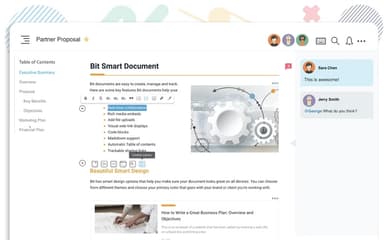
Bit features a collaborative document editor that enables multiple team members to work on the same file simultaneously. This capability, supported by inline comments, chat threads, and push notifications, keeps remote teams connected and highly productive.
AI Genius Assistant Writer
The platform integrates an AI genius writer and assistant to boost user productivity and content creation speed. The AI helps with drafting, outlines, research, and refining text, serving as a personal content co-creator to accelerate documentation workflows.
Centralized Knowledge Workspaces
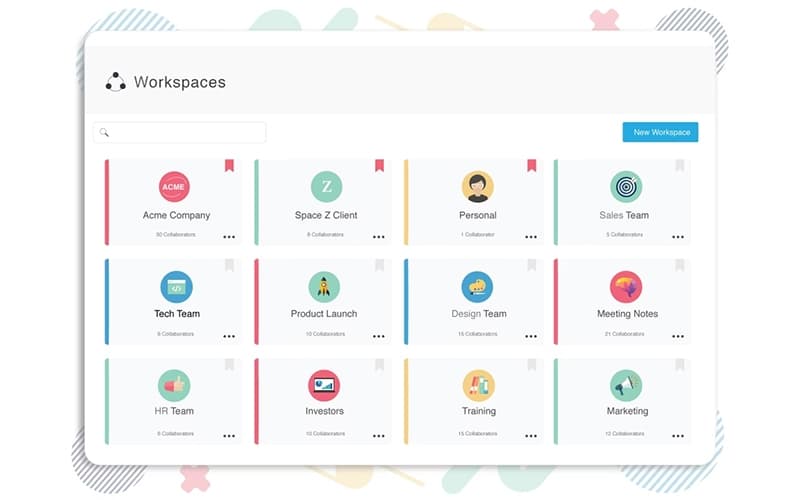
The platform uses unlimited, customizable workspaces and a structured folder hierarchy to centralize all organizational knowledge, documents, and digital assets in one location. This acts as a single source of truth, ensuring fast search times and easy access for all collaborators.
Advanced Document Tracking And Sharing
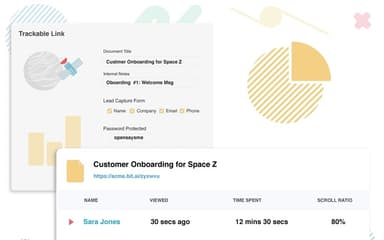
Documents can be shared intelligently using trackable links, password protection, and link expiration settings. This allows administrators to monitor engagement (time spent, views) and maintain security control, providing measurable insights into stakeholder engagement.
Pros And Cons of Bit
Pros
Easiest platform to create, manage, and share knowledge
AI Genius boosts writing, speed, and content creation
Real-time collaboration works seamlessly with team and guests
Cons
New releases sometimes prolong project timelines
Constant updates may reduce feature adaption
Bit Reviews
Total 4 reviews
5
All reviews are from verified customers
Rating Distribution
5
Stars100%
4
Stars0%
3
Stars0%
2
Stars0%
1
Stars0%
Share your experience
Non-Profit Organization Management, N/A employees
Less than 6 months
“Dynamic templates and flawless document syncing”
Pros
Bit.ai feels really simple to use. I can whip up new documents fast and sharing them is just as quick. The built-in template designs also make setting up projects much smoother since I'm not starting from scratch every time.
Cons
Having more font types would be a small upgrade worth adding. Other than that, there's nothing I'm unhappy with.
Rating Distribution
Ease of use
10
Value for money
10
Customer Support
10
Functionality
10
Non-Profit Organization Management, N/A employees
Less than 6 months
“trackable progress actually helps”
Pros
Built-in templates are a strong way to kick off just about any project fast. The feature that really stood out was how easy it is to use... especially when embedding digital assets and links like spreadsheets, Google Forms and website URLs. Editing the master document updates everything everywhere it's used, including the articles we embed on our WordPress site. Overall, it's been a really solid workflow boost.
Cons
The only real downside I ran into with Bit.ai is the formatting/design control. Right now, it doesn't let us change font styles to align with our organization's branding so we're a bit limited there.
Rating Distribution
Ease of use
10
Value for money
9
Customer Support
10
Functionality
8
E-Learning, N/A employees
Less than 6 months
“Timely chat support”
Pros
It's honestly surprising I didn't find it sooner. I originally created an account just for a competitor analysis template I could adapt for a course. I also didn't think much about collaboration tools at first since it's basically just me working, at the time I was perfectly happy keeping everything in Dropbox with layers and layers of subfolders for files, notes and recordings. After going through the 10-minute tutorial series, everything clicked. I set up a Workspace for the course and started using it to build checklists for what's already done, what still needs to be done and what has to be revisited. Even though the platform includes collaboration comments, I used that section as quick personal notes so I can track exactly what I need to tweak. The minimal editor is a real lifesaver and the embed feature is huge-I can drop in draft video versions, watch them right inside the document and jot down adjustments without jumping between tools. Overall, it's way easier to manage progress in one place, with clear notes on what I've completed, what needs redoing and what comes next. Compared to my previous Dropbox + MS Word setup (which turned into organized chaos with lots of nested folders), it keeps everything noticeably cleaner and more motivating.I'm still keeping Dropbox too since I'm a bit paranoid and want a backup but Bit has been a big productivity boost. I don't have to stare at folders and get overwhelmed or lose momentum just trying to find what I need.
Cons
No real downsides have shown up yet. It would be nice to have a mobile app so I can work on the go but that's not a dealbreaker for me.
Rating Distribution
Ease of use
10
Value for money
10
Customer Support
9
Functionality
9
Frequently Asked Questions
What language does Bit support?
Bit primarily operates in English.
Does Bit offer an API?
Bit offers an API documentation.
Does Bit have a mobile app?
Bit does not offer a native mobile app; however, the application is fully web-based and responsive, allowing collaboration via mobile browsers.
Who are the typical users of Bit?
Bit software is ideal for professionals in sectors such as large companies, SMBs, teams, startups, and agencies.
What types of pricing plans does Bit offer?
Bit pricing consists of the following plans: Free Plan at $0 per user/month, Pro Plan at $12 per user/month, and Business Plan at $20 per user/month. Contact us to get a Bit cost quote.
What level of support does Bit offer?
Bit offers email and in-app chat support across all plans, with priority support and a dedicated success manager available on the Business plan.
What other apps does Bit integrate with?
Bit integrates with a variety of software, including Google Drive, Dropbox, Trello, Figma, Miro, and YouTube.