


MindMeister
Last Updated
Overview
MindMeister transforms brainstorming into an interactive, structured experience. It helps create dynamic mind maps, collaborate in real-time, and streamline workflows with intuitive design and powerful integrations. Although the free version limits the number of maps, its seamless collaboration and customization options make it an essential tool for creative thinkers and teams.
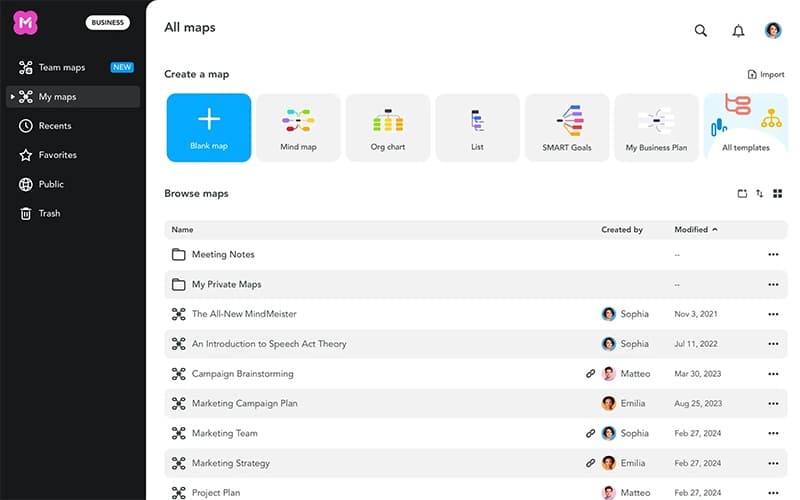
MindMeister Specifications
- Real-Time Communication
- File Sharing & Management
- Document Management
- Task & Project Management
MindMeister Features
Beautiful Themes
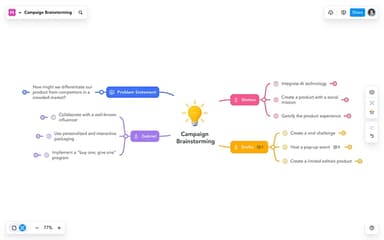
MindMeister offers expertly designed themes that enhance readability and comprehension by adding color and style to mind maps. These visually appealing layouts improve organization, making it easier to structure thoughts and ideas effectively within the software.
Tintable Images And Emojis
The platform allows customizable images to be tinted, adding visual depth to mind maps. An integrated emoji panel offers additional personalization, ensuring expressive elements can be incorporated seamlessly into brainstorming sessions and structured diagrams.
Expandable Notes
MindMeister software enables additional context to be added through expandable notes, providing extra space to elaborate on ideas. This feature ensures detailed documentation is easily accessible while maintaining a clean and structured mind map layout.
Brainstorm Mode
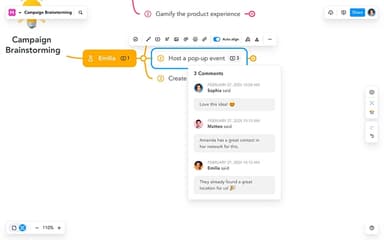
The solution facilitates collaborative brainstorming sessions where multiple participants can contribute ideas dynamically. Comments and reactions help refine concepts, allowing for creativity while structuring thoughts effectively within a shared digital workspace.
Roles And Permissions
MindMeister offers granular control over user access settings, enabling permissions to be defined for individuals and groups. Specific roles can be assigned, determining who can view, edit, or manage mind maps within the platform's collaborative environment.
Pros And Cons of MindMeister
Pros
User-friendly interface with an attractive design
Easy to use and quick to create mind maps
Supports integrations and conversion options
Helps in brainstorming and organizing ideas effectively
Automatically adjusts space for new items
Cons
Lacks a presentation mode
The free version is limited to three mind maps
Limited customization for item and subitem design
MindMeister Reviews
Total 14 reviews
4.3
All reviews are from verified customers
Rating Distribution
5
Stars64%
4
Stars14%
3
Stars14%
2
Stars0%
1
Stars7%
Share your experience
Marketing and Advertising, 1-10 employees
More than a year
“Solid mind mapping tool”
Pros
The website has never gone down and it's pretty quick and easy to get ideas out of my head and onto a mind map.
Cons
Compared to tools like X Mind, It doesn't have many map layouts like timeline or fishbone. Also they try to get you to use their task management tool, Meistertask but it feels like a issue. It's kind of annoying to have to use two separate tools, one for mind maps and one for tasks when other companies have a single product that handles both.
Rating Distribution
Ease of use
8
Value for money
7
Customer Support
7
Functionality
7
Health, Wellness and Fitness, 11-50 employees
More than a year
“Disappointing customer service”
Pros
It's decent for mind mapping and organizing new ideas and projects.
Cons
I had a really disappointing experience with It and I hope this helps save others from wasting their time and money. My company has been using MindMeister since March 2021, spending over USD2,200. Then, on April 19, 2024 I got an email saying they charged USD419 for a 6-month renewal for 4 users. Just a minute later I got another email offering a discount if I switched to a 12-month plan. I told them that my team wasn't using the tool except for me and asked for a refund for the 3 extra licenses. They said no and mentioned their 'fine print' in the terms & conditions which felt unfair. It's frustrating when companies prioritize the fine print over loyal customers. I'll be looking at alternatives that actually care about their users.
Rating Distribution
Ease of use
3
Value for money
1
Customer Support
3
Functionality
4
Entertainment, 1-10 employees
Free Trial
“My experience with Mindmeister”
Pros
We use It for collaborative project reviews. I love that it already has tabs for different options like "what could we improve" and "what could we learn," so we can collect both positive and negative feedback. This is helpful because project overviews can be hard when they're either all positive or all negative.
Cons
I really wish I could export to a database which I know is possible with a paid account. But honestly it feels like too many clicks just to get there.
Rating Distribution
Ease of use
6
Value for money
5
Customer Support
7
Functionality
6
Frequently Asked Questions
MindMeister offer an API?
MindMeister offers API access.
Does MindMeister have a mobile app?
MindMeister offers dedicated mobile apps for iOS and Android devices.
What level of support does MindMeister offer?
MindMeister provides various support options, including email help desk, phone support, live 24/7 assistance, chat, FAQs, a knowledge base, and a community forum to address user inquiries and technical needs.
What types of pricing plans does MindMeister offer?
The MindMeister cost structure follows a subscription-based model with four plans: Free ($0), Personal ($7.50/user/month), Pro ($12.50/user/month), and Business ($19/user/month). A MindMeister price analysis quote is available for users seeking customized options.
What language does MindMeister support?
MindMeister supports multiple languages, including Spanish, German, French, Italian, Portuguese, Russian, Japanese, Korean, and English, ensuring accessibility for a diverse global audience.
What other apps does MindMeister integrate with?
MindMeister provides powerful integrations with MeisterTask, Microsoft Teams, Google Workspace, and PayPal for seamless workflow management and collaboration.
Who are the typical users of MindMeister?
MindMeister benefits businesses and professionals across various fields, including software and IT, marketing, consulting, human resources, education, and student learning.