


Rise Vision
Last Updated
Key Takeaways
Generated from the text of customer reviews
Rise Vision is a cloud-based digital signage platform used to create, schedule, and remotely manage content on screens. Users consistently praise its template library and Canva integration, though a few note lags on graphics-heavy slides over wireless connections. Recently, Rise Vision added an AI presentation design tool that converts text prompts into animated slide options.
Our Verdict
Rise Vision is designed for schools and organizations needing simple, template-driven signage with built-in emergency alert capabilities. Since pricing is charged per building or school, costs scale fast for districts or chains managing several sites. We recommend Rise Vision for K-12 schools, healthcare facilities, and multi-location businesses who want to design, schedule, and manage content across multiple displays and locations.
Be the first one to leave a review!
No review found

Starting Price
$11
per display per month
Rise Vision Specifications
- Calendar & Scheduling
- Integration With Other Tools
- Automation & Workflow
- Mobile Accessibility
What Is Rise Vision?
Rise Vision is a cloud-based digital signage content management system (CMS) that allows organizations to remotely design, schedule, and broadcast visual content across multiple electronic displays or TVs. With this software, an organization can centrally control one screen or hundreds of screens across locations.
Typical content includes announcements, promotional messages, images, videos, slides, web pages, and social or news-style content, and many more. This product is commonly used in K–12 schools, but it is also relevant to offices, healthcare facilities, retail locations, places of worship, manufacturing sites, and multi-location businesses. Its value is strongest where nontechnical teams need to keep distributed screens current without relying on IT for every content update.
What Is Rise Vision Best For?
One of the standout features of Rise Vision is its automated emergency alerts with CAP integration. The platform connects with Common Alerting Protocol (CAP) services and national weather warning systems to distribute emergency messages across connected displays. When a critical situation occurs, such as severe weather, an active threat, or fire drill, Rise Vision can override existing content and display emergency instructions without requiring an administrator to update each screen manually. This is particularly useful for schools, campuses, and corporate environments where administrators need to communicate urgent safety information across multiple displays quickly.
How Much Does Rise Vision Cost?
Rise Vision pricing starts at $11/display/month under the Basic plan for K-12 sector. The vendor also offers a 14-day free digital signage software trial. Pricing varies by sector:
K-12:
- Advanced – Starting at $138/display/year
- Enterprise – Starting at $164/display/year or $1,399/school/year (unlimited displays)
Higher Education & Non-Profit:
- Basic - Starting at $11/display/month
- Advanced - Starting at $138/display/year
- Enterprise - Starting at $164/display/year
Business, Government & Other:
- Basic – Starting at $12/display/month
- Advanced - Starting at $156/display/year
- Enterprise - Starting at $180/display/year
The pricing above covers software cost only. Organizations should also budget for the following hardware and setup costs:
- Display Screen: $500-$2,000 for a commercial or consumer-grade display
- Media Player: $25-$700 depending on device type (Fire OS, Chrome OS, Windows, Android)
- Cabling And Mounts: Around $13 for HDMI cabling, plus $50-$200+ for mounting hardware
- Provisioning: $250-$350/display if outsourced to IT staff
For a complete first-time setup, total cost typically ranges from $680 to $3,400+ per screen, depending on hardware choices. Rise Vision's Hardware as a Service option can convert these upfront costs into predictable monthly payments instead.
Reviewers generally describe Rise Vision's pricing as fair and competitive, especially compared to competitors offering similar features at higher costs. Some users note per-building or per-school licensing adds up for multi-location deployments, and a few mention premium features that were once standard now require a plan upgrade.
Disclaimer: The pricing is subject to change.
Rise Vision Integrations
The vendor integrates with multiple content, data, and communication tools, including:
- Microsoft Power BI
- Microsoft 365 software
- Google Workspace software
- Canva
- Google Calendar
- YouTube
How Does Rise Vision Work?
Here's how you can access the platform and start using its features:
- Log in to your Rise Vision account after setup
- Choose your hardware, use recommended Avocor displays or media players, or bring your own
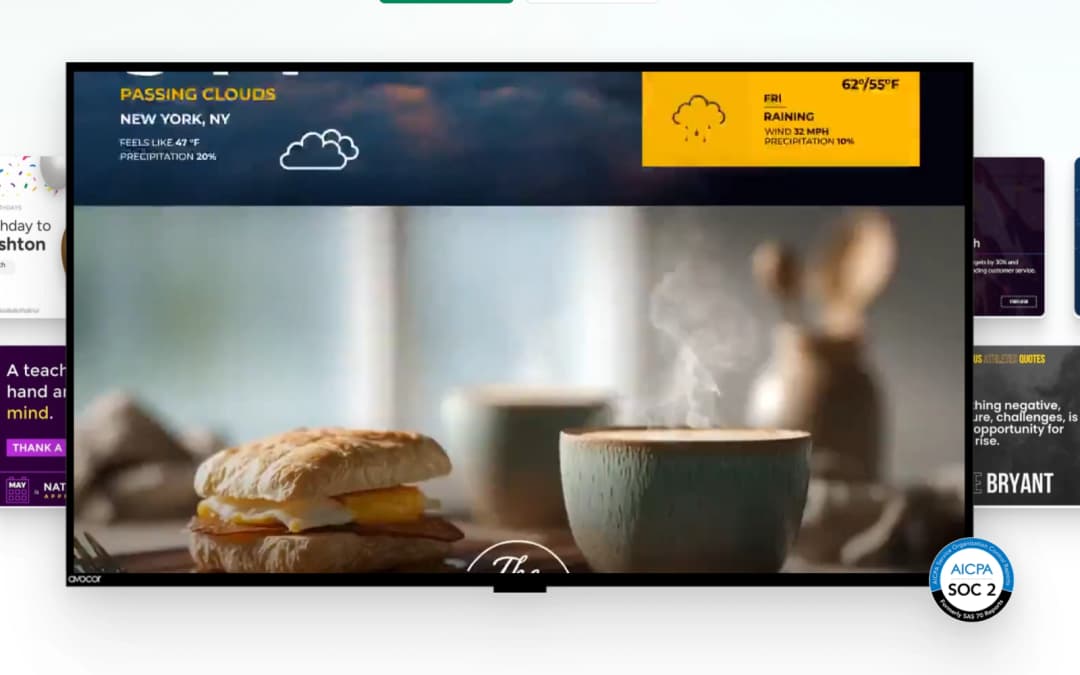
- Build content using 750+ templates or the AI presentation design and editing tool
- Pull in live data through integrations like Power BI, Canva, and Google Workspace
- Push content to your displays and manage everything remotely across locations
- Set up screen sharing across devices, no adapters or dongles required
- Connect emergency alert systems like Raptor, CrisisGo, or Singlewire for automated notifications
- Complete onboarding through personalized or self-guided training and in-app resources
Who Is Rise Vision For?
It serves organizations across a range of industries and sectors, including:
- K-12 education
- Higher education
- Manufacturing
- Transportation and logistics
- Government
- Healthcare
- Financial services
Rise Vision Use Cases
Based on our analysis of Rise Vision features and platform capabilities, we have identified key scenarios where this software is a strong fit for:
Classroom Overrides For Instant Lockdowns
During severe weather or an active security threat, schools rely on vocal PA announcements or manual sirens. In a loud classroom or a high-stress environment, critical words can be misheard or completely missed. But what the software does is that it automatically hijacks the screen feed to display clear, color-coded, visual evacuation routes or lockdown directions onto the screen, overriding whatever a teacher or presenter is currently casting.
Automated Daily Cafeteria Menu Scheduling
School and corporate cafeterias change their food offerings multiple times a day to transition between breakfast, lunch, and afternoon snacks. Traditionally, staff had to manually swap out physical letterboards, print new paper signs, or log into digital displays at exact times to update these items. Because kitchen staff are busy preparing food during peak rush hours, these updates are frequently delayed or forgotten. Rise Vision allows staff to use batch content creation and automated dayparting scheduling. Kitchen staff can upload the monthly menu once. The software is programmed to automatically show the breakfast menu from 7:00 AM to 9:00 AM, switch entirely to the lunch menu at 11:00 AM, and clear out automatically for afternoon announcements.
Real-Time Factory Floor KPI Dashboard Streaming
Industrial manufacturing plants rely on strict, hour-by-hour production quotas and safety regulations to remain profitable and safe. However, floor workers do not operate from desks, meaning they have zero access to corporate emails, Slack channels, or company intranets. If production drops or a safety hazard occurs, the workers on the line have no way of knowing until the shift is already over. The software links directly to live data spreadsheets and displays them on overhead monitors. It streams production metrics straight to deskless workers, closing the information gap without forcing them to check emails.
Guest Wayfinding And Interactive Donor Recognition
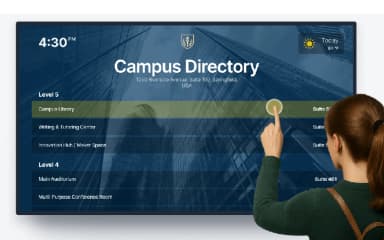
Visitors usually get lost in large facility lobbies (like those in universities, hospitals, and corporate headquarters) because there are no clear maps. They constantly crowd the front desk to ask for directions, which stops receptionist staff from doing their actual work. In fact, some schools and hospitals use permanent engraved wooden boards or brass plates on walls to show the names of people who donated money. The problem with these physical boards is that they run out of physical wall space and cannot be easily updated when new people donate money. The software turns a lobby TV into an interactive tablet map, so visitors can find rooms themselves. This stops people from crowding the front desk and lets you display unlimited donor names on a single screen.
Is Rise Vision Right For You?
Rise Vision is best suited for educational institutions and corporate offices requiring simple, template-driven digital signage with integrated emergency alerts. It works best if you want simple content updates, wireless classroom screen-casting, and compatibility with hardware you already own.
Moreover, the software architecture is audited to meet SOC 2 Type II compliance standards for data security, with full HTTPS/TLS encryption for all communication between the cloud and media players. This guarantees compliance with corporate and institutional IT audits. Your IT director can confidently approve the software purchase knowing that third-party data auditors have verified that Rise Vision safely handles data, reducing the risk of a network breach or data leak.
Still not sure if Rise Vision software is the right choice for you? Contact us at (661) 384-7070, and our team will help you decide based on your requirements.
Rise Vision Features
Digital Signage
This one is a content management system. It provides over 750 customizable templates, an integrated media editor, and more than 40 native integrations with platforms like Google Workspace, Microsoft 365, Canva, and social media. HR personnel and marketing teams can schedule content playlists, organize layouts, and manage thousands of displays from a single dashboard. It saves them hours of graphic design time by allowing them to quickly deploy professional, auto-updating content.
Screen Sharing
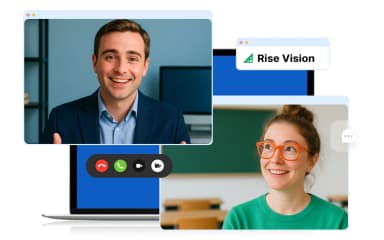
It contains wireless presentation capabilities that allow users to instantly broadcast their personal laptop, tablet, or phone screens to a central room for display. That completely bypasses the need for physical HDMI adapters, dongles, or proprietary streaming cords. Presenters can seamlessly transition between speakers and walk freely around a classroom or boardroom while continuously controlling and casting their presentation.
Emergency Alerts
The software has automated integration with common alerting protocol (CAP) networks and campus safety systems. It features full-screen media overrides and localized targeting to hijack any active display to broadcast real-time safety protocols or weather updates. It gives school superintendents or operations managers an automated, zero-delay visual siren that ensures critical safety instructions reach building occupants instantly during high-stress crises.
Interactive Displays
This capability provides touch-screen support for interactive digital signage. It accommodates interactive maps, button-triggered media menus, student/employee recognition profiles, and tactile menus. This is beneficial for visitors or new employees as it makes building navigation and wayfinding effortless through touchscreen directories and simplifies self-service interaction like checking in or browsing community boards.
Hardware Support
The software is compatible with any existing operating system (including ChromeOS, Windows, Raspberry Pi, and Linux) combined with official partnerships for commercial-grade Avocor smart displays and plug-and-play media players. It protects fixed institutional budgets by letting organizations reuse their current infrastructure (like old TVs or spare media boxes) rather than forcing them to purchase expensive, proprietary monitors.
AI Presentation Design And Editing Tool
This feature converts simple text prompts into three distinct presentation options in seconds. It builds fully animated, moving slides optimized for large display layouts rather than flat images. The built-in editing suite opens presentations directly in the native editor to change text, backgrounds, and layouts. It also allows instant tone and style modification to match company branding guidelines. Because of those non-designers, school secretaries and HR assistants can launch professional digital content without graphic design skills.
Pros And Cons of Rise Vision
Pros
Provides a large library of pre-made templates saves setup time
The platform’s web-based platform allows updates from anywhere
Users praise its fast, responsive customer support turnaround
Cons
A few users note lag on graphics-heavy slides over wireless connections
Offers very limited ability to fully customize templates
Rise Vision Pricing
K-12 | Higher Education & Non-Profit | Business, Government, & Other |
|---|---|---|
$11 per display per month | $11 per display per month | $12 per display per month |
|
|
|
Disclaimer: The pricing details were last updated on Sep 25, 2026 from the vendor's website. Please contact us for a tailored pricing list.
Rise Vision Reviews

No reviews yet!
Be the first to review this product
Frequently Asked Questions
What level of support does Rise Vision offer?
The vendor offers support through phone and online channels.
Who are the typical users of Rise Vision?
Typical users of Rise Vision include K-12 education, higher education, manufacturing, transportation and logistics, government, and healthcare organizations.
What types of pricing plans does Rise Vision offer?
Rise Vision price starts at $11/display/month for the Basic K-12 plan. Pricing varies by sector and plan, with Advanced starting at $138/display/year and Enterprise at $164/display/year. Business plans start at $12/display/month, while a 14-day free trial is also available. Contact us for a custom Rise Vision price quote.
Does Rise Vision have a mobile app?
Yes, Rise Vision offers a mobile app for both Android and iOS.
Does Rise Vision offer an API?
No, the software offers a API.
What other apps does Rise Vision integrate with?
Rise Vision platform integrates with Microsoft Power BI, Microsoft 365, Google Workspace, Canva, Google Calendar, and YouTube.
What language does Rise Vision support?
Rise Vision primarily supports the English language.