


Last Updated
Overview
SnapCall facilitates visual customer support through one-click video and photo capture, enabling faster issue resolution without app downloads. While the absence of an offline mode might limit operations during outages, its intuitive interface ensures quick adoption. Ultimately, it provides clarity that text-based support often lacks.
Be the first one to leave a review!
No review found

Starting Price
Custom
SnapCall Specifications
- Real-Time Communication
- Integration with Other Tools
- Automation & Workflow
- Mobile Accessibility
What Is SnapCall?
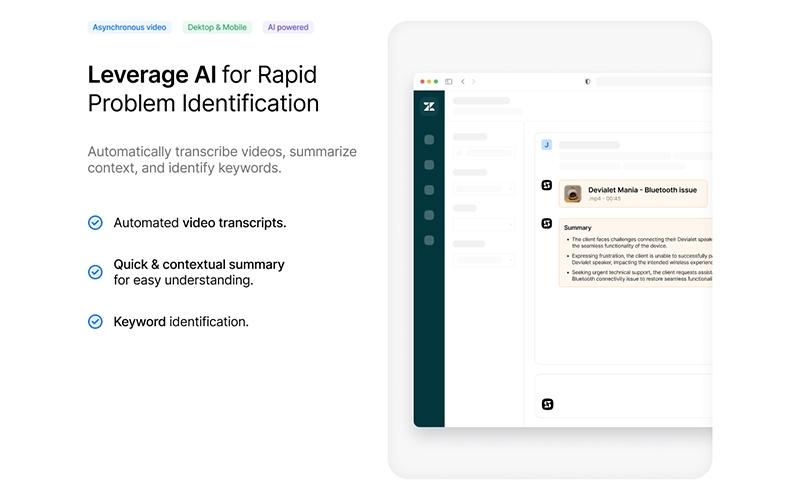
SnapCall is a Visual Support platform designed to streamline customer service interactions through instant media capture and AI analysis. It allows agents to initiate voice and video connections directly from their existing workflows, eliminating the need for external downloads. By utilizing features like photo capture and AI-driven video summaries, businesses can significantly reduce ticket resolution times. This solution is scalable for various enterprise sizes, addressing the pain point of lengthy, text-based troubleshooting by providing immediate visual context.
SnapCall Pricing
Disclaimer: The pricing has been sourced from third-party websites and is subject to change.
SnapCall Integrations
The software supports integration with multiple platforms, such as:
- Zendesk
- Slack
- ServiceNow
- Intercom
- Salesforce
- Kustomer software
Who Is SnapCall For?
SnapCall is ideal for a range of industries, including:
- Healthcare
- Retail
- Automotive
- Telecommunications
- Manufacturing
Is SnapCall Right For You?
SnapCall is an excellent choice for businesses aiming to modernize their support infrastructure with visual context. Its standout ability to significantly reduce ticket resolution time makes it a powerful tool for efficiency-focused organizations. The software is particularly well-suited for the retail and warranty sectors, where visual proof is essential. With robust security measures, including GDPR compliance and encryption, SnapCall offers a compelling solution for companies seeking to elevate customer satisfaction through direct digital interaction.
Still not sure about SnapCall? Contact our support team at (661) 384-7070 for further guidance.
SnapCall Features
Photo Capture
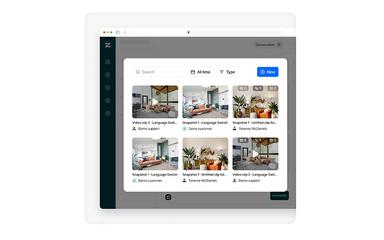
This feature enables customers to instantly take photos of issues through a user-friendly interface without requiring any downloads. The captured images are automatically transferred to the support team and attached to the ticket, streamlining the visual verification process for agents.
Video Recording
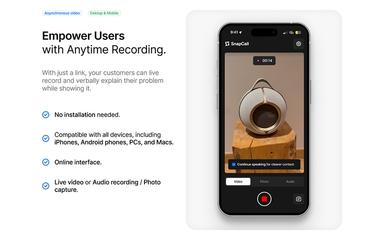
The software supports easy video recording, allowing users to verbally explain and show their problems simultaneously for better clarity. It provides agents with comprehensive context, making it easier to understand complex issues compared to text-based descriptions, thus speeding up resolution.
Audio Call
SnapCall permits agents to initiate high-quality audio calls directly within the chat widget or support platform interface. It eliminates the need for phone numbers or external equipment, providing a seamless digital voice communication channel for immediate customer assistance.
Video Call
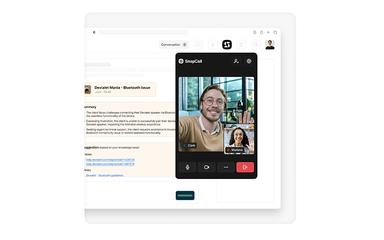
The system facilitates face-to-face video interactions between agents and customers with a single click to build stronger trust. This visual connection helps build trust and allows agents to guide customers through physical tasks or troubleshooting steps in real-time, enhancing the overall support experience.
Screen Video Capture
SnapCall enables users to share their entire screen or specific windows during a support interaction to show errors. This capability allows agents to see exactly what the customer sees on their device, which is crucial for diagnosing software issues or guiding navigation.
Pros And Cons of SnapCall
Pros
Supports seamless CRM integration capabilities
Offers a robust and user-friendly interface design
Comes with effective visual data collection
Cons
Its customization options could be expanded
Lacks advanced analytics tools
SnapCall Reviews

No reviews yet!
Be the first to review this product
Frequently Asked Questions
What types of pricing plans does SnapCall offer?
The SnapCall price starts at $20/user/month, as per third-party sources. Request a personalized SnapCall pricing quote for your business.
What other apps does SnapCall integrate with?
SnapCall software integrates with various third-party platforms, including Slack, Zendesk, Intercom, ServiceNow, Outlook, and Salesforce.
What level of support does SnapCall offer?
SnapCall provides support through chat, training sessions, a shared Slack channel, form submission, and a help center.
Does SnapCall have a mobile app?
No, SnapCall does not offer a standalone mobile app, but it is web-based and optimized for mobile browsers without requiring downloads.
What language does SnapCall support?
SnapCall is primarily available in English; however, its tools support multiple languages, including Spanish and French , for video summarization.
Does SnapCall offer an API?
Yes, SnapCall offers an API.
Who are the typical users of SnapCall?
The typical users of SnapCall features come from different industries, such as healthcare, retail, automotive, telecommunications, and manufacturing.