
Add to Compare

Add to Compare

Add to Compare

Compare ModMed EMR vs Updox

Overall Rating

Ease of Use

8

0

Customer Support

8

0

Value for Money

8

0

Functionality

8

0

Specifications

Appointment Management/Scheduling
Billing and Invoicing
Claims Management
Customizable Forms
e-Prescriptions
Lab Integration
Mobile App
Patient Demographics
Patient Portal
Telemedicine

Pros and Cons

Pros

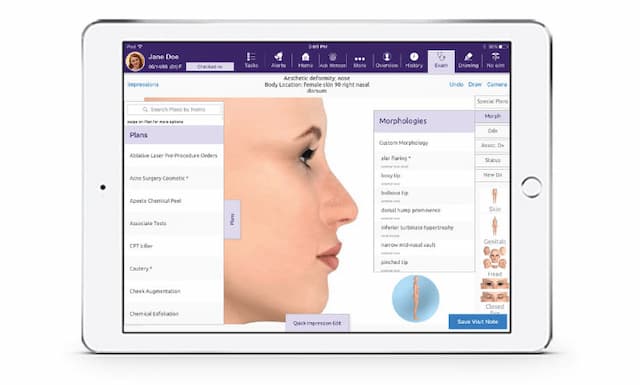
ModMed EMR may be a strong fit if you: Run a specialty practice Are a busy clinician or medical staff member who needs excellent process automation in more focused, custom clinical settings Want a cost-effective software solution backed by reliable customer support Need a HIPAA-compliant, ONC-certified EMR with secure cloud hosting ModMed’s platform is built by practicing physicians and tightly tailored for multiple clinical disciplines. The software also meets rigorous compliance standards through ONC 2015 Edition Cures Act Certification and HIPAA-aligned security controls. It supports specialties including allergy, dermatology, gastroenterology, OBGYN, ophthalmology, orthopedics, otolaryngology (ENT), pain management, plastic surgery, podiatry, and urology. Some key strengths: Adaptive and Specialty-Specific Design - EMA and gGastro are built to adapt to individual physician workflows (charts, treatments, exam flow) rather than force you into templates. Cloud-Based and Mobile Accessibility - You can use the system on devices like iPad, desktop or mobile browsers; features like PocketEMA offer flexibility to access patient histories, schedules, notes etc. Its cloud infrastructure is built to scale across single locations and multi-site specialty groups. Efficient Documentation and Coding Support - The system suggests ICD-10, CPT, and modifier codes based on exam content, and incorporates built-in diagnoses/procedures for practices across multiple specialties. Patient and Staff Engagement Tools - Includes features like patient portals, kiosks, secure messaging, appointment reminders, self-scheduling, and image and drawing tools (for example, in ENT or dermatology) to facilitate better care coordination.

Uses artificial intelligence to help with diagnosis and treatment strategies

Rapid access to patient info with hyperlinks saves time

Specialty-specific design with tap-to-annotate dermatology images and built-in templates

Metrics-driven reports for informed decision-making

Quick and reliable electronic fax retrieval

Excellent for online consultation and patient reminders

Provides unlimited cloud storage and flexible functionality


Cons

The patient portal feature may not work well on mobile devices

Reports of software crashes disrupting access to patient data

Patient reminders are sometimes redundant or problematic for some users

Text message delivery can be sometimes unreliable

Secure texting setup can be confusing for some patients
Pricing