



Last Updated
Overview
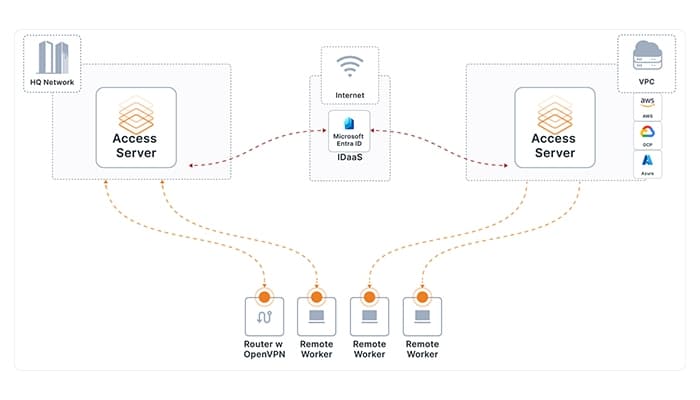
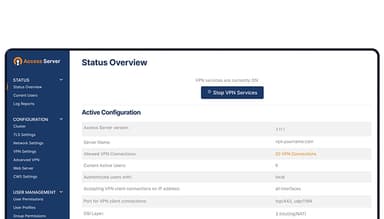
Access Server software provides secure remote access to internal networks, making it easier for teams to connect from anywhere. While its setup might require technical knowledge, it excels in reliability and security. Moreover, many users find its robust features worth the initial learning effort for enhanced remote connectivity.
Access Server Specifications
- Access Controls/Server
- Firewall Protection
- Anti-Virus and Anti-Malware
- Data Encryption
Access Server Features
Secure Remote Access
Access Server ensures encrypted remote connections to internal networks. Users can protect data in transit from unauthorized access. This feature benefits organizations by enabling employees to securely access critical resources from anywhere. Som, maintain quick access while safeguarding sensitive information.
Secure IoT Communications
The solution secures communication between IoT devices and networks, encrypting data and preventing unauthorized access. This enhances the security of connected devices and protects them from cyber threats. Access Server also ensures reliable, secure data exchange within IoT ecosystems.
Site-to-Site Networking
Creating a unified, encrypted network as this feature provides secure site-to-site connections between multiple office locations. It benefits organizations by simplifying data sharing across sites and enhancing collaboration while maintaining network security and integrity.
Enforcing Zero Trust Access
Access Server enforces a zero-trust security model that enables the verification of every connection attempt before granting access. This approach minimizes risks because only authenticated and authorized users can access network resources.
Cyber Threat Protection and Content Filtering
Users can enable cyber threat protection and content filtering, which helps block malicious content and restrict access to harmful websites. In this way, Access Server helps organizations safeguard their networks from threats by reducing the risk of cyberattacks.
Pros And Cons of Access Server
Pros
Easy to navigate on any device and operating system
Excellent speed, even for daily use
Highly intuitive to launch a new virtual private network
Strong encryption options
Cons
Slight learning curve for average users
Configuration can be a bit complex initially
Some improvements might be helpful in the server management interface, as per some users
Access Server Reviews
Total 17 reviews
4.8
All reviews are from verified customers
Rating Distribution
5
Stars76%
4
Stars24%
3
Stars0%
2
Stars0%
1
Stars0%
Share your experience
Outsourcing/Offshoring, 500+ employees
Less than 6 months
“Secure Browsing”
Pros
It is very easy to use ensuring secure browsing.
Cons
After 6 months of use have not found anything I dislike about this VPN.
Rating Distribution
Ease of use
10
Value for money
10
Customer Support
10
Functionality
10
Machinery, 11-50 employees
Less than 6 months
“Works great as von access”
Pros
We use this at my manufacturing job to monitor cameras aimed at machines so we can see when they finish even when we're not at the shop.
Cons
Have not seen any cons so far. It works great for what we need.
Rating Distribution
Ease of use
10
Value for money
8
Customer Support
9
Functionality
9
Pharmaceuticals, 101-500 employees
More than a year
“OVPN Access Server, your go-to network protection ensurance”
Pros
What I really like about OVPN Access Server is how easy it is to use and that even people with no tech experience can set it up and use the software.
Cons
The initial setup can be a bit challenging but that is fine because it helps create an effective environment and protects against unknown threats from the start.
Rating Distribution
Ease of use
10
Value for money
10
Customer Support
10
Functionality
10
Frequently Asked Questions
Does Access Server offer an API?
The vendor site does not indicate whether it offers API.
What language does Access Server support?
Access Server supports the English language only.
What other apps does Access Server integrate with?
Access Server supports Google Authenticator, Microsoft Access Directory, Oracle Identity Management, etc.
Does Access Server support mobile devices?
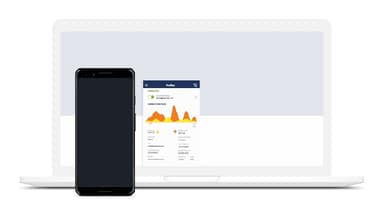
Yes, Access Server supports Android and iOS devices.
What types of pricing plans does Access Server offer?
Besides a free plan, the range of Access Server cost starts from $14/month. Users can get a custom quote for their businesses.
Who are the typical users of Access Server?
The typical users of Access Server are oil and energy, textiles, financial services, IT, and any such business that is looking for a secure and remote virtual network accessibility.
What level of support does Access Server offer?
Access Server offers email, FAQs, chat, Knowledge Base, and phone support.