


Last Updated
Key Takeaways
Generated from the text of customer reviews
Our Verdict
Overall Rating
Based on 36 users reviews
4.7
Rating Distribution
Positive
100%
Neutral
0%
Negative
0%
Starting Price
$7
per user per month
Cloudflare Specifications
- Security Measure
- Firewall Protection
- Data Encryption
- Threat Intelligence
Cloudflare Features
Rate Limiting
Cloudflare Rate Limiting lets businesses set granular thresholds for requests to their applications and automatically block or log clients that go over those limits. This occurs at Cloudflare's edge in 335+ cities, blocking excessive traffic before it reaches the origin server, so protecting login pages from brute-force attacks and keeping API fees under control.
SSL/TLS Cryptography
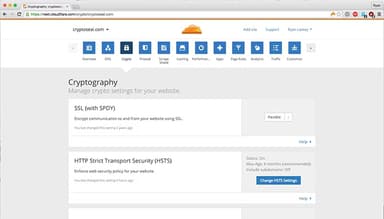
With automatic certificate issuance and renewal, businesses may implement free SSL/TLS certificates in less than five minutes, eliminating the need for manual certificate management. This encrypts data exchanged between users and servers, protecting sensitive information from on-path assaults and assisting businesses in meeting compliance standards such as PCI-DSS.
Turnstile
Cloudflare features ‘Turnstile’ that substitutes traditional CAPTCHAs with a simple, free code snippet that authenticates visitors' identities without forcing them to complete riddles. Turnstile validates users transparently in the background and never gathers data for ad retargeting, allowing businesses to block bots while maintaining a seamless experience and visitor privacy.
Web Application Firewalls (WAF)
Cloudflare's WAF examines incoming web and API requests against controlled rule sets to prevent SQL injection, cross-site scripting, and zero-day exploits. Businesses may also create custom rules using Cloudflare's Rules language, and updates propagate globally in seconds, providing teams with quick, flexible protection without the need to install anything on-premises.
Magic Transit
Magic Transit delivers Layer 3 and 4 DDoS protection to networks without the need for additional hardware, leveraging Cloudflare's global network to absorb and filter attacks near to their source. Malicious traffic is often recognized and blocked within three seconds, allowing enterprises to replace costly scrubbing infrastructure with network operations offered and invoiced as a service.
Pros And Cons of Cloudflare
Pros
The interface is easy to navigate and simple to use
Free tools are available for businesses to add directly to their website
The platform has a strong track record of keeping customers long-term
Cons
Some glitches can take a while to get resolved
The analytics tools could use further development
Cloudflare Pricing
Network and CDN Free | Pro | Business | Contract | SASE/Zero Trust Free | Pay-as-you-go | SASE/Zero Trust Contract |
|---|---|---|---|---|---|---|
$0 | $25 per month | $250 per month | Custom pricing | $0 | $7 per user per month | Custom pricing |
|
|
|
|
|
|
|
Disclaimer: The pricing details were last updated on Sep 07, 2026 from the vendor's website. Please contact us for a tailored pricing list.
Cloudflare Reviews
Total 36 reviews
4.7
All reviews are from verified customers
Rating Distribution
5
Stars72%
4
Stars28%
3
Stars0%
2
Stars0%
1
Stars0%
Share your experience
Henk
Small Business, 11-50 employees
“Lots of customization options”
Pros
There are tons of customization options which I really appreciate and I'm able to fine-tune everything through an interface that feels user-friendly. It gives me solid control over who can access my website, what they're allowed to view and even when they can access it, without making the whole process feel overly complicated or hard to manage.
Cons
Certain tasks can feel a little more involved when they're not things I do regularly. For instance, if I need to block an IP and route that visitor to a specific page or a custom 404 page, there's definitely a bit of a learning curve. In those situations, I usually end up watching a tutorial. Aside from that, the platform is pretty user-friendly.
Rating Distribution
Ease of use
9
Value for money
9
Customer Support
9
Functionality
9
UTKARSH S.
Small Business, 11-50 employees
“Useful for threat monitoring”
Pros
Their WAF is excellent and much simpler to set up than I expected. One thing I really appreciate is how quickly we can roll out custom rules whenever a new vulnerability appears or when unusual traffic patterns start showing up. The real-time visibility is extremely useful for threat monitoring and forwarding those security events into our SIEM for deeper correlation is a fairly seamless workflow. It also takes care of DDoS mitigation automatically which adds a lot of peace of mind. The biggest problem it solves is stopping huge amounts of bot traffic, basic vulnerability scans and volumetric attacks directly at the edge. From a SOC standpoint, that is a huge win because it cuts down the noise we need to ingest and analyze downstream in the SIEM. By blocking all that junk traffic before it ever reaches our environment, it helps reduce bandwidth costs and keeps us from wasting time chasing thousands of meaningless alerts. It really works as a strong first layer of defense so we can spend more time focusing on legitimate, advanced threats.
Cons
The biggest frustration is log retention and exporting. Getting detailed, real-time logs into a SIEM can feel more limited and more expensive than it should be unless you are paying for the higher enterprise tiers. On top of that, while the managed rulesets are generally reliable, reducing false positives can sometimes mean building fairly complex regex-based exceptions so legitimate API traffic does not get blocked by mistake. Support can also be a bit slow to respond unless you are a very large enterprise customer.
Rating Distribution
Ease of use
10
Value for money
9
Customer Support
9
Functionality
8
MATOVU C.
Small Business, 1-10 employees
“Great choice for application security and performance”
Pros
It has been a solid choice for application security and performance, especially because it includes a lot of free features that other platforms usually put behind a paid plan. Its global edge network makes a noticeable difference, letting my customers reach the website very quickly with almost no delay which is a major advantage. The caching also helps improve site speed for users. Another thing I appreciate is the dashboard which gives me one place to handle security and view insights instead of jumping across multiple tabs. The setup process was simple and simple, with clear guidance that made getting started hassle-free. I use it to protect my website from malicious activity, boost performance and manage security settings and bot access without much effort.
Cons
Customer support is difficult to reach if you are not an enterprise user. The dashboard could also be improved because the platform has grown so much that important features can get buried under service bloat. It would be useful to have an AI bot for basic questions and then route more advanced issues to human support. Personalized dashboards would also make a big difference by helping users highlight the features that matter most to them.
Rating Distribution
Ease of use
10
Value for money
10
Customer Support
9
Functionality
10
Frequently Asked Questions
Does Cloudflare offer an API?
Yes, Cloudflare provides API access for its users.
What language does Cloudflare support?
The vendor offers support in the English language.
What other apps does Cloudflare integrate with?
Cloudflare software integrates with multiple third-party apps, including Google Cloud, Microsoft 365 software, NTT, Kyndryl, MTN, Rakuten, and SentinelOne.
Does Cloudflare have a mobile app?
The vendor offers a dedicated mobile app for Android and iOS users.
What types of pricing plans does Cloudflare offer?
Cloudflare price starts at $7 with the Pay-as-you-go plan in the SASE/Zero Trust module and has custom pricing for the Contract plan. For the Network and CDN module, pricing starts at $25/month with the Pro plan. Other plans of this module are Business at $250/month and Contract with custom pricing. Request a tailored Cloudflare pricing quotation.
Who are the typical users of Cloudflare?
Common users of Cloudflare operate in different industries and sectors, including healthcare, financial services and banking, telecommunications, government and public sector, education, information technology and services, e-commerce and retail, and computer software and SaaS.
What level of support does Cloudflare offer?
Support is available via phone and online booking sessions.