


sellerboard
Last Updated
Overview
sellerboard delivers comprehensive profit tracking and expense management tools. While the interface may take time to get used to, the software assists in calculating accurate fees, taxes, and inventory costs. Also, sellerboard helps businesses make informed financial decisions and optimize their operations for better profitability.
sellerboard Specifications
- Multi-channel management
- SSL Security
- Order management
- Promotions management
sellerboard Features
Inventory Management
sellerboard enables users to track stock levels and sales performance seamlessly. It provides alerts for low inventory and ensures timely restocking, helping sellers minimize stockouts and overstock situations. The feature leads to improved cash flow and sales efficiency.
Refunds For Lost Inventory
This feature enables sellers to identify and recover funds for lost or damaged inventory. It automatically starts tracking discrepancies between expected and actual stock. It also ensures that sellers receive appropriate reimbursements from Amazon, enhancing financial accuracy and profitability.
Automated Reports
sellerboard generates comprehensive financial summaries and performance metrics with minimal effort. It saves time on manual reporting and allows sellers to focus on strategy while receiving insights into profits, expenses, and trends that drive informed decision-making.
PPC Optimization
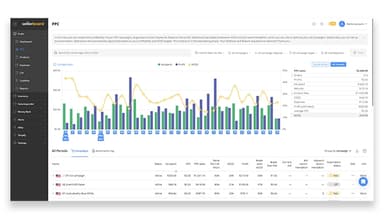
The software analyzes advertising campaigns and provides actionable insights to enhance performance. It helps sellers allocate budgets more efficiently and identifies the most effective keywords and bids. Eventually, it reduces wasted spending and increases return on investment for their advertising efforts.
Real-Time Profit Dashboard
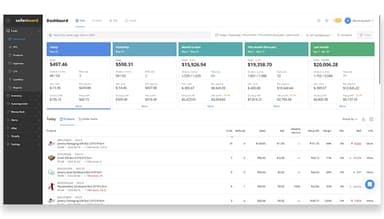
The comprehensive dashboard presents a clear, up-to-date view of financial performance, including revenue, costs, and profit margins. It empowers sellers to make quick decisions based on current data. sellerboard also improves its ability to respond to market changes and optimize profitability.
Pros And Cons of sellerboard
Pros
It enhances advertising efficiency
Comprehensive training resources available
Provides a cost-effective solution for Amazon sellers
Automated reports save time on tracking
It has a robust mobile app
Cons
Initial training is required
Occasional synching issues with Amazon
No direct order management capabilities
Lacks advanced forecasting features
sellerboard Reviews
Total 12 reviews
4.9
All reviews are from verified customers
Rating Distribution
5
Stars92%
4
Stars8%
3
Stars0%
2
Stars0%
1
Stars0%
Share your experience
Retail, 1-10 employees
More than a year
“Strong sales analytics tool for Shopify, Amazon, and eBay”
Pros
Sellerboard is incredibly affordable and packed with features. It's the perfect sales analytics tool for Shopify, Amazon, and eBay. I love how comprehensive it is!
Cons
While the system can be a bit difficult at times, it's an incredibly powerful suite overall.
Rating Distribution
Ease of use
10
Value for money
10
Customer Support
10
Functionality
10
Retail, 1-10 employees
Free Trial
“It is worth our money!”
Pros
It gives me incredibly detailed data on every aspect of my business, from sales and inventory to advertising. I really appreciate having all this information in one place.
Cons
I haven't found anything to dislike so far. Of course, I might have some suggestions down the line as I continue to use it.
Rating Distribution
Ease of use
10
Value for money
10
Customer Support
10
Functionality
9
Retail, 1-10 employees
Free Trial
“This is a must have tool for selling on Amazon”
Pros
What I really love is that I can easily track my profits across all my marketplaces at once. It's something I didn't even realize I needed until I had it, and it's become invaluable. The PPC insights and Money Back features are fantastic, and the price is very reasonable. The customer service is another highlight because they're always quick, professional, and get things done. After using H10 for years, I decided to give Sellerboard a try, and I have to say, I'm incredibly impressed. Overall, I'm really happy with the switch.
Cons
Everything's been great so far. We haven't encountered any issues, and the support we received when we had a couple of questions was fantastic!
Rating Distribution
Ease of use
10
Value for money
10
Customer Support
10
Functionality
10
Frequently Asked Questions
Does sellerboard offer an API?
Yes, sellerboard offers an API.
What language does sellerboard support?
sellerboard supports around eight languages, including English, Spanish, and German.
What other apps does sellerboard integrate with?
sellerboard integrates with Google, Facebook, Snapchat, Pinterest, and TikTok.
Does sellerboard have a mobile app?
Yes, sellerboard has a mobile app.
What type of pricing plans does sellerboard offer?
The sellerboard price for monthly billing starts at $19/month for the Standard plan, $29/month for the Professional plan, $39/month for the Business plan, and $79/month for the Enterprise plan. Users can also get pricing for a tailormade plan and discounts on annual billing.
Who are the typical users of sellerboard?
The typical users of sellerboard are Amazon seller stores across different niches, such as retail, computer hardware, and wholesale.
What level of support does sellerboard offer?
sellerboard offers support through email and a knowledge base.