


GoToWebinar
Last Updated
Overview
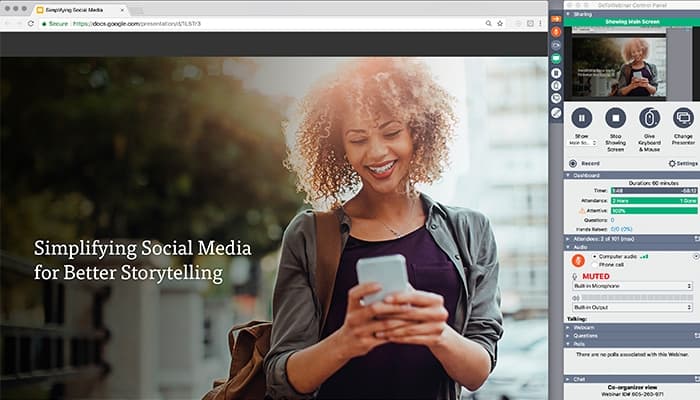
GoTo Webinar provides webinar hosting tools that support live training and audience engagement. Although the platform’s frequent notifications can be frustrating for some users, its recorded webinars give organizers control over content delivery. Overall, the software allows teams to efficiently host educational sessions and manage live webinars.
Overall Rating
Based on 1 users reviews
5
Rating Distribution
Positive
100%
Neutral
0%
Negative
0%
Starting Price
$69
per month
GoToWebinar Specifications
- Activity Dashboard
- Asynchronous Learning
- Activity Tracking
- Access Controls/Permissions
What Is GoToWebinar?
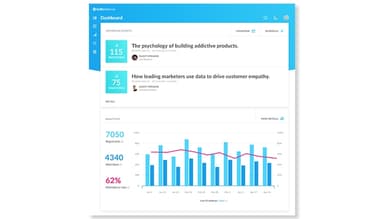
GoTo Webinar allows firms to deliver live and recorded online training, lectures, conferences, and employee sessions. The platform allows organizations to schedule events and create custom registration forms to gather attendees’ information even before an event starts. It also provides teams with various engagement tools, including polls and Q&A sessions to involve attendees during live sessions. Additionally, the software includes attendance and engagement reports to let users review the participation and performance of learners during sessions.
What Is GoToWebinar Best For?
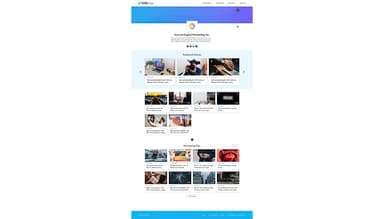
The software is well known for its GoTo Stage capability, which gives organizers a dedicated channel for publishing recorded webinars and keeping them available for later viewing. It allows organizers to publish sessions from their account and monitor viewing activity, including watch time and total views. GoToWebinar lets organizers measure whether recorded sessions continue attracting and engaging viewers after the original event.
How Much Does GoToWebinar Cost?
The starting price of the software is $69/month. This package, known as the Reach plan, includes various features, such as automated email reminders and reporting and analytics. Additional GoToWebinar pricing tiers are as follows:
- Elevate – $129/month
- Complete – Custom pricing
Besides the fixed subscription charges, users should also account for additional prices to consider the total cost of ownership. It includes, but is not limited to, the following:
- Implementation And Setup: Typically costs $500–$3,000, depending on webinar and account setup
- User Onboarding And Training: Might add up to $300–$2,000, based on the number of hosts and participants involved
- Third-Party Integrations: Could range from $500–$5,000, influenced by the complexity of integrations
- Custom Branding And Configuration: Often falls around $500–$3,000 for branding requirements and workspace customization
- Data Migration: Generally costs $500–$3,000, with expenses varying according to the existing webinar data and volume
- Ongoing Administration: Around $500–$3,000 annually for a potential allowance for user management and platform administration needs
Disclaimer: The pricing is subject to change.
GoToWebinar Integrations
The platform integrates with multiple systems, such as:
How Does GoToWebinar Work?
Here's how you can get started with the platform upon logging into the system:
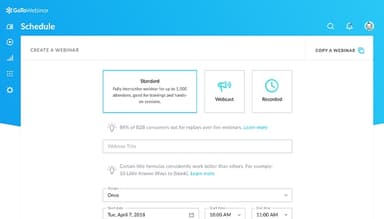
- Create a webinar by adding details, including title, date, time, and description
- Setup the registration page to collect potential attendees’ information
- Set invitation and reminder emails to keep registrants informed before the webinar
- Assign presenters and update the session settings before making the event available to attendees
- Use polls, Q&A, and surveys during the session to engage with learners
- Review attendee reports and registration data after the event to analyze the participation of attendees
- Publish recorded webinars through GoTo Stage so learners can attend sessions even after an event ends
Who Is GoToWebinar For?
The software is used in various industries and sectors, including:
- Consultation
- Education
- Finance
- Accounting
- Human resources
- Banking
GoToWebinar Use Cases
Based on the system’s existing capabilities, we have identified several scenarios where the platform can fit specific learning and development requirements:
Employee Training Across Distributed Teams
It gets difficult for organizations that conduct repetitive employee training to bring teams from different departments together physically. This is particularly relevant for compliance briefings or professional development sessions delivered to employees working from different locations. GoToWebinar software provides such organizations with pre-recorded sessions to accommodate employees who cannot attend at the scheduled time. It allows firms to make sure that all their employees get the relevant training sessions.
Live Product Demonstrations For Prospective Buyers
The platform helps sales teams that need to demonstrate a product to potential clients without arranging individual meetings for every interested buyer. A similar or repetitive demonstration can bring multiple prospects into the same session, while the platform allows presenters to address questions as they arise. It is specifically relevant for software vendors with products that require explanation before purchase.
Marketing Teams Measuring Webinar Registration Sources
When a company promotes the same educational event through several acquisition channels, it gets difficult for the firm to identify which source actually generated registrations can become difficult. The system allows teams to associate registrations with their promotional sources. It lets marketing teams analyze where webinar interest originated and use those findings when planning any similar event campaigns.
Organizations Building A Public Webinar Content Library
The software’s GoTo Stage tool helps organizations that produce educational webinars regularly but want those sessions to remain discoverable even after the original event ends. Instead of treating every webinar as a one-time broadcast, the system allows teams to maintain a dedicated channel where prospects or learners browse published sessions. It lets organizations build a library around similar educational topics or professional knowledge.
Event Teams Collecting Detailed Registrant Information
GoTo Webinar is useful for training or education teams that need more information from attendees before accepting them into an online session. It allows hosts to configure registration requirements around the information the organizer needs to collect. Additionally, the platform provides teams with quizzes when registration itself needs an assessment component. It is suitable for professional training programs where organizers need to understand the audience before the event begins.
Is GoToWebinar Right For You?
GoTo Webinar might be an ideal solution for organizations running repetitive training sessions or large virtual events. It supports sessions for up to 3,000 participants and includes various security measures, including encryption. The software follows SOC 2 Type II, SOC 3, and GDPR compliance regulations to secure confidential user data. Trusted by various companies, such as Deloitte and St. John’s University, the platform is capable of meeting the needs of growing organizations.
The latest industry trends show that on-demand access is becoming a standard part of webinar programs. GoToWebinar is keeping pace with these trends through its pre-recorded webinars and GoTo Stage tools that allow organizations to make training and educational sessions available beyond their scheduled live delivery.
Still have confusion about the GoToWebinar software? Contact us at (661) 384-7070 for further guidance.
GoToWebinar Features
Pre-Recorded Webinars
GoTo Webinar allows organizers to schedule recorded sessions for on-demand or timed viewing. It also allows hosts to carry forward the settings of previous webinars, including polls and descriptions for similar or repetitive sessions. Additionally, the system’s automated reminders, practice mode, and attendee interaction options let presenters reuse recorded sessions without hosting each delivery live themselves.
Flexible Scheduling
The platform allows organizers to set up a one-time event or schedule a repetitive webinar series. It lets teams provide attendees with recorded webinars as on-demand sessions to give them access without requiring them to join at a fixed time. It helps repetitive training programs aimed to cater to audiences throughout different schedules.
Attendee Reports
GoTo Webinar features attendee reports to show hosts who joined a webinar and provide participation records for post-event review. It allows organizers to use these reports to identify repetitive attendees and examine audience behavior. This way, the software helps organizations evaluate training sessions and product education events via participation records after delivering webinars.
Source Tracking
This functionality helps firms identify which promotional channels generated webinar registrations. It lets marketing teams compare signup sources when planning future events. The platform allows teams to determine whether a campaign, referral channel, or other promotion brings prospective attendees to the registration page for each campaign or not.
Custom Registration Forms
The system provides organizations with custom registration forms to let organizers request specific attendee information before an event starts. It also provides users with quizzes to give presenters another way to collect responses and understand who actually plans to attend. These captured registration details help hosts with audience segmentation before a webinar.
Pros And Cons of GoToWebinar
Pros
Saves time by simplifying webinar setup and management
Reduces barriers to joining and participating in webinars
Improves efficiency by keeping event tools in one place
Keeps large audiences engaged without disrupting presentations
Increases event reach through flexible sharing options
Cons
Audio and video issues can disrupt sessions
Navigating attendee controls can be confusing
Screen sharing may fail to stream properly
GoToWebinar Pricing
Reach | Elevate | Complete |
|---|---|---|
$69 per month | $129 per month | Custom Pricing |
|
|
|
Disclaimer: The pricing details were last updated on Sep 25, 2026 from the vendor's website. Please contact us for a tailored pricing list.
GoToWebinar Reviews
Total 1 reviews
5
All reviews are from verified customers
Rating Distribution
5
Stars100%
4
Stars0%
3
Stars0%
2
Stars0%
1
Stars0%
Share your experience
Hospitality, 500+ employees
More than a year
“GoTo Webinar makes online events become as cool as they should.”
Pros
GoTo Webinar offers an intuitive interaction interface that allows everyone to participate seamlessly during live events. Its advanced security features ensure our discussions remain private and secure. The audio and video quality are excellent, making our live events run smoothly without interruptions.
Cons
My experience with GoTo Webinar has been smooth and highly effective. I haven't encountered any issues.
Rating Distribution
Ease of use
10
Value for money
10
Customer Support
10
Functionality
10
Frequently Asked Questions
Does GoToWebinar offer an API?
Yes, GoTo Webinar offers an API to its users.
What languages does GoToWebinar support?
GoTo Webinar supports the English language.
What other apps does GoToWebinar integrate with?
GoTo Webinar integrates with Hansen Software, HubSpot, Zoho, FreshSales, ServiceNow, Salesforce, and Zendesk.
What types of pricing plans does GoToWebinar offer?
The platform’s starting price is $69/month for its Reach package. Besides this, the software also offers two more plans: Elevate ($129/month) and Complete (custom pricing). Get a custom GoToWebinar cost today.
Who are the typical users of GoToWebinar?
GoTo Webinar is used in banking, human resources, accounting, consultation, finance, and education industries.
What level of support does GoToWebinar offer?
GoTo Webinar provides form submission and phone support.
Does GoToWebinar have a mobile app?
Yes, GoTo Webinar has a mobile app available on iOS and Android devices.