


Last Updated
Overview
Atlist helps teams build and publish custom Google Maps without a developer. Its drag-and-drop interface, data imports, and embedding options support interactive map creation. While it focuses only on Google Maps-based experiences, it suits businesses creating store locators and data-driven maps.
Be the first one to leave a review!
No review found

Starting Price
Custom
Atlist Specifications
- Mobile Accessibility
- Space Management And Planning
- Asset Lifecycle Management
- Maintenance Management
What Is Atlist?
Atlist is a software product for creating custom Google Maps that can be shared or embedded on websites. It is designed for individuals and teams who want to build maps without a developer, using a drag-and-drop interface. The software supports markers, shapes, overlays, spreadsheet imports, API access, and team collaboration through workspaces. It enables users to publish maps online, update them anytime, and create interactive experiences, such as store locators and data visualizations.
Atlist Pricing
The Atlist cost is structured around the following plans:
- Free - $0
- Basic - $14/month
- Pro - $24/month
Disclaimer: The pricing is subject to change.
Atlist Integrations
Atlist features seamless integration with various third-party applications, including:
Who Is Atlist For?
The platform caters to a variety of industries, including:
- Government/public sector
- Commercial real estate
- Higher education
- Food and beverage
- Banking/financial services
- Consumer goods (FMCG)
Is Atlist Right For You?
If you’re looking for an easy way to create custom Google Maps that can be shared or embedded online, Atlist offers a no-code, drag-and-drop interface designed for quick map building and publishing. It allows maps to be updated anytime and shared across websites without requiring a developer.
Atlist is used for world maps, store locators, data visualizations, and similar interactive experiences. If creating and managing custom maps independently is a priority, it may be a suitable option.
Still not sure if Atlist is right for you? Our support staff is available at (661) 384-7070 to help you make the right choice.
Atlist Features
Modals
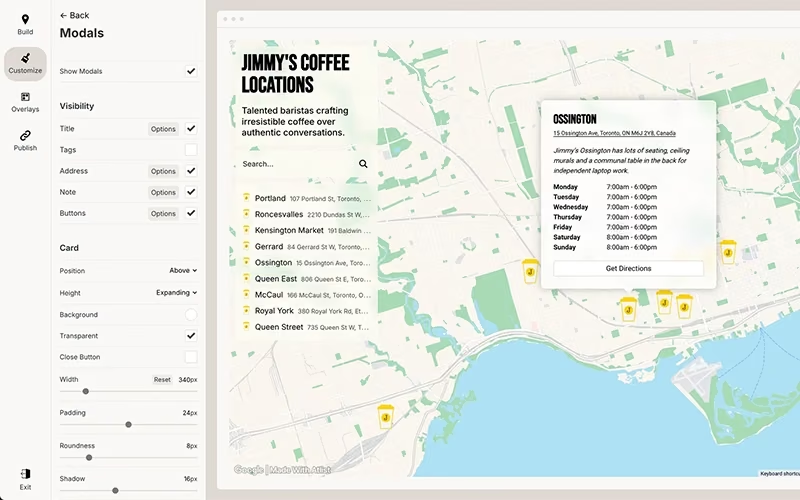
Atlist enables fully customizable modal pop-ups featuring HTML content, interactive buttons, photo galleries, and rich media elements. It enhances map engagement by seamlessly presenting detailed information, visuals, and calls to action directly within each marker experience.
Shapes
Atlist allows the creation of polygons, circles, lines, and detailed regional boundaries such as cities or neighborhoods. It helps visualize territories, highlight service areas, and represent geographic data clearly across interactive maps for audiences.
Clusters
The platform automatically groups nearby markers into organized clusters when maps contain large volumes of data. It significantly improves readability, reduces visual clutter, and ensures smoother navigation across dense interactive mapping environments.
Search
The software provides a location-based search that identifies markers near a current position or specified address. It enables efficient discovery of relevant locations, improving accessibility and overall navigation across interactive maps.
Tags
Atlist supports customizable tags that allow dynamic filtering of markers based on selected categories or attributes. It streamlines map exploration by displaying only relevant data points according to defined criteria.
Pros And Cons of Atlist
Pros
Eliminates the need for developer involvement
Speeds up map creation and deployment
Simplifies complex mapping workflows
Cons
May lack consistent dedicated support
Feature compatibility can vary across categories
Atlist Reviews

No reviews yet!
Be the first to review this product
Frequently Asked Questions
What language does Atlist support?
Atlist primarily supports the English language.
What level of support does Atlist offer?
Atlist offers support through a help center, blog, product updates, online contact form, FAQs, and email.
Who are the typical users of Atlist software?
Atlist serves a range of industries, including government and public sector, commercial real estate, higher education, food and beverage, banking and financial services, and consumer goods (FMCG).
What other apps does Atlist integrate with?
Atlist integrates with third-party applications such as Google Sheets, Google Maps, Squarespace, Shopify, Notion, and Framer.
What types of pricing plans does Atlist offer?
Atlist provides three pricing plans to suit different needs. The Free plan is available at no cost, while the Basic plan costs $14 per month and includes additional features. For full access to all tools, the Pro plan is priced at $24 per month. Request a detailed Atlist price breakdown for your organization today.
Does Atlist offer an API?
Yes, Atlist offers an API.
Does Atlist have a mobile app?
No, Atlist does not offer a dedicated mobile application.