

Last Updated
Overview
Cupix delivers 3D digital twin and reality capture capabilities to streamline construction and facility management workflows. Although the platform drops panoramic images quality slightly, its advanced spatial documentation and AI‑driven features offer high value. With progress tracking tools, Cupix remains a compelling choice for teams managing complex job sites.
Be the first one to leave a review!
No review found

Starting Price
Custom

Cupix Specifications
- Asset Lifecycle Management
- Reporting And Analytics Dashboards
- CAD/BIM Integration
- Mobile Accessibility
What Is Cupix?
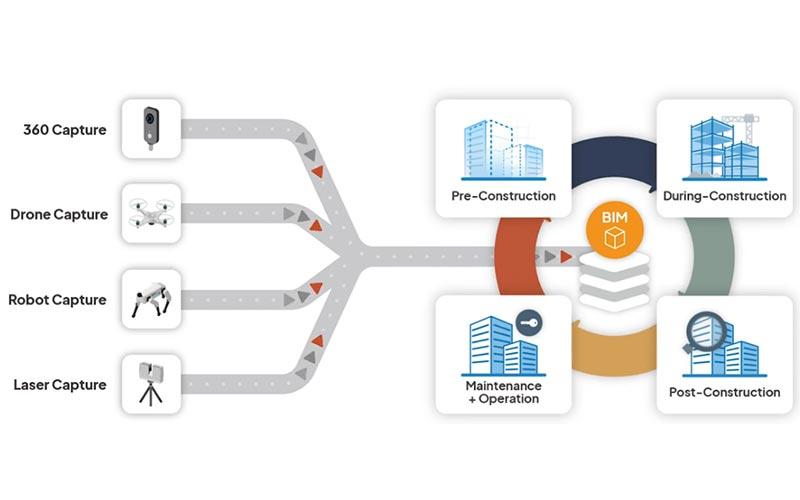
Cupix is a digital twin and reality capture platform designed for construction, engineering, and facility management teams that need spatial intelligence to streamline operations. By transforming 360° video and aerial data into accurate 3D maps and immersive site visualizations, the software helps teams better understand their projects. Its AI-powered progress tracking and georeferenced documentation capabilities help reduce rework, enhance coordination, and improve decision-making across the project lifecycle.
How Much Does Cupix Cost?
While the vendor does not list definitive Cupix pricing on its official site, the cost of the software typically ranges from approximately $500 to $1,000+ per month for enterprise‑grade digital twin and facility management subscriptions based on industry benchmarks.
The software offers two customizable plans depending on your needs:
- Builders
- Unified
Organizations should also consider additional cost factors that contribute to total cost of ownership:
- Implementation And onboarding – $2,000–$10,000, depending on project complexity and team size
- Integrations – $1,000–$5,000 for connecting BIM platforms (Autodesk BIM 360, Revizto) and other tools
- Maintenance And support – $500–$2,000/year for premium support tiers or dedicated account services
- Hardware Requirements – $300–$2,000 for cameras, mounts, or accessories, depending on project needs
Disclaimer: Pricing references are based on publicly available third-party information and industry benchmarks. Actual costs may vary.
Cupix Integrations
The system supports integration with multiple platforms, such as:
Who Is Cupix For?
Cupix software caters to various industries and sectors, including:
- Retail
- Healthcare
- Manufacturing
- Maritime
- Oil and gas
- Biomedical
Is Cupix Right For You?
If your organization requires advanced spatial intelligence and comprehensive construction documentation, Cupix might be the right fit. The software offers enterprise-grade security, offering multi-factor authentication, user-configurable privacy controls, encryption, and granular access management to keep the data safe. The platform is SOC 2 Type II, ISO 27001, and CSA STAR certified, providing confidentiality for sensitive information.
Still doubtful if Cupix is the right fit for you? Contact our customer support team at (661) 384-7070, who will clear up any doubts to help you make an informed decision.
Cupix Features
Drone Mapping
With SkyMap, aerial captures from drones are processed into orthomosaics, DSMs, and point clouds, all within a georeferenced environment. Combining aerial and ground data lets teams compare, analyze, and act on site conditions while aligning results with BIM for better project control.
360° Video To 3D Map
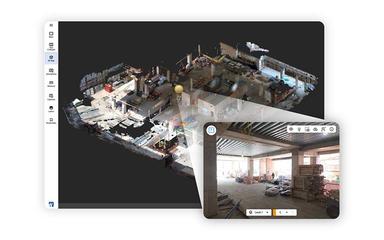
Cupix software converts 360° camera footage into detailed 3D digital twins and panoramic site views. Its cloud‑based AI reconstructs spatial data from simple walkthrough videos, enabling teams to easily capture, process, and explore job sites in 3D for improved visibility and collaboration.
4D Documentation
Cupix features 4D documentation capabilities to enhance traditional spatial records with time‑based insights. It generates dynamic visual histories of project sites, improving decision‑making, quality control, and documentation for legal or insurance purposes through precise measurement and timeline‑based tracking.
Construction Progress Tracking
The platform uses AI to automatically detect installation progress and track milestones against BIM and schedules. Its customizable reporting and dashboards help teams spot delays, monitor work areas, and adjust execution plans, improving on‑site transparency and schedule adherence.
Off‑Site BIM Verification
This functionality enables remote validation of as‑built conditions against design intent by syncing 360° captures with BIM. It allows users to overlay models, validate accuracy, and resolve discrepancies early. Seamless sync with Autodesk BIM 360/ACC and Revizto further supports cross‑discipline coordination.
Pros And Cons of Cupix
Pros
Share 3D and VR models easily
Custom tours improve engagement
360 photos create models faster
Cons
Requires specialized equipment
Uploading panoramas can be slow
Cupix Reviews

No reviews yet!
Be the first to review this product
Frequently Asked Questions
Who are the typical users of Cupix?
Typical users of Cupix include professionals working in maritime, oil and gas, retail, healthcare, biomedical, and manufacturing industries.
What other apps does Cupix integrate with?
Cupix integrates with Revizto, Procore, and Autodesk BIM 360.
What language does Cupix support?
Cupix supports Korean, English, and Japanese languages.
What types of pricing plans does Cupix offer?
The Cupix price typically ranges from approximately $500 to $1,000+ per month for enterprise‑grade digital twin and facility management subscriptions based on industry benchmarks. Get a personalized Cupix pricing quotation today.
Does Cupix have a mobile app?
Yes, Cupix has a TwinCapture mobile app available on iOS and Android devices.
Does Cupix offer an API?
No, Cupix does not offer an API.
What level of support does Cupix offer?
Cupix offers form submission support option.