


Revizto
Last Updated

Overview
Revizto simplifies project coordination by integrating visual issue tracking and model clash detection into a single, intuitive interface. It assists users in analyzing complex data and enhances collaboration workflows. However, clash detection requires careful setup for accuracy. Its secure environment ensures reliable decisions during the design and construction phases.
Overall Rating
Based on 7 users reviews
4.6
Rating Distribution
Positive
100%
Neutral
0%
Negative
0%
Starting Price
Custom pricing

Revizto Specifications
- Document Management
- Quality Control
- Collaboration Tools
- Progress Tracking
What Is Revizto?
Revizto is an Architecture, Engineering, Construction, and Operations (AECO) Collaboration software that brings 2D drawings and 3D models into an interactive environment. Users can run clash detection, track issues tied to an exact spot in the model, and review conflicts in VR before they reach the field. Built on gaming-engine technology, the platform stays fast and stable even on large, complex, federated models. This allows teams to work from the same source of truth whether they're in the office or on site. This way, Revizto turns discipline-specific coordination into one shared, always-current model.
What Is Revizto Best For?
Revizto stands out for its unified “Collaboration Hub,” which brings model viewing, issue tracking, and coordination into one platform instead of separate tools. Non-technical users, from field teams to executives, can navigate 2D and 3D models just as easily as veteran BIM users. Moreover, it integrates directly with existing CDEs and authoring tools like Procore, SharePoint, Revit, and Navisworks. In this regard, teams can automate clash and issue identification, cut manual coordination work, and keep cross-discipline collaboration moving.
How Much Does Revizto Cost?
The pricing of Revizto is estimated to range between $240 to $102,000+/year, depending on the nature of the plan you pick. The platform sells through three commercial models depending on how a business wants to deploy it:
- For Growing Teams
- For Project Delivery
- For Enterprise Rollout
In addition to the base subscription cost, organizations should also account for additional considerations. These include:
- Project-Based Licensing (Multi-Stakeholder Projects): $800–$4,200+/month equivalent, priced against project value and duration rather than headcount
- Enterprise Rollout And Multi-Year Agreements: Typically $2,000–$8,500+/month for large firms deploying across multiple projects, with potential discounts for 2–3 year commitments
Reviewers offer mixed feedback on Revizto's pricing. Some describe costs as restrictive for high-complexity or larger projects. While others value its fixed-price structure since it isn't only tied to user count, making it easier to share access with entire project teams without extra per-seat costs.
Disclaimer: Pricing references are based on publicly available third-party information and industry benchmarks. Actual costs may vary.
Revizto Integrations
The platform supports integrations with various third-party systems, including:
How Does Revizto Work?
Here's how you can access the platform and its features:
- Log in to your Revizto account or create one to access your project workspace
- Import 2D sheets and 3D models from authoring tools such as Revit, Navisworks, or SketchUp into the unified environment
- Run clash detection by defining rule sets and grouping related clashes so they surface as a single item
- Create and assign issues directly on the 2D sheet or 3D model, tagging the responsible discipline or individual
- Review flagged conflicts in VR or standard 3D view to confirm severity before assigning rework
- Track issue status through the centralized dashboard as team members respond, resolve, or escalate items
- Generate reports and dashboards through Connected Project Intelligence to monitor coordination trends
- Export finalized models, markups, and issue logs for recordkeeping or handoff to the next project phase
Who Is Revizto For?
Revizto is built primarily for teams delivering complex, multi-stakeholder construction projects, and it serves company types including:
- Architecture firms
- Engineering firms
- General contractors
- Subcontractors
- Owners
Revizto Use Cases
Based on our analysis of Revizto features, we have identified the following key business scenarios where it is well suited:
BIM/VDC Managers Running Weekly Coordination Meetings
BIM and VDC managers use Revizto to consolidate federated models from multiple disciplines. They walk stakeholders through clashes live in the 2D/3D model during the meeting, rather than reviewing results in tables. Related clashes get grouped into a single item, so teams aren't sorting through duplicates one by one. Models also load fast enough to support real-time walkthroughs during coordination meetings.
General Contractors And Subcontractors Coordinating On-Site Issues
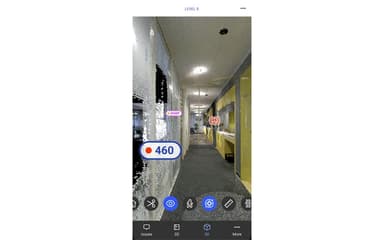
Field teams use Revizto to open models on mobile devices and log issues tied to an exact 3D location rather than describing a problem verbally or marking up a printed drawing. Users can be non-Revit users, including civil engineers and specialty subcontractors, and still navigate and comment on the model without training on the authoring software. This helps reduce the back-and-forth that comes from relying on paper markups or verbal handoffs.
Owners And Program Managers Overseeing Multi-Stakeholder Projects
Owners' teams use Revizto's centralized issue register to track design queries, clashes, and coordination items in one place. This replaces the old approach of tracking discipline-specific issues across separate systems. Large infrastructure and rail programs benefit most, since they involve many stakeholders who all need visibility into the same decisions.
Design And Engineering Teams Doing Cross-Discipline Clash Automation
Design and engineering teams use Revizto's automated clash rule sets to catch conflicts between structural, MEP, and architectural models. This removes the need to manually run every combination by hand. For teams working through frequent design iterations, clash tests and model imports can be scheduled. Therefore, its clash detection can keep pace with each round of updates on the configured schedule. Grouping related clashes into a single item also means engineers spend less time triaging duplicates and more time actually resolving conflicts.
Stadium And Large Venue Teams Coordinating Tight Event Deadlines
Stadiums and other large venue projects bring together architects, structural engineers, MEP contractors, and venue operators who all need visibility into the same model. Revizto lets non-technical stakeholders, including venue operators, navigate the 3D model without training and weigh in on clash resolution alongside the technical team. Teams can also flag conflicts across seating, structural, and AV systems well ahead of a fixed event date. This keeps venue delivery on schedule even when the project scope shifts late in construction.
Is Revizto Right For You?
Revizto is a reasonable choice if your project involves multiple firms and disciplines that need to see and act on the same coordination data without everyone owning a BIM authoring license. It's a stronger fit for teams large enough to justify a dedicated coordination workflow rather than occasional, single-user clash checks.
Trusted by renowned names such as AECOM, Arup, Skanska, and Stantec, Revizto is GDPR compliant and certified with ISO 27001, ISO 27017, and SOC 2 Type 2 standards. Moreover, having won the 2025 “Building Innovation Awards” and “London Construction Awards,” the platform has established itself as a reliable option in the market.
Still doubtful if Revizto software is the right fit for you? Connect with us at (661) 384-7070 for further guidance.
Revizto Features
Unified 2D/3D Environment
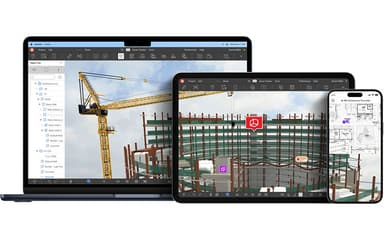
This feature overlays 2D drawings and 3D models in one interactive workspace. Teams can compare live CDE documentation directly against the model, without switching tools. It includes 2D/3D overlay, split-view comparison, and advanced search for finding elements fast. AR, VR, and QR-code access also let field teams pull up the model on site, right where the work is happening.
Collaborative Clash Automation
Revizto lets teams define multiple clash types and automate detection rules, instead of running conflict checks manually for every discipline pairing. Related clashes get grouped dynamically, so they surface as one item instead of a dozen duplicates. Interactive visual analysis tools then let teams review severity before assigning any rework.
Integrated Issue Management
Issues can be created, tracked, and resolved directly in 2D or 3D, from any device. Each item stays synced to its exact spatial location in the model, so nothing gets lost in translation between the field and the office. Stamp-and-issue workflows and automation rules route issues to the right discipline or team member automatically, cutting down on manual reassignment. Filtering and search tools help teams focus on open items, and an audit trail is captured through to resolution.
Connected Project Intelligence
This feature turns coordination activity into interactive dashboards and reports. Teams get visibility into clash trends, issue resolution speed, and model data across the whole project, not just a single discipline. Model data can also be extracted through an Issue API and broader API integrations, so coordination data can feed directly into other business intelligence tools the team already relies on.
Pros And Cons of Revizto
Pros
Intuitive interface enables quick team adoption
Centralized 2D/3D model keeps teams aligned
Strong clash detection and automation tools
Helpful issue tracking from clash to resolution
Fast, stable performance on large models
Cons
Limited integrations with other project systems
2D markup and document workflows feel underdeveloped
Mobile experience lags behind the desktop version
Revizto Pricing
For Growing Teams | For Project Delivery | For Enterprise Rollout |
|---|---|---|
Custom pricing | Custom pricing | Custom pricing |
|
|
|
Disclaimer: The pricing details were last updated on Oct 09, 2026 from the vendor's website. Please contact us for a tailored pricing list.
Revizto Reviews
Total 7 reviews
4.6
All reviews are from verified customers
Rating Distribution
5
Stars57%
4
Stars43%
3
Stars0%
2
Stars0%
1
Stars0%
Share your experience
Mid Market, 51-100 employees
“Increased our efficiency by revolutioizing our workflow”
Pros
The collaboration and visualization capabilities have genuinely revolutionized how we work! The gaming engine really makes it shine compared to other tools. Clash detection and automation save us time, and having everything reviewable in one central location is convenient. I'm especially impressed with the export scheduler and being able to set exports for after hours keeps our workflow running smoothly.
Cons
The clash detection sometimes picks up model issues that shouldn't really count as clashes, so I end up manually reviewing and approving each one. Hopefully, they'll fix this in future updates.
Rating Distribution
Ease of use
10
Value for money
10
Customer Support
10
Functionality
9
Enterprise, 500+ employees
“Integrates well with other systems”
Pros
Working with other systems has been simple, and there are plenty of features that keep everything running smoothly.
Cons
It takes forever to upload models, and the measurement tools could be better.
Rating Distribution
Ease of use
8
Value for money
10
Customer Support
10
Functionality
8
Enterprise, 500+ employees
“Simple to use”
Pros
I found it very simple to use. I like the live commenting feature that keeps everyone on the same page. What stands out most is how it handles massive data integration, bringing everything together in one complete model.
Cons
Model updates can be pretty slow, especially if I haven't used the software for about a week.
Rating Distribution
Ease of use
9
Value for money
10
Customer Support
10
Functionality
8
Frequently Asked Questions
Who are the typical users of Revizto?
Revizto is used by businesses across diverse company types, including architecture firms, engineering firms, general contractors, subcontractors, and owners.
Does Revizto offer an API?
Yes, Revizto offers an API.
What level of support does Revizto offer?
Revizto offers customer support via resources, help center, Revizto Academy, and contact form.
Does Revizto have a mobile app?
Yes, Revizto offers a native mobile app for iOS and Android devices.
What languages does Revizto support?
Revizto supports multiple languages, including English, French, and German.
What other apps does Revizto integrate with?
Revizto offers integration with a wide range of applications, including Autodesk, Procore, Rhino, OpenSpace, and Hexagon.
What types of pricing plans does Revizto offer?
Revizto price is estimated to fall between $240 to $102,000+/year, depending on the nature of the plan you pick. Get in touch for a tailored Revizto cost estimate.