


Last Updated
Overview
Floor Plan Mapper helps organizations streamline facility management by turning static office layouts into interactive, searchable maps for efficient space planning. It simplifies desk booking and employee location tracking, improving hybrid workplace productivity. While customization options are limited, its intuitive interface and support make it a reliable space management solution.
Be the first one to leave a review!
No review found

Starting Price
Custom
Floor Plan Mapper Specifications
- Space Management And Planning
- Mobile Accessibility
- Visitor And Resource Booking
- CAD/BIM Integration
What Is Floor Plan Mapper?
Floor Plan Mapper is a facility management solution that helps businesses optimize office space and resource usage. Its interactive floor plans and drag-and-drop seating functionality allow quick updates, while real-time desk availability and automated booking reminders streamline hybrid workplace operations. Designed for mid to large organizations, it helps teams locate people, rooms, and assets efficiently, improves overall workplace organization, and supports smoother collaboration across departments, making day-to-day office management faster and more productive.
Floor Plan Mapper Pricing
Floor Plan Mapper pricing comprises the following plans, along with a free trial option:
- Small Organization: $28/month (1–2 floors and unlimited employees)
- Medium Organization: $42/month (3–6 floor plans and unlimited employees)
- Medium to Large Organization: $72/month (7–10 floor plans and unlimited employees)
- Large Organization: $148/month (Unlimited floor plans and employees)
- On-Premise Version: $75–$150 (One-time cost/floor plan)
In addition to the subscription fee, organizations adopting Floor Map Planner should anticipate industry-standard implementation costs. Based on facility management SaaS benchmarks, initial setup and configuration typically range from $500 to $5,000, training and onboarding from $500 to $3,000, and optional add-ons such as custom icons, shapes, or advanced desk-booking modules may add $200 to $2,000.
Disclaimer: The pricing is subject to change.
Floor Plan Mapper Integrations
Floor Plan Mapper offers integration with multiple apps, including:
- Microsoft Outlook
- Microsoft Teams
- Okta
- Google Calendar
- Microsoft SharePoint
Who Is Floor Plan Mapper For?
Floor Plan Mapper is ideal for a wide range of industries and sectors, including:
- Media and entertainment
- Higher education
- News and information
- Healthcare and life sciences
- Industrial and automotive manufacturing
- Food and beverage
- Government and non-profit
Is Floor Plan Mapper Right For You?
Floor Plan Mapper is the perfect solution for organizations navigating hybrid work, offering interactive 3D maps and automated desk booking to streamline facility management. Its standout features are rapid implementation and a unique pricing model that provides unlimited users and desks at no extra cost. Trusted by clients such as Mercedes-Benz, Hulu, and Guess, it excels in the media, education, and healthcare industries. Furthermore, robust security and seamless Office 365 integration make it an ideal, cost-effective choice for modern workplaces.
Are you still unsure if Floor Plan Mapper software is what you need? Call us at (661) 384-7070 for further assistance.
Floor Plan Mapper Features
Interactive Office Maps
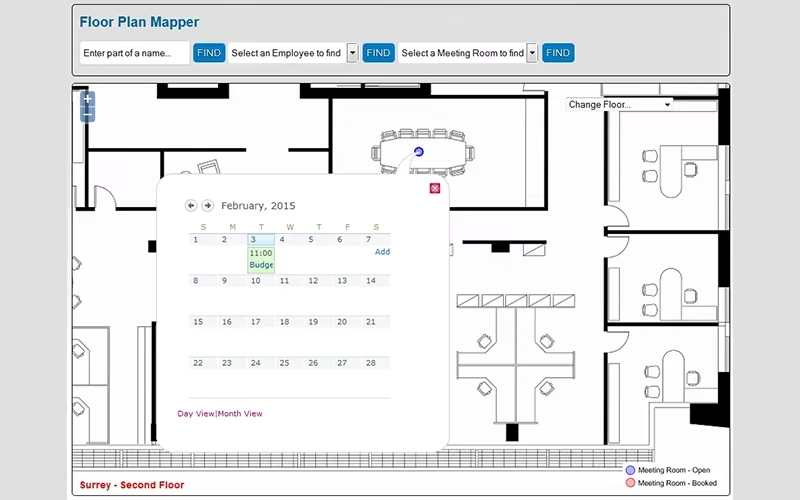
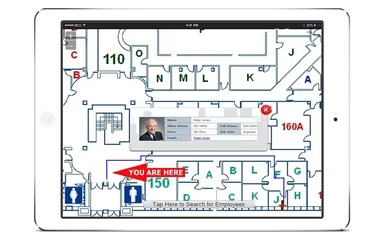
The software allows users to convert static floor plans into interactive office maps. Employees can easily locate desks, meeting rooms, printers, and other resources. Shapes can be drawn to highlight areas of interest, improving navigation and visual understanding of workplace layouts.
Seating Plans
This feature enables users to quickly create and update office seating plans using a drag-and-drop interface. Employee locations can be accurately placed on existing floor plans, helping managers maintain organized layouts and ensuring seating arrangements reflect current workplace needs.
Hot Desking And Desk Booking
The software provides a visual system for hot-desk and meeting-room bookings. Employees can filter available desks, book them for specific hours, days, or recurring intervals, and receive automated email reminders, simplifying scheduling and optimizing office space utilization effectively.
Rapid Implementation
This feature allows users to upload floor plans in PDF, CAD, or JPG formats and quickly add people, desks, printers, and meeting rooms through the admin portal. Organizations can set up interactive maps efficiently and start managing office spaces immediately.
Pros And Cons of Floor Plan Mapper
Pros
Easily maps key office assets
Shows comprehensive details for each desk
Quickly find employees across multiple floors
Cons
Cannot edit floor layouts directly
Difficult to add additional data points
Floor Plan Mapper Reviews

No reviews yet!
Be the first to review this product
Frequently Asked Questions
What types of pricing plans does Floor Plan Mapper offer?
Floor Plan Mapper offers plans for all organization sizes. Small organizations pay $28/month (1–2 floors), medium $42/month (3–6 floors), medium‑large $72/month (7–10 floors), and large $148/month for unlimited floors and employees. The on-premise version costs $75–$150 per floor plan. Get in touch for a personalized Floor Plan Mapper cost estimate.
Does Floor Plan Mapper have a mobile app?
No, Floor Plan Mapper does not have a mobile app.
Does Floor Plan Mapper offer an API?
Yes, Floor Plan Mapper offers an API.
What level of support does Floor Plan Mapper offer?
Floor Plan Mapper provides support via phone, email, online form, ticket system, FAQs, and support center.
What language does Floor Plan Mapper support?
Floor Plan Mapper supports English, French, German, and Spanish languages.
What other apps does Floor Plan Mapper integrate with?
Floor Plan Mapper has integration arrangements with OKTA, Microsoft SharePoint, Microsoft Teams, Google Calendar, and Microsoft Outlook.
Who are the typical users of Floor Plan Mapper?
Floor Plan Mapper features are primarily used in organizations across multiple industries and sectors, including food and beverage, higher education, government and non-profit, healthcare and life sciences, news and information, industrial and automotive manufacturing, and media and entertainment.