

Last Updated
Overview
Noggin helps teams in mid-to-large organizations streamline operational, safety, and crisis workflows through a centralized resilience platform. While some reporting and analytics are limited, it offers pre-configured templates, dashboards, and no-code customization. Overall, it is a reliable solution for emergency management, security, and operational risk teams.
Be the first one to leave a review!
No review found

Starting Price
Custom
Noggin Specifications
- Reporting And Analytics Dashboards
- Compliance And Safety Management
- Mobile Accessibility
- Incident/Event Tracking
What Is Noggin?
Noggin is an integrated resilience software designed for organizations seeking to manage operational, security, and crisis-related risks. The software unifies business continuity, operational resilience, incident and crisis management, emergency response, and safety and security operations within a single workspace.
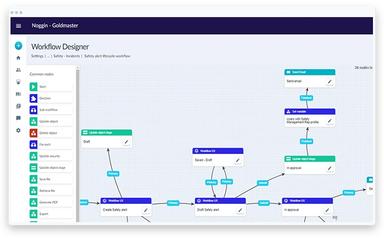
It also offers pre-configured workflows, templates, dashboards, and no-code customization, allowing teams to coordinate processes, track incidents, and share information efficiently.
Noggin Pricing
According to our estimate, the pricing for Noggin starts at $10,000/year. In addition to the core subscription fee, organizations adopting Noggin should anticipate typical implementation and operational costs based on industry benchmarks. For a mid-to-large enterprise, one-time setup and professional services may total around $82,000, ongoing licensing and support approximately $294,000 over three years, and internal training and maintenance an estimated $148,000.
Disclaimer: Pricing references are based on publicly available third-party information and industry benchmarks. Actual costs may vary.
Noggin Integrations
The software supports integration with multiple systems and platforms, such as:
Who Is Noggin For?
Noggin is ideal for organizations across a wide range of industries and sectors, including:
- Aviation and airports
- Construction
- Financial services
- Healthcare
- Manufacturing
- Mining, oil and gas
- Government
Is Noggin Right For You?
Noggin is suitable for organizations that need a unified platform for resilience, crisis, and security management across sectors such as transportation, healthcare, or government. It integrates ten core resilience solutions with customizable workflows, mobile access, and robust security. Built to meet global standards, Noggin helps organizations comply with ISO 22308, ISO 45001, ISO 31000, ISO 22301, ISO 22320, NIMS, ICS, ISO 27001, and more, enabling enterprise-scale operations with reliable compliance and governance.
Still doubtful if Noggin software is the right fit for you? Connect with our customer support staff at (661) 384-7070 for further guidance.
Noggin Features
Business Continuity Management
The platform provides comprehensive business continuity management to mitigate organizational disruptions. It includes pre-configured workflows, templates, and dashboards to plan, respond, and recover from incidents efficiently. Teams can maintain operational resilience while keeping stakeholders informed and aligned during critical events.
Operational Resilience
This feature strengthens overall organizational resilience by integrating risk, incident, and crisis management. It allows teams to monitor processes, assess vulnerabilities, and ensure consistent operations under changing conditions. Real-time dashboards provide insights to drive informed decision-making and continuous improvement.
Safety Management
This feature centralizes health, safety, and well-being operations while improving compliance. It includes risk assessments, incident reporting, and real-time analytics to protect personnel and manage contractors. Dashboards and customizable workflows allow teams to monitor hazards, track certifications, and adapt to emerging challenges.
Emergency Management
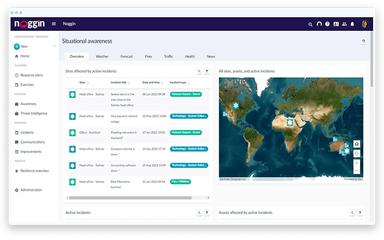
Noggin software enables organizations to prepare for and respond to emergencies with speed and precision. It supports pre-built plans, notifications, and real-time reporting to coordinate teams effectively. The system ensures critical workflows are followed to protect people and assets during high-stakes events.
Investigations And Case Management
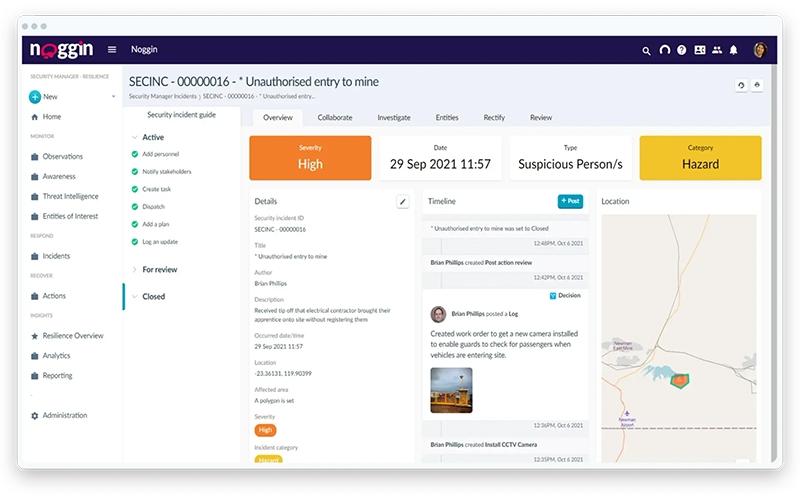
The software facilitates structured investigations and case tracking for compliance and operational oversight. Users can assign tasks, document findings, and manage corrective actions within a centralized platform. This approach streamlines case resolution and enhances accountability across the organization.
Pros And Cons of Noggin
Pros
Real‑time updates and notification features
Offers low‑code/no‑code customizable workflows
Improves incident communication and coordination
Cons
Feature access varies by license level
Some modules may require extensive training
Noggin Reviews

No reviews yet!
Be the first to review this product
Frequently Asked Questions
What types of pricing plans does Noggin offer?
Noggin price plans are estimated to start at around $10,000/year. Get a detailed Noggin cost breakdown tailored to your specific requirements.
What level of support does Noggin offer?
Noggin offers support through a newsletter, contact form, phone, and email.
Who are the typical users of Noggin?
Noggin features are used by organizations across industries and sectors, including healthcare, construction, aviation and airports, mining, oil and gas, government, financial services, manufacturing, and transportation.
Does Noggin offer an API?
Yes, Noggin offers an API.
What other apps does Noggin integrate with?
Noggin supports integrations with multiple platforms, such as Microsoft 365, Workday HCM, Okta, and Oracle.
Does Noggin have a mobile app?
Yes, Noggin offers a dedicated mobile app.
What language does Noggin support?
Noggin supports English, Spanish, and Portuguese languages.