

Last Updated
Overview
Operations1 helps manufacturers streamline facility management with digitized workflows, real-time process guidance, and automated task management. While advanced configuration may require IT support, its intuitive interface ensures ease of use. Overall, it’s a reliable platform for organizations seeking productivity, quality, and operational efficiency across multiple sites.
Be the first one to leave a review!
No review found

Starting Price
Custom
Operations1 Specifications
- Mobile Accessibility
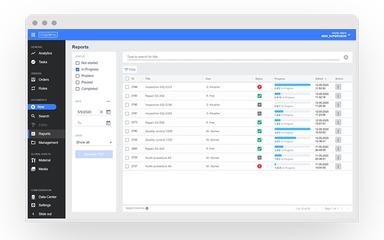
- Reporting And Analytics Dashboard
- Asset Lifecycle Management
- Maintenance Management
What Is Operations1?
Operations1 is a powerful paperless manufacturing software that fully digitizes employee-led processes, providing context-based, real-time information and intuitive process guidance across the shop floor. It's clear visual instructions, multilingual checklists, and step-by-step workflows help reduce errors, enhance operational efficiency, and significantly boost overall productivity. Advanced analytics enable continuous improvement, flexible process adaptation, and informed decision-making.
This makes it an ideal solution for manufacturers looking to standardize procedures, increase quality, and optimize performance across teams and locations.
Operations1 Pricing
The pricing for Operations1 starts at €10,000/year. The vendor offers the following to customizable plans:
- Professional
- Enterprise
In addition to the base annual subscription, organizations should account for the following expenses:
- Implementation And Process Digitization Setup: €3,000–€15,000 for mid-sized manufacturers; €15,000–€50,000 for multi-site or enterprise rollouts
- Workflow And SOP Migration: €2,000–€12,000, depending on the volume of legacy documents, checklists, and standard operating procedures being digitized
- Admin And Shopfloor Training: €1,000–€8,000, based on the number of supervisors, operators, and internal champions trained
- ERP, MES, SSO, And API Integrations: €3,000–€20,000, depending on integration complexity and existing IT infrastructure
Disclaimer: Pricing references are based on publicly available third-party information and industry benchmarks. Actual costs may vary.
Operations1 Integrations
Operations1 integrates with:
- SAP
- Microsoft SharePoint
- Microsoft Azure
Who Is Operations1 For?
Operations1 is ideal for various industries and sectors, including:
- Machine and plant manufacturing
- Agricultural and commercial vehicles
- Industrial goods
- Food and beverage
- Automotive
Is Operations1 Right For You?
Operations1 is ideal for organizations seeking to streamline shop floor operations, eliminate manual paperwork, and optimize workflows. It provides digital, real-time guidance and analytics, resulting in measurable gains in productivity, quality, and compliance. The platform meets ISO and IEC 27001 standards for information security and scales with organizational growth to support businesses of any size, especially in manufacturing and industrial sectors. This specialized focus makes it an excellent fit for organizations prioritizing operational efficiency, standardized processes, and continuous quality improvement.
Are you still unsure if Operations1 software is what you need? Call us at (661) 384-7070 for further assistance.
Operations1 Features
Checklists And Reports
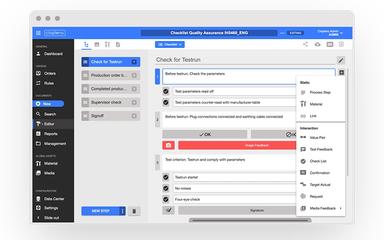
Users can manage inspections with structured digital checklists that integrate images, videos, and validation logic. The feature enables audit-ready reporting, reduces documentation effort, ensures consistent execution, and provides analytics for continuous improvement while maintaining clear, scalable quality processes.
Digital Work Instructions
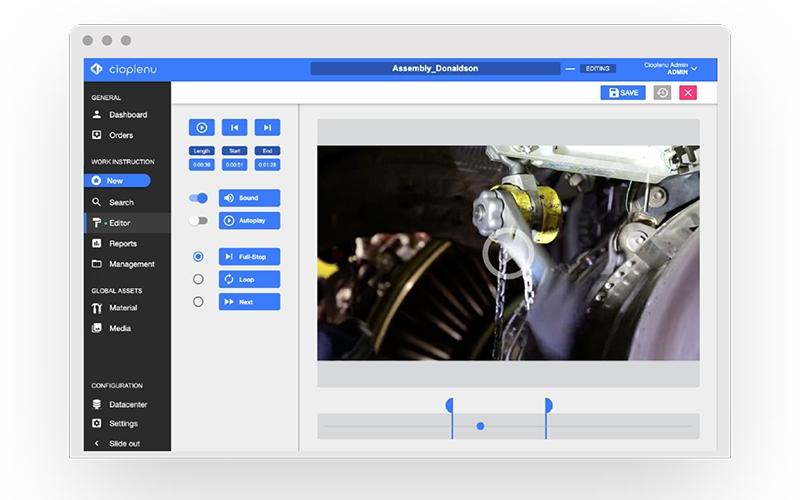
This feature allows users to create centralized, modular work instructions that guide employees step by step. It reduces training time, ensures process consistency, and supports images, videos, AI-based conversions, and multilingual versions, delivering error-free and scalable operations across all sites.
Task Management
Operations1 provides a centralized task management system that converts findings into actionable tasks. Teams can assign, prioritize, and track tasks efficiently, communicate via integrated chat, and monitor progress in real-time, ensuring accountability, faster problem resolution, and sustainable operational improvements.
Qualification Management
This feature allows users to centrally track and manage employee qualifications, ensuring compliance and safety on the shop floor. Automatic checks prevent unqualified execution, while bulk assignment and skill matrix oversight simplify training, certification, and qualification management across processes and employees.
Order Management
The software streamlines order planning by enabling digital creation, assignment, and automation of recurring tasks. Employees can view progress in real-time, reduce manual effort, and execute orders efficiently, ensuring process reliability, transparency, and improved operational productivity across manufacturing or maintenance activities.
Pros And Cons of Operations1
Pros
Multimedia support with images and videos
AI-assisted conversion of existing documents
Audit-ready reports are generated automatically
Cons
Heavy integration setup needs careful planning
Complex approvals may slow execution times
Operations1 Reviews

No reviews yet!
Be the first to review this product
Frequently Asked Questions
What other apps does Operations1 integrate with?
Operations1 integrates with Microsoft Azure, SAP, and Microsoft SharePoint.
Who are the typical users of Operations1?
Operations1 features are used by organizations across multiple industries and sectors, including agricultural and commercial vehicles, industrial goods, food and beverages, machine and plant manufacturing, and automotive.
Does Operations1 offer an API?
Yes, Operations1 offers an API.
What types of pricing plans does Operations1 offer?
Operations1 pricing is customized starting at €10,000/year through two plans, i.e., Professional and Enterprise plans, depending on company size and deployment scope. Additional costs may include implementation and process digitization (€3,000–€50,000), workflow and SOP migration (€2,000–€12,000), admin and shopfloor training (€1,000–€8,000), and ERP, MES, SSO, or API integrations (€3,000–€20,000). Get in touch for a personalized Operations1 cost estimate.
What language does Operations1 support?
Operations1 supports English and German languages.
What level of support does Operations1 offer?
Operations1 provides support via an online form, live chat, ticket system, FAQs, a resource center, and a knowledge base.
Does Operations1 have a mobile app?
Yes, Operations1 has a mobile app for Android and iOS users.