


Sign In App
Last Updated
Overview
Sign In App helps workplaces manage visitors with digital sign-in, contactless check-in, ID scanning, and evacuation reporting. While the initial configuration can be a bit complex, its centralized portal and multi-site controls support safer operations. Overall, it is a solid fit for offices, schools, and multi-location teams.
Sign In App Specifications
- Reporting and Analytics Dashboards
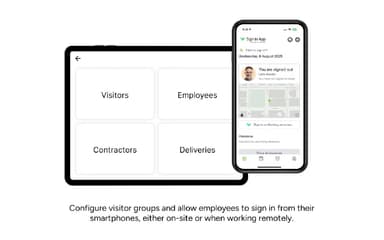
- Mobile Accessibility
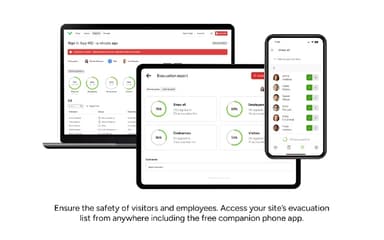
- Compliance And Safety Management
- Visitor and Resource Booking
Sign In App Features
Online Portal
Sign In App provides an easy-to-use online portal that allows administrators to access visitor history, evacuation lists, and site settings from any desktop or laptop. The platform offers real-time occupancy views, pre-registration options with branded invitations and QR codes, and advanced search and reporting capabilities to manage visitors efficiently across all sites.
Notifications
The platform automatically notifies hosts when visitors sign in via email, SMS, Slack, MS Teams, or the Companion app. Sign In App allows customization for each staff member’s notification preferences and can include photos and additional recipients, ensuring teams such as catering or security are informed promptly and consistently for every guest arrival.
Multi-Site Management
Sign In App enables centralized control of multiple locations, providing consistent visitor management across all sites. Administrators can update policies, track staff movements, and manage global staff lists while tailoring the visitor experience for each site. The platform supports seamless staff movement and a professional sign-in experience wherever they are.
Badges
The platform supports customizable visitor badges to confirm identities while reflecting your brand. Sign In App offers a range of templates or fully custom designs, allowing emphasis on critical details such as names or roles. Badges can be highlighted or enlarged for clarity, helping staff identify guests quickly and securely during check-in.
Pros And Cons of Sign In App
Pros
Easy to use for staff
Contactless sign-in feels convenient
Helpful visitor and staff tracking
Cons
Navigation can feel a bit confusing
Printer connections may drop sometimes
Sign In App Reviews
Total 42 reviews
4.8
All reviews are from verified customers
Rating Distribution
5
Stars86%
4
Stars10%
3
Stars2%
2
Stars2%
1
Stars0%
Share your experience
Chemicals, 51-100 employees
Less than a year
“time saving check in app”
Pros
Right away, it took a lot of the trouble out of managing visitors and tracking staff attendance. The layout is clean so new team members usually understand how to use it almost immediately without needing any training. Getting everything up and running was fast and features like badge printing and notifications have really improved how our front desk operates. From a security perspective, it also gives peace of mind because we always have an accurate record of who is on site.
Cons
It does take a little time to get comfortable with some of the more advanced customization options especially things like detailed evacuation reports or setting up multiple sites. Every now and then, there are small syncing delays if the internet connection is weak but it's not something that happens very often.
Rating Distribution
Ease of use
10
Value for money
10
Customer Support
9
Functionality
8
Education Management, 500+ employees
More than a year
“fantastic multi site visitor management”
Pros
Getting this set up was easy and we can carry the same settings across multiple sites without any hassle. We're now using this in about six of our buildings and it has been a huge improvement over the manual process we used before.
Cons
From our side, there's honestly nothing we'd really want to change and I can't point to any major issue. If anything some users might feel it's a bit too basic but for what we need, it fits perfectly.
Rating Distribution
Ease of use
10
Value for money
10
Customer Support
10
Functionality
9
Construction, 500+ employees
Less than a year
“Fast deployment”
Pros
Implementation was very simple because it only took a few minutes to get this up and running. The customer support has been outstanding as well, with help available within minutes whenever it's needed. I also appreciate the integration options since connecting external systems makes it possible to automate workflows. The notification settings are very flexible too, with choices for email, SMS and the Teams Bot. On top of that user management works really well because it can be connected with Entra for dynamic management. Overall, I'd honestly rate this 10/10.
Cons
Honestly, this is a hard one to answer because the app is so easy to use and has worked really well for us. I really can't think of any meaningful flaws at this point. It does exactly what we need and fully meets our requirements.
Rating Distribution
Ease of use
10
Value for money
10
Customer Support
10
Functionality
10
Frequently Asked Questions
Does Sign In App have a mobile app?
Yes, Sign In App offers a dedicated mobile app for both iOS and Android users.
Does Sign In App offer an API?
Yes, Sign In App offers an API.
What language does Sign In App support?
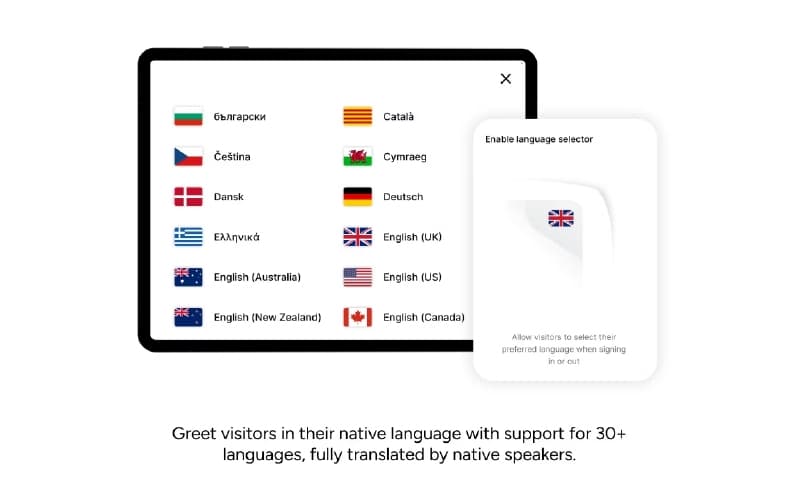
Sign In App supports English, Spanish, French, and German languages.
What other apps does Sign In App integrate with?
Sign In App integrates with multiple systems and platforms, including Microsoft Teams, Google Workspace software, and Slack software.
What level of support does Sign In App offer?
Sign In App offers support through phone, FAQs, a contact form, and online resources.
What types of pricing plans does Sign In App offer?
Sign In App price includes Core at $630/site/year, Enhanced at $1260/site/year, Pro at $1890/site/year, and Enterprise with custom pricing. Get a detailed Sign In App cost breakdown tailored to your specific requirements.
Who are the typical users of Sign In App?
Sign In App features are used by organizations across a wide range of industries and sectors, including logistics, education, and transport.