Last Updated
Overview
Badger Maps improves sales with route optimization and lead management tools for field service businesses. While customization is limited, it supports downloading detailed data reports for deeper insights. Overall, Badger Maps simplifies workflows, saves time on the road, and maximizes productivity for businesses looking to streamline their operations efficiently.
Overall Rating
Based on 9 users reviews
4.9
Rating Distribution
Positive
100%
Neutral
0%
Negative
0%
Starting Price
$69
per month
Badger Maps Specifications
- Customer Relationship Management (CRM)
- Mobile Access
- Real-time Notifications
- Reporting & Analytics
What Is Badger Maps?
Badger Maps is a field service software ideal for sales professionals, offering advanced route optimization, lead management, and data insights. It helps users save time, reduce travel costs, and boost efficiency. The tool empowers wide-ranging businesses with its intuitive interface and detailed reports for better decision-making. Badger Maps is ideal for sales teams across industries, systemizing territory planning and maximizing productivity, ensuring seamless day-to-day operations, and improved sales performance.
What Is Badger Maps Best Known For?
Badger Maps is best known for its map-based route planning and territory management built for outside sales teams. It turns CRM data into optimized daily routes, helping reps spend less time driving and more time selling. One of its standout feature is the mobile-first experience that combines scheduling, customer mapping, and multi-stop route optimization in one place.
How Much Does Badger Maps Cost?
Badger Maps pricing starts at approximately $69/month/user for Business and around $109/month/user for Enterprise. It uses a per-user model that scales with CRM usage, territory size, and routing needs. It also offers a 14-day free trial and 90-day money back guarantee.
Industry estimates typically fall into these ranges:
- Small Outside Sales Teams / Solo Reps: ~$60–$150/month per user
- Mid-Sized Field Sales Teams: ~$1,000–$5,000/month depending on users and integrations
- Large Enterprise Sales Teams: ~$5,000–$15,000+/month for multi-region field operations
The Territory Management Suite is available as an add-on and can be purchased independently or added to your existing plan. It includes:
- Badger Align (Territory Management): ~$20/territory/month for building, balancing, and optimizing sales territories
- Badger Lead Routing: ~$16–$18 per rep/month for automatic lead assignment based on territory rules
- Badger Insights (Analytics & Dashboards): ~$50–$60/user/month for heat maps, performance tracking, and reporting
- Badger Scoreboard (Gamification & KPIs): ~$12–$14/user/month for leaderboards and performance tracking
In addition to the plans and add-on products, the following extra costs may affect the total cost of using Badger Maps software:
- CRM Integration And Onboarding: ~$500–$3,000 depending on complexity
- Territory Setup And Data Structuring: ~$300–$2,000 one-time for cleaning and organizing accounts
- Optional Enterprise Customization/API Support: Varies based on workflow depth and internal systems
Overall, the suite is designed so companies start with routing + CRM mapping, then add territory management, analytics, and automation as field sales operations scale.
Disclaimer: The pricing is subject to change.
Badger Maps Integrations
Badger Maps has integration arrangements with different apps, such as:
- Salesforce
- Microsoft Dynamics
- HubSpot
- Zoho
- Insightly
- NetSuite
- Oracle NetSuite
How Does Badger Maps Work?
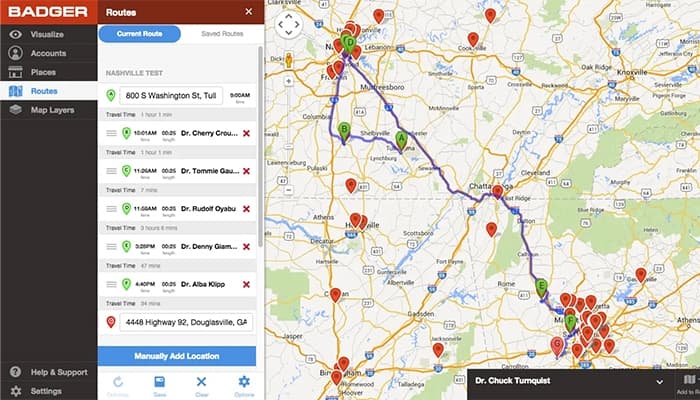
Badger Maps works by turning your CRM data into a map-based field sales workspace that helps you plan visits, optimize routes, and manage customer activity from one place.
- Connect your CRM (Salesforce, HubSpot, Zoho, etc.) or upload a CSV file to bring all customer and prospect data into the platform
- Display all accounts on an interactive map so you can visually understand your territory and customer distribution
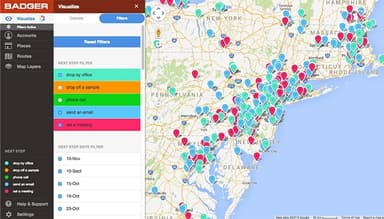
- Filter and segment accounts using key CRM fields such as revenue, last visit date, account type, or custom tags to identify priority visits
- Explore and select customers on the map using tools like the Lasso feature to quickly choose multiple accounts for a day or week of visits
- Optimize your schedule by generating an efficient multi-stop driving route that automatically orders visits to save time and reduce travel
- Adjust and save routes for recurring visits or modify them on the go while working in the field.
- Log and update each visit by checking in, adding notes, or uploading photos, with all activity syncing back to your CRM automatically
- Track and review field activity through summaries and reports that help managers monitor visits, routes, and rep productivity
- Scale territory management with advanced tools like territory alignment, lead routing, and performance dashboards for larger sales teams
Who Is Badger Maps For?
Badger Maps software is specifically structured for field sales and service teams and is suitable for use by the following:
- Sales managers
- Sales reps
- Sales trainers
- Team pilots
Badger Maps Use Cases
Based on user feedback and Badger Maps’ functionality, the following scenarios show where the software fits best for field and outside sales teams:
Field Sales Reps Covering Large Territories With Tightly Packed Daily Visit Schedules
When sales reps manage 50–200 accounts spread across wide geographic areas, a large part of their day goes into deciding which customers to visit first. That planning time often competes with actual customer-facing work. Teams in distribution, pharmaceuticals, and B2B manufacturing use Badger Maps to structure daily visits into clear driving routes. This is especially useful when reps handle both existing accounts and new prospects in the same territory.
Sales Teams Using CRM Systems While Spending Most Of Their Time In The Field
In many field-heavy sales organizations, reps working with Salesforce, HubSpot, or Microsoft Dynamics tend to update records after their visits rather than during them. Notes and visit details are often reconstructed later in the day, which can lead to missing or incomplete entries. Badger Maps is used in situations where reps need to capture visit activity while moving between appointments. Companies bring it in when they want more consistent CRM updates without changing how field work is done.
Organizations Adjusting Territories After Expansion Or Restructuring
As companies hire new reps, enter new regions, or absorb accounts after acquisitions, territory balance often becomes uneven. Spreadsheet-based planning can make it harder to see overlaps between reps or accounts that fall through gaps. Sales operations teams turn to Badger Maps when they need to redraw coverage areas and redistribute accounts based on geography and workload. This becomes particularly relevant during periods of rapid expansion or structural change.
Field Reps Looking For Nearby Prospects Between Scheduled Visits
During travel between appointments, sales reps often pass by potential customers without acting on them due to limited visibility into nearby accounts. Over time, these missed stops can affect overall coverage in route-based selling models. Badger Maps is used when reps want to identify nearby prospects and add them into their day without rebuilding their entire schedule. This is common in industries such as medical devices, wholesale distribution, and other field-driven sales environments.
Sales Managers Tracking Activity Across Distributed Field Teams
For managers overseeing multiple field reps, understanding actual customer visit patterns can be difficult when updates depend on manual reporting. Self-reported activity often lacks detail about which accounts were visited versus skipped. Badger Maps is used when managers need clearer visibility into territory coverage and daily field activity without requiring separate reporting workflows from reps. This helps leadership identify gaps and understand how effectively regions are being covered.
Is Badger Maps Right For You?
Badger Maps is an ideal solution for field sales teams aiming to increase efficiency and productivity. It offers route optimization, CRM integration, and real-time access to customer information. Its easy-to-use interface, secure data handling, and features like route planning and lead management assist users to systemize daily tasks and save time. Badger Map helps salespeople focus on key activities, enhance performance, and drive business growth, ensuring that every day is more productive than the last. That’s why Badger Maps is a top choice for hundreds of businesses, such as Cutter & Buck, NCR Aloha, and Cargill.
Are you still unsure about Badger Maps software? Contact our experts at (661) 384-7070 for further assistance.
Badger Maps Features
Route Optimization
Badger Maps features a Route Optimization tool that arranges multiple stops into the most efficient driving order and supports long daily routes for field sales teams. It helps reduce unnecessary travel between accounts and is commonly used in roles where reps cover wide geographic regions. For teams with heavy travel schedules, it directly impacts how many customer visits can be completed in a day.
Teams
Teams functionality supports managers in assigning territories, adjusting account distribution, and reviewing field activity across multiple reps. It is especially relevant in growing sales organizations where territory imbalance can lead to missed accounts or uneven workloads. Managers can use it to understand coverage gaps and how effectively regions are being worked.
Check-Ins
Check-Ins allow reps to log visit details, notes, and photos during or after customer meetings, which then sync back to the CRM. This reduces gaps between field activity and CRM records, especially in fast-moving sales environments. Managers can rely on these updates to review visit frequency and understand how often key accounts are being engaged.
Color And Filter
Color and Filter tools allow users to segment accounts using CRM data like revenue size, account type, or visit history and visualize them directly on the map. This helps reps quickly identify which customers deserve priority during limited travel time. It is often used in upsell or cross-sell situations where account prioritization affects revenue outcomes.
Lasso
Lasso lets field reps drag a selection area on the map and quickly add multiple nearby accounts into a route instead of selecting each stop manually. It is mainly used when planning clustered visits in dense territories where speed and geography matter. This becomes especially useful for reps managing many accounts in a single day where quick route building directly impacts time spent in front of customers.
Route Mode
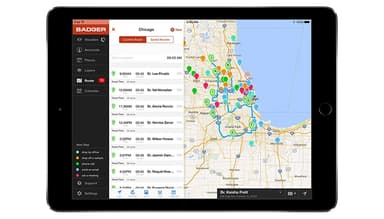
Route Mode gives reps a structured daily visit sequence so they can follow planned stops without constantly switching views or reworking schedules. It is useful for maintaining consistency in execution-heavy sales roles where daily visit discipline matters. In practice, it helps field reps stay aligned with planned customer coverage throughout the day.
Pros And Cons of Badger Maps
Pros
Saves time on route planning
Helps with note and progress tracking
Allows filtering by regions
Supports downloading data reports
Cons
Users cannot add extra categories in the tool
The prospecting feature needs improvement
Limited customization options
Badger Maps Pricing
Business
View Price
What's Included
AI route planner, email automations & voice-to-CRM
AI-powered customer visit recommendations
Personalized 1:1 & team onboarding training
Automated, customizable forms connected to CRM
Route optimization with up to 120 stops
Talk-to-text notes with photos (iOS, Android, Windows)
Standard 2-way native CRM integration (real-time)
Mileage tracking & automated expense reports
Enterprise
View Price
What's Included
Advanced CRM integration with SCIM & SSO support
Enhanced lead generation (view up to 60 leads at a time)
HIPAA compliance & dedicated account manager
Up to 10,000 records/accounts per license
Customizable forms with conditional fields
All Business plan features included
Location & time-stamped activity reports
Priority dedicated support team
Disclaimer: The pricing details were last updated on May 12, 2026 from the vendor's website. Please contact us for a tailored pricing list.
Badger Maps Reviews
Total 9 reviews
4.9
All reviews are from verified customers
Rating Distribution
5
Stars89%
4
Stars11%
3
Stars0%
2
Stars0%
1
Stars0%
Share your experience
Anonymous
Airlines/Aviation, 101-500 employees
Less than 6 months
“Perfect tool for field sales efficiency”
Pros
Managing sales and keeping track of clients has become so much quicker and more efficient for me. It really saves a lot of time and effort.
Cons
I haven't noticed anything major yet but I'll keep using it and see how it goes.
Rating Distribution
Ease of use
10
Value for money
10
Customer Support
10
Functionality
10
Corina
Retail, 1-10 employees
Less than 6 months
“Really good experience”
Pros
It's simple and easy to use. What I love most is how its simplicity makes it so effective.
Cons
I really liked everything about it. It worked exactly as I expected it to. It's super simple to use and honestly, it's a real gem.
Rating Distribution
Ease of use
10
Value for money
10
Customer Support
10
Functionality
10
Susan
Construction, 11-50 employees
Less than 6 months
“Nothing better than Badger Maps”
Pros
Badger Maps has been an awesome way to track my sales reps all over the country. It's a one-stop shop where I can pin leads, check out notes and keep an eye on their progress. Plus, the customer support is super helpful and always available when needed.
Cons
So far, I have no complaints about Badger. It's been working just fine for me.
Rating Distribution
Ease of use
10
Value for money
10
Customer Support
10
Functionality
10
Frequently Asked Questions
Does Badger Maps offer an API?
Yes, Badger Maps provides an API.
Does Badger Maps have a mobile app?
Yes, Badger Maps has a mobile app for Android and iOS users.
What language does Badger Maps support?
Badger Maps currently support English Language.
What types of pricing plans does Badger Maps offer?
The Badger Maps cost includes two plans: Business at $69/user/month (monthly) and Enterprise at $109/user/month (monthly). A free trial for Badger Maps is available on request. Contact us to get a custom Badger Maps cost quote.
What other apps does Badger Maps integrate with?
Badger Maps seamlessly integrates with Zoho, Salesforce, HubSpot, Insightly, Microsoft Dynamics, and NetSuite.
Who are the typical users of Badger Maps?
Badger Maps is designed for field sales and service teams, making it ideal for sales representatives, sales managers, sales trainers, and team pilots.
What level of support does Badger Maps offer?
Badger Maps offers support through phone, chatbot, email, FAQs/forums, and knowledge base.