Last Updated

Key Takeaways

Generated from the text of customer reviews

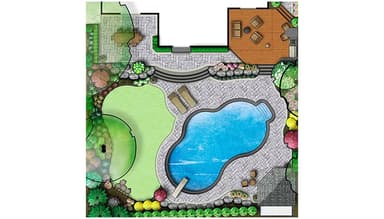
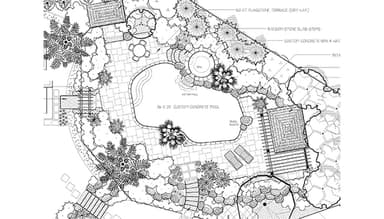
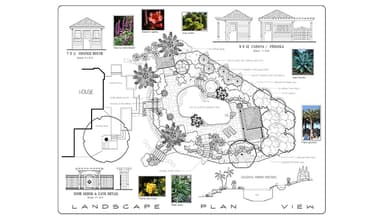
DynaSCAPE is a landscape design, estimating, and business management platform used by landscape contractors, design-build firms, and outdoor planning teams. Users frequently praise its plant and furniture libraries for creating detailed landscape plans, although some note limitations when handling larger projects and multi-page printing tasks. Recent updates introduced 50+ new figures, including pool accessories and Tropical Desert plant libraries.

Our Verdict

DynaSCAPE is a practical fit for landscape contractors, design-build firms, and outdoor service companies managing estimates, crews, and project costs across multiple jobs. Users generally consider the pricing reasonable for landscaping-specific workflows, though additional modules may increase costs for smaller businesses. It is recommended for companies seeking industry-focused operational management tied closely to landscape design workflows.

Overall Rating

Based on 17 users reviews

3.9

Rating Distribution

Positive

82%

Neutral

12%

Negative

6%

Starting Price
$119

per month
DynaSCAPE Specifications

  • Work Order Management
  • Scheduling & Dispatching
  • Mobile Access
  • Customer Relationship Management (CRM)
View All Specifications

What Is DynaSCAPE?

DynaSCAPE is a cloud-based landscape software solution for design and business management professionals, including contractors. It offers an all-in-one platform to manage landscape design, business operations, and estimating, helping businesses create proposals, manage sales pipeline, generate invoices, and handle project coordination. The software is tailored to meet the specific needs of the green industry, offering tools to manage material take-offs, change orders, labor tracking, job costing, and proposal generation.

What Is DynaSCAPE Best Known For? 

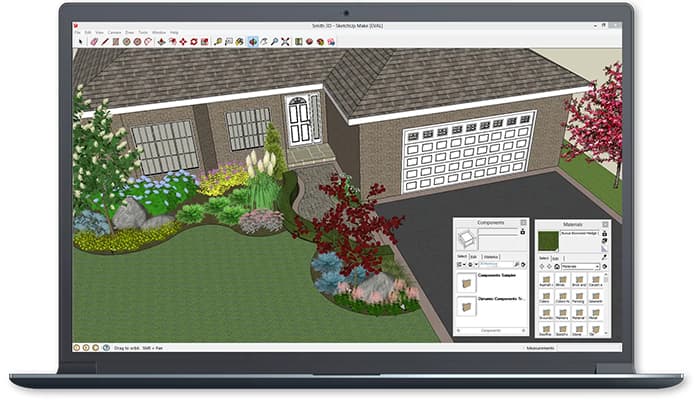
DynaSCAPE is best known for its SketchUp plugins, which allow landscape designers and contractors to connect landscape design work with estimating and proposal creation. The plugins support workflows such as importing design measurements, calculating material quantities, and transferring project data into estimates without manually re-entering information. 

How Much Does DynaSCAPE Cost? 

The starting price of the software is $119/month. This package, known as the Creator plan, includes various features, such as precision measuring, unlimited designs, cloud connectivity, and more. Additional DynaSCAPE pricing tiers are as follows: 

  • Design: $158/month 

Design Bundles: 

  • Design + Manage360 + Color: $394/month 
  • Design + Color + Sketch3D: $219/month 
  • Design + Color: $195/month 
  • Creator + Color: $195/month 
  • Design + Sketch3D: $195/month 
  • Manage360: $219/month for its Sales & Estimate Package and $359/month for all Manage360 features 

DynaSCAPE cost will differ depending on your organization's type and needs. Besides the monthly subscription charges, users should also consider paying additional, hidden costs, including but not limited to the following: 

  • Implementation And Onboarding Costs: Approximately $599–$1,259 as a one-time cost, depending on the selected package and deployment complexity 
  • Training Costs: May range from $209–$679 per course, depending on the software module and training depth selected 
  • Add-On Module Costs: Advanced add-ons such as Color and Sketch3D may cost approximately $59/month each 
  • 3D Rendering And Visualization Costs: Might add additional Sketch3D-related expenses of approximately $59/month 
  • Integration Costs: May range from approximately $500–$3,000 for more customized environments 
  • Premium Support Or Advanced Services: Might range from approximately $100–$250/hour depending on service complexity 
Get a personalized DynaSCAPE price quotation today.

Disclaimer: The pricing is subject to change. 

DynaSCAPE Integrations

DynaSCAPE software supports integration with Quickbooks.

How Does DynaSCAPE Work? 

Here’s how users can get started with DynaSCAPE after onboarding is complete:

  • Log into the main dashboard to access estimating tools, sales activity, crew schedules, and active jobs 
  • Set up customer records, property details, supplier information, and service categories 
  • Configure costbooks with labor rates, material pricing, equipment costs, and markup rules 
  • Create proposals and estimates using landscape measurements, material quantities, and project templates 
  • Assign jobs to crews, schedule site visits, and monitor work progress from the operations dashboard 
  • Review sales pipelines, pending bids, completed estimates, and customer communication records 
  • Track labor hours, material usage, field notes, and job updates through the mobile crew app 
  • Generate invoices, review job costing reports, and export financial data to accounting systems such as QuickBooks 
  • Manage user permissions, office access, and reporting visibility for estimators, sales staff, and field teams 
Schedule a free DynaSCAPE demo to learn more about its features. 

Who Is DynaSCAPE For?

The software caters to the needs of businesses of all sizes across various industries, such as:

  • Construction
  • Design
  • Architecture and planning
  • Utilities
  • Food and beverages
  • Luxury goods and jewelry
  • Retail

DynaSCAPE Use Cases

Based on our analysis of the user feedback platform’s capabilities and common landscaping business workflows, we have identified several scenarios where DynaSCAPE is frequently used: 

Landscape Design-Build Companies Managing Estimating Alongside Design Work

Landscape firms that handle both design and project execution often struggle with transferring measurements, material quantities, and labor assumptions between separate design and estimating systems. DynaSCAPE may fit these environments by connecting design workflows with estimating and proposal creation, particularly for teams already using SketchUp during client presentations. This setup reduces repeated data entry when preparing bids for patios, irrigation systems, planting layouts, or outdoor living projects. 

Growing Landscaping Businesses Coordinating Multiple Field Crews

As landscaping companies expand, scheduling crews, tracking labor hours, and monitoring project activity across multiple job sites can become difficult to manage through spreadsheets or paper records. DynaSCAPE platform is commonly used by businesses that need office staff and field crews working from the same operational data. Managers can monitor job progress, material usage, and labor reporting without relying on manual end-of-day updates from crews. This type of workflow is particularly useful for maintenance operations and seasonal landscaping businesses handling overlapping service schedules.

Estimating Teams Handling Large Volumes Of Residential Bids

Contractors preparing frequent estimates for residential landscaping projects often need faster ways to maintain pricing consistency across proposals. DynaSCAPE software may work well for estimating teams managing recurring calculations tied to labor rates, supplier pricing, equipment costs, and markup rules. Businesses quoting hardscape installations, planting projects, outdoor lighting, or lawn renovations can maintain standardized pricing structures while still adjusting estimates for property-specific requirements. It reduces pricing discrepancies between estimators working on similar project types.

Multi-Service Landscape Companies Tracking Job Profitability 

Companies offering a mix of landscaping, snow removal, irrigation, maintenance, and construction services frequently need better visibility into project profitability across divisions. The software is often adopted by operations managers who want labor costs, material expenses, invoices, and change orders tied back to individual jobs. This allows teams to compare estimated versus actual costs while reviewing which service categories generate stronger margins. Businesses managing long-duration commercial contracts may also use these records when reviewing seasonal budgeting decisions.

Landscape Businesses Managing Change Orders And Project Adjustments Mid-Job

Landscape contractors working on residential or commercial projects often face frequent scope changes once work has begun, especially when clients request adjustments to materials, layouts, or installation details. These changes can create confusion when updates are tracked across emails, paper notes, or separate spreadsheets. DynaSCAPE is commonly used in such situations to keep revised estimates, updated costs, and project modifications tied to the original job record. It helps teams maintain consistency between what was quoted, what was approved, and what is actually delivered on site, particularly in projects where revisions are common during execution. 

Is DynaSCAPE Right For You?

DynaSCAPE might be an excellent choice for businesses in the landscape industry due to its comprehensive tools for design, estimating, and business management. It combines estimating scheduling, sales tracking, and project management in a unified platform. Additionally, the software is also PCI DSS, PIPEDA, and CASL compliant, ensuring the security or sensitive user data. The software is also highly scalable to meet the needs of growing organizations.

Still unsure if DynaSCAPE software is right for you? Contact us at (661) 384-7070 for personalized guidance.

DynaSCAPE Features

Account Management

DynaSCAPE allows landscape businesses to efficiently manage client information, track interactions, and monitor sales pipelines. This centralized approach improves customer relationship management by letting teams track leads, respond to customer inquiries, manage ongoing accounts, and monitor bid progress.

See How It Works
Opportunity Management

The software lets users oversee sales opportunities from initial contact to final sale. By tracking each stage of the sales process, businesses can monitor pending bids, review sales activity, identify stalled opportunities, and track conversion progress.

See How It Works
Costbook

DynaSCAPE's integrated costbook provides a built-in database of materials, labor rates, and equipment costs. This resource allows users to create accurate and consistent estimating, ensuring that all quotes reflect true expenses and desired profit margins.

See How It Works
Purchase Orders

Users can automate the creation and management of purchase orders. By using standardized purchase order workflows, businesses can track material requests, reduce manual entry errors, manage supplier orders, and maintain project schedules.

See How It Works
Mobile Crew Tracking

DynaSCAPE offers a mobile app that allows crews to log time, materials used, and job progress in real-time. This feature improves communication between field teams and office staff, helping businesses track labor hours, verify completed work, prepare invoices, and monitor active jobs.

See How It Works

Pros And Cons of DynaSCAPE

Pros

  • Helps manage landscaping projects in one place

  • Speeds up estimating and design tasks

  • Custom pricing improves quote accuracy

  • Keeps client information organized and accessible

  • Support team resolves issues quickly

Cons

  • Limited reporting capabilities

  • Performance can slow during heavy use

  • Training takes time for new users

  • Not ideal for small businesses

DynaSCAPE Reviews

Total 17 reviews

3.9

All reviews are from verified customers

Rating Distribution

5

Stars

18%

4

Stars

65%

3

Stars

12%

2

Stars

0%

1

Stars

6%

Share your experience

J

Jamie

Facilities Services, 101-500 employees

4.0
January 2025

Reliable tool for designing

Pros

It is super easy and smooth to use. I got exactly what I needed for quotes and the integration with design software made takeoffs from drawings easy.

Cons

After finishing the quote, there was nothing else. At the time, it was not a complete package and when I reached out, they said they planned to add more features but the development timeline was too long. I needed something faster.

Rating Distribution

Ease of use

8

Value for money

7

Customer Support

10

Functionality

7

M

Michael

Construction, 1-10 employees

4.0
October 2021

Dynascape in my workflow

Pros

This is the only software I have really used. I am sure AutoCAD could work for us but switching would be a huge change. It took a little time to get comfortable with it but I am completely happy with it now.

Cons

As a Mac user, I have to run this through Parallels Desktop but saving files is glitchy. I really wish Dynascape had a Mac or cloud version so I could use it on any device.

Rating Distribution

Ease of use

8

Value for money

8

Customer Support

6

Functionality

10

G

Gina

Design, N/A employees

5.0
October 2021

Great software for landscape drafting

Pros

Super easy to use! I am really enjoying the new SketchUp overlays.

Cons

I love everything about it! I am not a tech person but I can barely remember hand drafting anymore. This is the only CAD-based landscape software I have used and I am so satisfied that I have never felt the need to look elsewhere.

Rating Distribution

Ease of use

10

Value for money

10

Customer Support

10

Functionality

10

Frequently Asked Questions

Does DynaSCAPE offer an API?

Yes, DynaSCAPE offers an API.

What language does DynaSCAPE support?

DynaSCAPE supports the English language.

What other apps does DynaSCAPE integrate with?

DynaSCAPE integrates with Quickbooks.

Does DynaSCAPE have a mobile app?

Yes, DynaSCAPE has a mobile app available on iOS and Android devices.

What type of pricing plans does DynaSCAPE offer? 

DynaSCAPE pricing will differ depending on your business needs. The software offers the Creator plan for $119/month, Design for $158/month, Design + Manage360 + Color for $394/month, Design + Color + Sketch3D for $219/month, Design + Color for $195/month, Create + Color for $195/month, Design + Sketch3D for $195/month, Manage360 Sales & Estimating Package for $219/month, and Manage360 Features for $359/month. Get custom DynaSCAPE cost today.

Who are the typical users of DynasCAPE?

The typical users of DynasCAPE are those in the architecture and planning, food and beverages, luxury goods and jewelry, construction, design and utilities industries.

What level of support does DynaSCAPE offer?

DynaSCAPE offers email, phone support, chat, FAQs and knowledge base.