


Jobber

Last Updated
Key Takeaways
Generated from the text of customer reviews
Our Verdict
Overall Rating
Based on 53 users reviews
4.2
Rating Distribution
Positive
77%
Neutral
17%
Negative
6%
Starting Price
$39
per month
Jobber Specifications
- Word Order Management
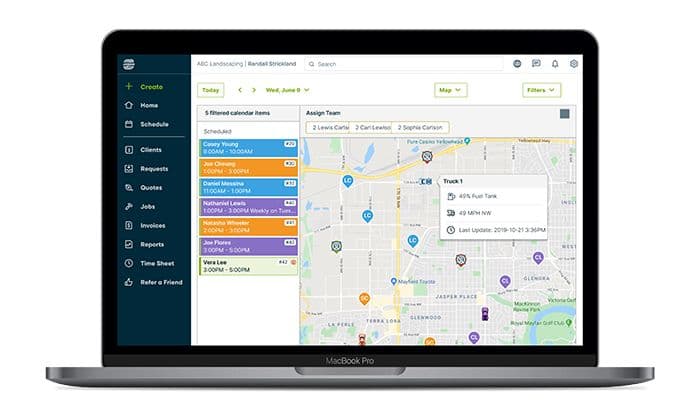
- Scheduling & Dispatching
- Mobile Access
- Customer Management
Jobber Features
Client Manager
Jobber software centralizes client information, allowing businesses to easily access contact details, service history, and communication logs. This streamlines client interactions, improves customer service, and enables personalized communication for enhanced client relationships.
Scheduling And Dispatching
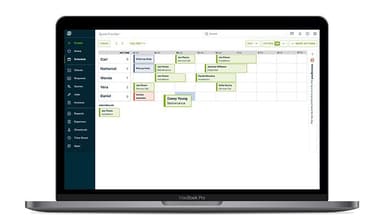
This feature simplifies the process of assigning and managing appointments for field teams. With intuitive scheduling tools and real-time updates, businesses can optimize their schedules, reduce travel time, and maximize productivity.
Online Booking
The software empowers clients to book appointments directly through a business's website or social media platforms. This convenient self-service option increases booking rates, reduces administrative overhead, and enhances the overall customer experience by providing a seamless booking process.
Job Forms
Businesses can create customizable digital forms for collecting important job details, such as service requests, site assessments, or safety checklists. This ensures consistency and accuracy in information capture, streamlines data collection processes, and minimizes paperwork.
Marketing Tools
Jobber software enables businesses to create and send professional-looking emails, newsletters, and promotions to clients. With built-in templates, scheduling options, and tracking capabilities, businesses can easily engage with clients, nurture relationships, and drive sales.
Pros And Cons of Jobber
Pros
Cheap to set up
Easy to deploy, reduces manual work and operational errors
Enables mobile billing and instant payments
Robust suite of tools improves scheduling and client communication flow
Cons
Customer support could be better
Some features can appear dated
Jobber Pricing
Core | Connect | Grow | Plus |
|---|---|---|---|
$39per month | $169per month | $349per month | $599per month |
|
|
|
|
Disclaimer: The pricing details were last updated on Sep 14, 2026 from the vendor's website. Please contact us for a tailored pricing list.
Jobber Reviews
Total 53 reviews
4.2
All reviews are from verified customers
Rating Distribution
5
Stars58%
4
Stars19%
3
Stars9%
2
Stars8%
1
Stars6%
Share your experience
Information Technology and Services, 11-50 employees
Less than a year
“Smooth customer management”
Pros
What I like is that it offers a great customer management system that makes it simple to book jobs online and really smooths out the booking workflow for businesses that provide services.
Cons
As a web developer I appreciate that their lead capture form can be embedded but in practice the form is extremely long and ends up wrecking any page layout I try to drop it into. Splitting it into multiple steps or pages would make a huge difference and fix the design issues.
Rating Distribution
Ease of use
7
Value for money
8
Customer Support
8
Functionality
7
Electrical/ Electronic Manufacturing, 1-10 employees
Less than a year
“Limited features...”
Pros
I recently canceled two subscriptions with this service and I find it an average piece of software. HouseCall Pro is far superior in my experience. This company held me hostage for $8,250 for seven days, claiming it was my first transaction. With HouseCall Pro I had my funds the next day, even on their first transaction. I lost business because of this delay and I won't use them again. I'm switching back to HouseCall Pro
Cons
I would rather pay more for better service so I'm going back to HouseCall Pro, they have decent pricing, let you load pictures and notify you when paid.
Rating Distribution
Ease of use
5
Value for money
2
Customer Support
2
Functionality
5
Consumer Services, 1-10 employees
More than a year
“organized and evolving platform”
Pros
For my business, this tool helps me stay organized and prevents me from letting payments or client messages slip through the cracks. What I appreciate most is how it's constantly evolving, new features are regularly added to simplify tasks and boost efficiency. Truly, I can't imagine running my operation without it.
Cons
Honestly I wish integrating CallRail for inbound calls had been simpler, aside from that, the built-in features have been fantastic and keep getting better. Overall everything native works really well and the ongoing improvements are noticeable.
Rating Distribution
Ease of use
10
Value for money
10
Customer Support
10
Functionality
10
Frequently Asked Questions
Does Jobber software offer an API?
Yes, the software offers an API.
What language does Jobber software support?
Jobber software supports English and Spanish.
What other apps does Jobber software integrate with?
Jobber software integrates with QuickBooks, Zapier, Gusto and CompanyCam.
Does Jobber software support mobile devices?
Yes, Jobber software supports Android and iOS devices.
What types of pricing plans does Jobber software offer?
Jobber offers three packages: Core at $39/month (1 user), Connect at $169/month (up to 5 users), Grow at $349/month (up to 10 users), and Plus at $599/month (up to 15 users). The Jobber software pricing can be tailored to your organization's needs, accessible through a quote request and a free trial available.
Who are the typical users of Jobber software?
The typical users of Jobber software are professionals working in plumbing, HVAC, landscaping, general contracting, and lawn care.
What level of support does Jobber software offer?
Jobber software offers email, live chat, phone and FAQs.