

Uptick
Last Updated
Key Takeaways
Generated from the text of customer reviews
Uptick is a field service management platform designed specifically for fire inspection, testing, and maintenance businesses. While its reporting features could be improved, its scheduling, inspection forms, and billing tools make it a practical choice for managing day-to-day technical field operations. Recent updates to Uptick introduced Digital Logbooks, allowing fire protection businesses to manage their logbooks digitally and meet AS 1851-2012 standards.
Our Verdict
Uptick is a practical option for fire protection companies that want to centralize service management and optimize their workflows. It provides sales quoting, customer portal, and inventory tools. Pricing is more suited for growing businesses in this space. We recommend it for service businesses managing their operations from one platform.
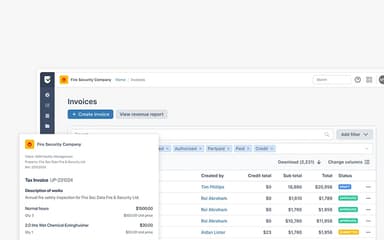
Uptick Specifications
- Work Order Management
- Scheduling & Dispatching
- Mobile Access
- Customer Management
What Is Uptick?
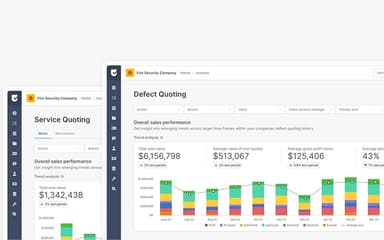
Uptick is a cloud-based fire and security inspections service management software that supports maintenance and installation-related work for technicians. It provides digital inspection forms, asset tracking, recurring job scheduling, deficiency management, and timesheets, helping businesses record service tasks and keep job information organized. Its mobile app lets users access site records, view schedules, and plan routes while working in the field. Customer portal and reporting tools also help share service information and monitor business performance.
What Is Uptick Best For?
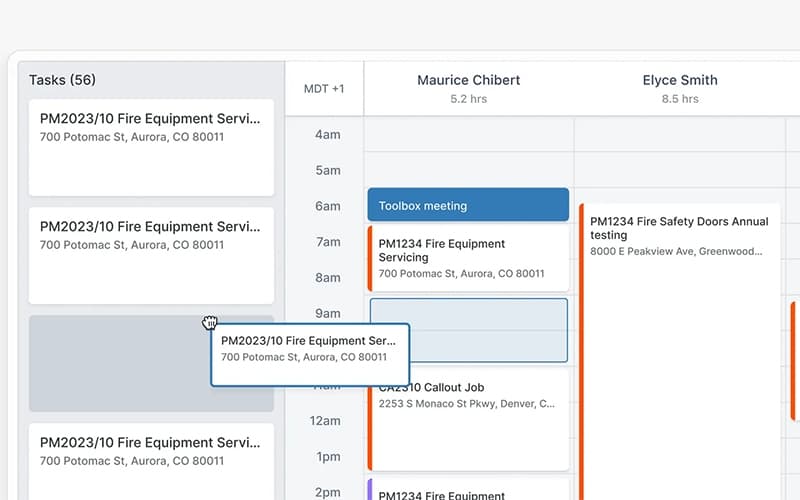
Uptick stands out for its AI Scheduler, which lets businesses assign and dispatch hundreds of tasks efficiently. It provides a real-time view of technician availability and workload, helping teams balance jobs and maximize billable hours. The scheduler also uses intelligent route optimization to send technicians on faster routes, helping reduce travel time and fuel costs.
How Much Does Uptick Cost?
Uptick pricing is estimated to fall between $50 and $150/user/month, based on industry benchmarks for similar field service software solutions. This range is intended for general budgeting purposes, as actual costs may vary depending on factors such as the number of users, selected features and modules, and integrations or operational scale.
In addition to the base subscription costs, organizations should account for the following potential expenses:
- Implementation: $500–$2,000 — Covers initial account setup, user configuration, service settings, and deployment assistance
- Data Migration: $500–$2,000 — Import and cleanup of customer, asset, and service data
- Training And Onboarding: $250–$1,000 — User training for office staff, administrators, and technicians
- Integrations: $100–$1,000 — Basic-to-moderate integration work for accounting, CRM, SSO, or other systems
- Customization And Configuration: $500–$2,000 — Configuration of forms, workflows, permissions, service rules, and reporting
- Premium Support: $500–$2,000 — Additional technical assistance for building or configuring custom integrations
User reviews present mixed opinions on Uptick pricing. Some users consider it expensive, particularly for those with limited usage, while others find the pricing structure reasonable. Despite the higher cost, some reviewers believe the software provides sufficient value to justify the expense.
Disclaimer: Pricing references are based on publicly available third-party information and industry benchmarks. Actual costs may vary.
Uptick Integrations
Uptick supports integration with a variety of third-party applications, including:
- QuickBooks
- Honeywell
- Xero Accounting Solution
- Sage
- MYOB
- Locatrix
How Does Uptick Work?
Follow the steps outlined below to get started with the software:
- Log in to your Uptick account to access the platform and manage service activities
- Set up clients, properties, and contracts to organize customer and site information
- Prepare service quotes or projects based on the required work
- Add inspection, repair, or callout tasks for scheduled service activities
- Schedule tasks for technicians based on availability and job locations
- Complete assigned tasks through the mobile app by recording work details, photos, materials, and labor
- Generate reports and certificates after completing the required service work
- Create invoices based on completed tasks and send them to customers
Who Is Uptick For?
The platform is designed to support businesses across a range of service areas, including:
- Fire protection
- HVAC
- Security services
Uptick Use Cases
Based on our analysis and user feedback of Uptick features and capabilities, we have identified the following key scenarios where it is a good fit:
Fire Protection Teams Struggling To Manage Multiple Tasks Within Installation Projects
Managing large installation projects can become difficult when teams need to keep related tasks, progress, costs, and billing details organized. Uptick allows users to create projects from scratch or convert existing quotes into projects and tasks. Related tasks can be grouped under the same project, making it easier to track progress and compare costs against the project budget. As billing progresses, teams can also manage deposit, progress, and retention claims within the project.
Technicians Struggling To Keep Asset Locations Updated On Floorplans
Technicians may need to update asset locations when equipment is added, removed, or moved within a building. Uptick allows users to create floorplans from Google Maps, images, or PDFs and place assets directly on them. When site information changes, users can move or remove assets to keep their locations updated. They can also add notes and photos to assets for additional context. These floorplans can then be included in reports to give customers a visual record of asset locations.
Service Managers Handling Different Inspection Documentation Requirements
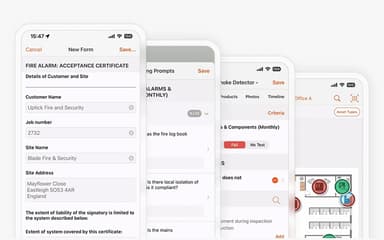
Service managers may need different forms to meet customer, site, and local compliance requirements. Uptick provides a library of hundreds of local compliance and inspection forms covering major US codes, including NFPA and AES. Teams can also create custom forms for individual customers or sites, while existing PDF forms can be converted into digital versions without coding. Completed forms can then be sent directly after an inspection, reducing reliance on paper documentation.
Teams Facing Difficulty Tracking Stock Transfers Between Locations
Service teams can lose visibility into available stock when equipment and materials are stored across multiple locations. Uptick allows users to manage stock at different locations and record transfers between them. Teams can also track items assigned to technicians, helping them see where stock is currently held. Supplier purchase orders can be digitized, while supplier catalogues and price books can be imported into the system. This gives teams a central record of stock, suppliers, and item movements.
Is Uptick Right For You?
If you are a fire and security inspection business looking to manage field operations, customer relationships, and asset maintenance, Uptick provides the tools to keep these processes connected within a unified platform. Its cloud-based approach gives teams access to essential service information across locations, while AI scheduling capabilities help coordinate technicians and assign work efficiently.
The software also supports compliance with industry standards, including NFPA and AES requirements, helping businesses maintain compliance and meet inspection requirements. The platform is also trusted by leading fire protection businesses, including Thompson, XDS Fire, Fire System Services, Homer, Exit PRO, and Colorado Fire Services.
Still not sure if Uptick is right for you? Contact us at (661) 384-7070 and we will help you make the right choice.
Uptick Features
Customer Portal
Uptick’s customer portal gives clients real-time access to fire safety and property information, including inspection reports, deficiency lists, asset records, quotes, and invoices. Clients can also review and approve quotes directly, keeping essential documents and communication in one place.
Scheduling
This feature helps teams assign jobs to technicians based on their availability, location, skills, and workload. It provides a central view of scheduled work, making it easier to coordinate appointments and manage changes. Teams can also schedule recurring inspection jobs in advance to keep routine inspections on track and reduce missed appointments.
Inspection Forms
The platform allows technicians to complete inspections digitally and record required information directly within the platform. Teams can use customized forms for different inspection types and capture details during site visits. Technicians can also document deficiencies and other inspection findings directly on the form, keeping all relevant information together.
Billing And Invoicing
Uptick lets businesses manage billing and invoicing for their service contracts, including automatic renewals and price increases. Teams can set billing terms to charge customers in advance and create invoices based on these billing terms. The platform also allows businesses to set authorization limits for on-site spending, giving them more control over service-related charges.
Asset Management
This feature lets technicians check the inspection status of assets and add notes through the mobile app. They can record deficiencies, attach photos, and create quotes for issues that cannot be fixed on-site. Technicians can also scan barcodes to quickly add or update asset details.
Pros And Cons of Uptick
Pros
Easy scheduling simplifies appointment management for service teams
Multiple features help businesses maintain service quality during growth
Customizable forms provide detailed inspection results to clients
Friendly support team provides prompt assistance when help is needed
Intuitive interface makes complex workflows easier to manage
Cons
Data merging issues can create challenges during the platform transition
Inventory functionality could be improved for easier stock management
Limited editing makes it harder to update service and defect quotes
Uptick Reviews
Total 11 reviews
5
All reviews are from verified customers
Rating Distribution
5
Stars100%
4
Stars0%
3
Stars0%
2
Stars0%
1
Stars0%
Share your experience
Facilities Services, 11-50 employees
Less than a year
“Amazing software”
Pros
Uptick software is amazing! It is easy to use and it has made a huge difference in boosting our revenue and streamlining operations at RAYN.
Cons
It is fantastic and very easy to use and while feature requests can take a little longer sometimes, I have never had any major problems with it.
Rating Distribution
Ease of use
10
Value for money
8
Customer Support
10
Functionality
10
Consumer Services, 51-100 employees
Less than a year
“Truly stands out for our business”
Pros
Uptick software is pretty easy to use with excellent features that make life easier for both our admins and technicians. I am thrilled to see how my team thrives with it and it keeps helping us grow.
Cons
At first the platform can be a little tricky to get used to because it's packed with features. Also technicians initially struggle with it but eventually love it once they get the hang of how it works.
Rating Distribution
Ease of use
8
Value for money
8
Customer Support
10
Functionality
10
Facilities Services, 11-50 employees
Less than a year
“Impressive in 2025”
Pros
This software is very powerful and perfectly adaptable to our specific needs. Plus the customer service is exceptional and the support meets our expectations.
Cons
It can be a bit overwhelming at times due to the amount going on. There are some challenges since it is new to the North American market but we are working through them.
Rating Distribution
Ease of use
10
Value for money
10
Customer Support
10
Functionality
10
Frequently Asked Questions
Who are the typical users of Uptick software?
The typical users of Uptick are professionals in field service businesses such as fire protection, HVAC, and security services.
Does Uptick offer an API?
Yes, Uptick offers an API.
What language does Uptick support?
Uptick primarily supports the English language.
Does Uptick have a mobile app?
Yes, Uptick offers a dedicated mobile application for iOS and Android devices.
What level of support does Uptick offer?
Uptick provides support through contact form, email, phone, and online resources.
What other apps does Uptick integrate with?
Uptick offers integration with a range of third-party applications, including Xero, QuickBooks, Sage, Honeywell, MYOB, and Locatrix.
What types of pricing plans does Uptick offer?
Uptick pricing is estimated to fall between $50 and $150/user/month. This range is intended for general budgeting purposes, as actual costs may vary. Request a detailed Uptick cost breakdown for your organization today.