


RouteIQ

Claimed
Last Updated
Overview
RouteIQ software helps fleet dispatchers organize multiple delivery and service assignments across driver shifts. Although drivers can work on only one route at a time, the platform supports multiple scheduled routes per driver, allowing dispatchers to plan morning and afternoon assignments separately.
Be the first one to leave a review!
No review found

Starting Price
$29
per site per month
RouteIQ Specifications
- Vehicle Tracking (GPS)
- Driver Management
- Route Optimization
- Compliance Management
What Is RouteIQ?
RouteIQ is dispatch and field-operations software developed by CodeRed Technologies, Inc. It helps businesses coordinate jobs, drivers, and routes through a shared web dashboard. Dispatchers can assign jobs, optimize multi-stop routes, and monitor driver locations and job progress.
The platform offers iOS and Android apps for drivers to view assignments, navigate routes, update job statuses, and submit proof of completion. RouteIQ also provides customers with branded tracking links and configurable notifications to keep them informed about delivery or service progress. It supports configurable job states, service types, zones, teams, dispatch rules, customer portals, chat, REST API access, and webhooks.
What Is RouteIQ Best For?
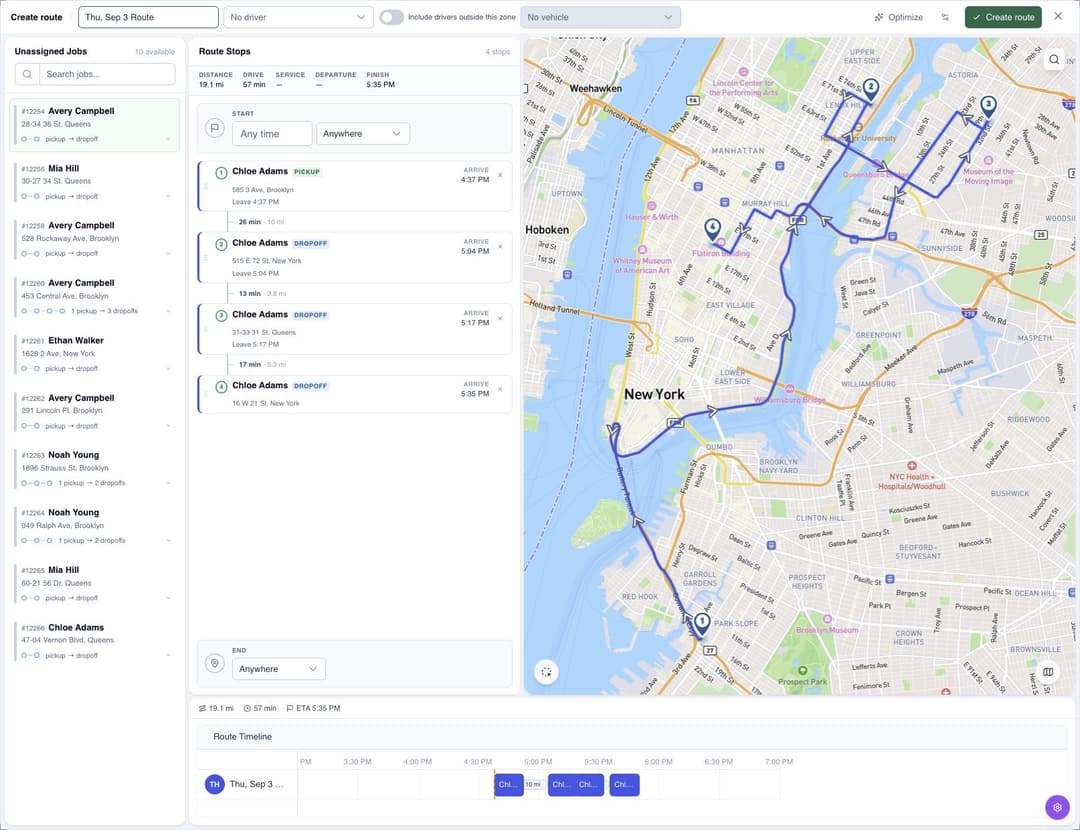
RouteIQ's standout feature is its 'Route Optimization', which helps fleet managers plan efficient multi-stop routes while accommodating scheduled delivery or service windows. The feature automatically rearranges stops based on travel time or distance, even combining stops from different jobs into a single route. Through this feature, the platform helps delivery and field service fleet operators reduce unnecessary travel, improve driver productivity, and complete more stops while meeting scheduled service commitments.
How Much Does RouteIQ Cost?
RouteIQ pricing starts at $29/site/month for the Pro plan, which includes 500 billable jobs per month, guided provider setup, and automatic discounts on additional jobs as usage increases. Extra billable jobs cost $0.05 each, dropping to $0.04 per job after 5,000 jobs per month. Pricing is based on the number of billable jobs rather than users, with each billable job covering up to 10 completed or attempted stops. Other pricing plans include:
- Free: $0/month
- Enterprise: Custom pricing
In addition to the base subscription fees, businesses should account for the following potential additional costs that may affect the overall RouteIQ price:
- Mapping And Routing API: $0–$100/month, depending on usage of external mapping providers such as HERE or Mapbox
- SMS And WhatsApp Notifications: $10–$100/month, depending on message volume and destination country
- Transactional Email: $0–$25/month, depending on the volume of booking confirmations, dispatch updates, and customer notifications
- AI Assistant Usage: $5–$50/month, based on API consumption through an external AI provider
- Voice And Video Communications: $0–$100/month, depending on call duration, video usage, and provider rates
- Payment Processing: $0–$30+/month in fixed or incidental fees, plus transaction fees based on payment volume and method
Disclaimer: The pricing is subject to change.
RouteIQ Integrations
The platform integrates with different third-party systems, including:
How Does RouteIQ Work?
Here's a step-by-step guide to use RouteIQ features:
- Log in to the RouteIQ dashboard using registered credentials
- Set up a site and add drivers, vehicles, and customer information
- Configure service types, driver schedules, and dispatch rules according to operational requirements
- Create jobs by entering customer details, pickup and drop-off locations, and scheduled time windows
- Optimize routes by arranging stops based on travel time, distance, and delivery schedules
- Assign jobs or planned routes to available drivers through the dispatch board
- Track driver locations, live ETAs, and job progress through the dashboard
- Record completed stops using driver updates, signatures, photos, or other required proof of service
Who Is RouteIQ For?
RouteIQ is designed for delivery, courier, field service, towing, shuttle, taxi, medical transport, and other operations coordinating work in the field. It serves the following businesses:
- Courier and delivery companies
- Field service firms
- Taxi and private hire fleets
- Shuttle and bus services
- Towing and roadside assistance
- Non-emergency medical transport
RouteIQ Use Cases
After evaluating the capabilities of RouteIQ, we identified several situations in which it could perform particularly well, including:
Courier Dispatchers Managing High-Volume Deliveries
Courier dispatchers face delivery delays and scheduling conflicts when assigning large volumes of orders across multiple drivers, destinations, and delivery time windows. RouteIQ allows them to import jobs in bulk and group nearby stops into routes, making it useful during periods of heavy order volume. While using this platform, dispatchers can also review route schedules before assigning work to available couriers, which reduces the need to plan each delivery separately.
Towing Dispatchers Handling Urgent Roadside Assistance Calls
Towing dispatchers face delays when stranded motorists need immediate assistance, particularly when the nearest available truck lacks the required recovery equipment. To address this issue, RouteIQ allows dispatchers to check operator locations, assigned vehicles, and estimated response times on a map. They can also compare available trucks against the equipment needed for each recovery job and assign a suitable crew. This capability reduces the need to call individual drivers to confirm their locations and availability.
Field Service Coordinators Scheduling Multiple Customer Visits
Field service coordinators often encounter scheduling conflicts when technicians handle appointments across different locations during the same shift. RouteIQ helps them deal with this issue by letting them assign service visits, review technician availability, and monitor arrival estimates. For coordinators managing changing appointment schedules, the platform thus provides a way to adjust assignments and keep customers informed about technician arrivals.
Healthcare Transport Coordinators Managing Appointment-Based Trips
Medical transport coordinators risk delayed pickups and missed medical appointments when they assign vehicles without accounting for pickup times and accessibility needs. To accommodate these requirements, RouteIQ offers scheduled pickup windows and configurable trip details. Using this software, coordinators can specify accessible vehicles, arrange appropriate transportation, and require signatures or forms at designated stops, reducing pickup delays and missed appointments.
Is RouteIQ Right For You?
RouteIQ could be a suitable option for growing courier and delivery fleets that need to accommodate increasing job volumes without paying separately for each driver. For instance, a delivery operator managing 20 drivers and up to 500 billable jobs/month can use the ‘Pro’ plan, which includes unlimited drivers and dispatchers. As operations expand, RouteIQ also supports multiple sites with independent workflows, while its ‘Enterprise’ plan provides enterprise-grade concurrency, a 99.9% uptime SLA, SSO options, and custom committed usage arrangements for larger operations.
When it comes to security, the vendor provides role-based access controls, encrypted integration credentials, and audit logs that record changes to operational data. One potential advantage over fleet management platforms that charge per user is RouteIQ's job-based pricing, which allows operators to add drivers without increasing per-user subscription fees.
Still unsure about RouteIQ? Connect with us at (661) 384-7070 for further guidance.
RouteIQ Features
Smart Assignment
It automatically matches incoming jobs with the nearest available driver based on location and job requirements. The assignment system also checks vehicle classes and qualification tags, such as hazmat certification and lift gate availability, before allocating jobs. Dispatchers can alternatively assign jobs manually by dragging them onto routes, reducing the risk of assigning unsuitable vehicles to specific jobs.
Configured Notifications
This functionality sends driver updates according to predefined job stages, such as 'Booked', 'On the Way', 'Nearby' and 'Delivered'. RouteIQ also supports custom workflow stages, allowing notification triggers to follow the job statuses configured for a particular operation. This reduces the need for dispatchers to communicate routine job updates manually.
Ask About The Work
The built-in AI assistant uses Claude to answer natural-language questions about active jobs, planned routes, driver availability, and operational totals. It retrieves answers from RouteIQ's existing records and limits the information returned according to the requesting user's permissions. As a result, dispatchers can retrieve operational details without manually searching through individual job and route records.
Zones And Teams
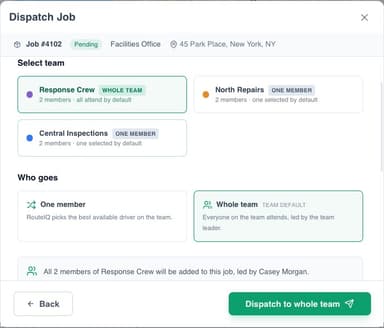
This feature organizes dispatch operations using geographic zones and designated driver teams. It supports zone-based and team-restricted assignments, while bulk dispatch distributes batches of jobs among team members according to their geographic locations. This reduces the time dispatchers spend assigning individual jobs across different service areas.
Pros And Cons of RouteIQ
Pros
Smart assignment minimizes unsuitable vehicle allocations
Route optimization reduces unnecessary travel between stops
Proof capture improves vehicle handover documentation
Driver earnings calculations reduce manual payroll work
AI assistant speeds up dispatch information retrieval
Cons
GPS tracking may stop outside duty hours
Overlapping zones could complicate job classification
Mandatory proof capture might delay stop completion
RouteIQ Pricing
Individual | Pro | Enterprise |
|---|---|---|
$0 per 50 billable jobs per month | $29 per site per month | Custom pricing |
|
|
|
Disclaimer: The pricing details were last updated on Oct 23, 2026 from the vendor's website. Please contact us for a tailored pricing list.
RouteIQ Reviews

No reviews yet!
Be the first to review this product
Frequently Asked Questions
Does RouteIQ's driver app work without an internet connection?
Yes, RouteIQ's driver app supports offline operations by saving duty status changes, completed stops, photographs, and signatures when internet connectivity is unavailable. Once the connection returns, the app synchronizes these records, provided drivers keep it open until synchronization finishes.
Can RouteIQ prevent the same delivery job from being assigned to multiple drivers?
Yes, RouteIQ restricts each stop to one active route at a time, preventing dispatchers from assigning the same work to multiple drivers simultaneously.
Can RouteIQ calculate additional charges for waiting time and special services?
Yes, RouteIQ supports configurable pricing rules for waiting time, distance, service types, vehicle categories, and additional charges. The system calculates final charges using available job details, including recorded waiting time.
What happens in RouteIQ when a customer cancels a job that has already been assigned?
RouteIQ cancels the remaining stops and removes them from active routes. With that, stops already completed remain part of the recorded job history.
Can dispatchers manually change optimized routes in RouteIQ to accommodate urgent deliveries?
Yes, RouteIQ allows dispatchers to rearrange stops manually or re-optimize routes when delivery priorities change. The platform recalculates estimated arrival times after changes to stop sequences and allows dispatchers to review scheduling warnings before saving. However, changes to high-priority deliveries may affect subsequent arrival times.
What happens when RouteIQ cannot find an eligible driver for an automatically dispatched job?
The platform leaves the job unassigned when no available driver satisfies the configured requirements. Dispatchers can review driver schedules, vehicle eligibility, geographic coverage, and assignment restrictions before attempting dispatch again.