


Uber for Business
Last Updated
Overview
Uber for Business offers a corporate travel and expense management platform that helps organizations streamline employee rides, control costs, and simplify reporting. While some features may vary by region, its centralized dashboard and reliable ride coverage make it a dependable choice for businesses managing employee transportation at scale.
Be the first one to leave a review!
No review found

Starting Price
Custom
Uber for Business Specifications
- Compliance Management
- Reporting & Analytics
- Expense Tracking
- Trip History Logging
What Is Uber For Business?
Uber for Business is a company account for managing work-related Uber rides and Uber Eats orders. A company creates a central account, while employees can use their usual Uber or Uber Eats app with a work profile. The organization can then manage payments, spending policies, receipts, and reporting from one place. Normally, if an employee needs an Uber ride for work, such as travelling to a client meeting, they book it through their personal Uber account and pay themselves.
They later submit the receipt to the company for reimbursement. With Uber for Business, the company sets up an official business account, allowing employees to charge eligible work rides directly to the company account. The company can also set rules for which rides or food orders it will cover, helping keep business spending within approved policies. Any eligible organization, from a small business to a large enterprise, can use the service where Uber and the selected business services are available.
What Is Uber For Business Best For?
One of the standout features of Uber for Business is automatic expense reporting. It can automatically send ride receipts and expense information to the company’s expense management or accounting system. This means employees do not have to save every Uber receipt, complete expense forms, and wait for manual reimbursement. Companies can connect Uber with supported expense management or accounting systems to automate this process, Trip details and receipts can then be sent automatically, whiles businesses can require employees to select an expense code, such as ‘Client Meeting,’ ‘Airport Travel,’ or ‘Recruitment,’ when booking a ride.
How Much Does Uber For Business Cost?
Uber for Business does not charge signup fees, and organizations pay only for the rides and meals employees actually use. There is no flat subscription fee for the core platform. As an added employee benefit, businesses can offer a discounted Uber One membership through their Uber for Business account:
- First 3 Months - Free
- Next 9 Months - $7.99/month
- After That - $9.99/month (Auto-Renews Until Canceled)
Uber One membership includes:
- Unlimited $0 delivery fee on eligible restaurant orders over $15, and grocery orders over $35
- Up to 10% off eligible deliveries and pickup orders
- 6% Uber One credits earned on eligible rides
- Priority customer support and invite-only experiences
Employees can cancel their Uber One membership at any time, at least 48 hours before their billing date, to avoid the next charge.
Reviewers generally find Uber for Business pricing reasonable given the convenience, especially with reduced fares during promotional periods. Some users note costs run higher than alternatives like Lyft or local taxis, and surge pricing during peak times makes budgeting less predictable.
Disclaimer: The pricing is subject to change.
Uber For Business Integrations
The software supports integration with multiple systems and platforms, such as:
How Does Uber For Business Work?
Here's how you can access the platform and start using its features:
- Sign up with a corporate email address and add a valid payment method
- Log in to the web-based business dashboard, no software installation required
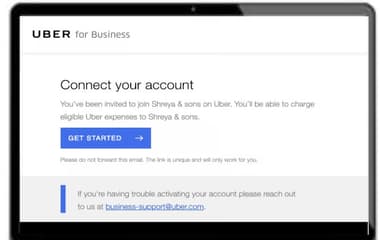
- Invite employees to join by linking their personal Uber account to the company's business account
- Set ride and meal policies, including spending limits by day, time, location, or budget
- Employees switch to their Business Profile in the Uber or Uber Eats app to request a ride or meal
- Automatically charge the trip or order to the company card, with the receipt sent to the employee's work email
- Sync ride and meal receipts directly into expense platforms like SAP Concur, Expensify, or Ramp
- Review spending, compliance, and usage reports from the central dashboard
Who Is Uber For Business For?
It serves organizations across a range of industries and sectors, including:
- Healthcare
- Higher education
- Government
- Human resources
- Hospitality
- Consultancy and agencies
Uber For Business Use Cases
Based on our analysis of Uber for Business features and platform capabilities, we have identified key scenarios where this software is a strong fit for:
Business Travel To Meetings And Airports
Some employees travel to client meetings, airports, or different office branches, and sometimes they have to visit off-site work locations. Normally employees pay personally for the ride, then keep receipts to submit expense claims, and wait for reimbursement. Finance teams then have to review all those claims, which makes travel spending harder to control and report on. But the company creates a travel program and lets employees charge approved rides to the business account. The organization can set travel rules and see trip spending in one dashboard.
Late-Shift And Employee Commute Transport
Employees working late-night, early-morning, or irregular shifts may have limited access to public transport. This is common in hospitals, hotels, retail stores, call centers, warehouses, security teams, and manufacturing sites. And those employers who may want to help staff travel safely, support attendance, and make difficult shifts more practical use the Uber for Business's commute program that covers eligible rides during selected work periods or from approved workplace locations. Employees book their own ride, while the company controls when and how the program can be used.
Remote-Worker And Team-Meal Programs
Distributed teams may not have a shared office lunch together or in-person social event. At the same time, companies want to support remote employees. They want remote workers to be involved in all training sessions, project launches, or company-wide events so that remote staff are included in the experience. This app can send meal vouchers or give eligible employees access to a meal program. Each person chooses their own meal and order time within the program rules, rather than the company arranging individual reimbursements.
Customer Marketing And Loyalty Campaigns
Marketing and customer-success teams often need incentives that encourage customers to attend a demonstration, respond to research, join an event, try a service, or maintain a relationship with the brand. A generic promotional message may not be enough to motivate participation. Uber for Business sends targeted ride or meal vouchers as a campaign incentive. It can set a budget and validity period, then track voucher use through its business program.
Is Uber For Business Right For You?
Uber for Business is a strong fit if your team frequently books rideshare or meal delivery for work and needs better financial oversight. It works well if your company spends significant time tracking receipts, managing traveling workers, or hosting clients.
It supports centralized login tools like SAML 2.0 Single Sign-On (SSO) and SCIM (System for Cross-domain Identity Management) to connect with corporate identity systems like Okta, OneLogin, or Azure AD. This stops unauthorized people from accessing the company's travel funds. When an employee leaves the company and is deleted from the central HR system, their access to the corporate Uber account is turned off instantly, preventing former workers from charging personal rides to the company's credit card.
Still unsure about Uber for Business software? Contact us at (661) 384-7070 for further guidance.
Uber for Business Features
The Dashboard
The dashboard is the central admin area where a company manages its Uber for Business account. Administrators can create and manage employee travel and meal programs, add people, set spending controls, choose payment methods, manage permissions, and review spending. For example, a finance manager can see how much different departments spend on business rides or meals, while an HR manager can set up a late-shift meal program for eligible employees.
Business Profiles
Business profiles let employees connect their personal Uber or Uber Eats account to their employer’s Uber for Business account. When an employee needs a work ride or business meal, they select their business profile rather than their personal profile. This helps personal and professional spending separate. It benefits employees because they do not need to pay first and request reimbursement for every approved business trip. At the same time, it benefits finance teams because business spending is recorded separately.
Delegate Booking
Delegate booking allows an executive assistant, office administrator, or other authorized employee to arrange business travel on behalf of another employee. The person booking the ride does not need to be the person travelling. Through this, an executive assistant can book an airport ride for a company director, choose the pickup time and destination, and manage the trip details.
Central
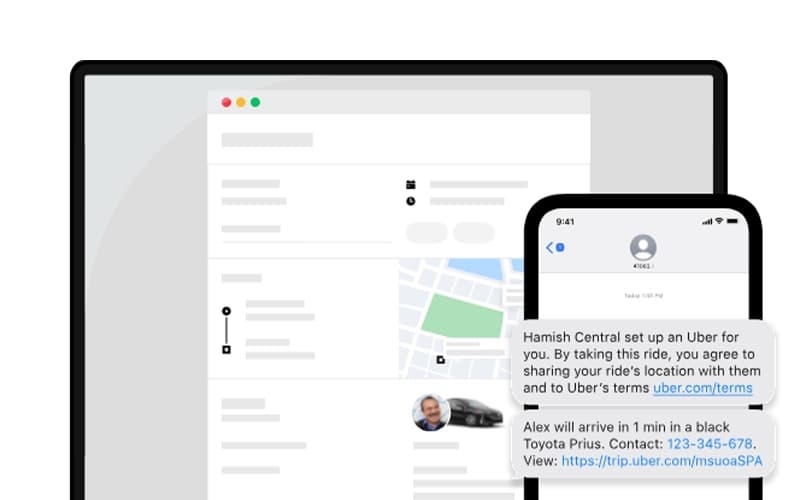
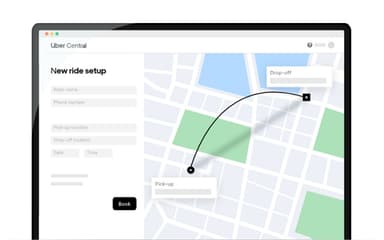
Central allows a company to request, schedule, manage, and pay for rides for customers, guests, clients, patients, candidates, or visitors. The rider does not need to have the Uber app: they can receive trip details and a tracking link through SMS. It benefits organizations that need to arrange transport for people who are not employees or may not be able to book a ride themselves (for example, a hotel can arrange an airport ride for a guest or a clinic can arrange transport for a patient).
Uber Health
Uber Health is Uber’s healthcare-focused transportation offering. It is intended to help healthcare organizations arrange rides for patients, caregivers, staff, or other eligible riders connected with care. This benefits hospitals, clinics, health insurers, care coordinators, social-service organizations, and patients who face transportation barriers.
Vouchers
This allows an organization to send controlled ride credits, meal credits, or both to employees, customers, guests, or event attendees. The organization sets the rules, for example, the amount covered, valid date, time window, locations, and whether the voucher applies to Uber rides, Uber Eats orders, or both.
Gift Cards
Gift cards let an organization buy Uber and Uber Eats gift cards in bulk and distribute them as gifts, rewards, incentives, or recognition. Unlike a voucher, a gift card is generally a prepaid balance given to a recipient, rather than a company-controlled credit limited to a specific event, place, or period.
Pros And Cons of Uber for Business
Pros
Simplifies tracking and reporting of business expenses
Keeps admins informed about employee business trips
Automatically generates invoices for eligible business rides
Cons
Personal rides can sometimes be charged to business
Setting up a business account can take weeks
Uber for Business Reviews

No reviews yet!
Be the first to review this product
Frequently Asked Questions
What language does Uber for Business support?
Uber for Business supports multiple languages, including Arabic, German, English, French, Italian, Japanese, Korean, Malay, Dutch, Portuguese, Russian, Swedish, Thai, Tagalog, and Chinese.
What other apps does Uber for Business integrate with?
Uber for Business integrates with SAP Concur, Zoho Expense, Rydoo, Expensify, and Certify.
Does Uber for Business offer an API?
Yes, Uber for Business offers an API.
Does Uber for Business have a mobile app?
Yes, Uber for Business offers a dedicated mobile app for both iOS and Android.
What types of pricing plans does Uber for Business offer?
Uber for Business pricing follows a pay-as-you-go model with no signup fees or minimums. As an added benefit, businesses can offer employees a discounted Uber One membership, free for the first 3 months, then $7.99/month for 9 months, before renewing at $9.99/month. Contact us for a custom Uber for Business price quote.
What level of support does Uber for Business offer?
Uber for Business offers support through phone, live chat, and online channels.
Who are the typical users of Uber for Business?
Typical users of Uber for Business include organizations in healthcare, higher education, government, and human resources teams managing employee travel and meal programs.