


Last Updated
Key Takeaways
Generated from the text of customer reviews
Our Verdict
Be the first one to leave a review!
No review found

Starting Price
$149
per month
OpenTable Specifications
- Reservations And Booking
- Guest Management And CRM
- Reporting And Analytics
- Multi-Property Management
What Is OpenTable?
OpenTable is a restaurant management platform built for restaurants to handle reservations, table management, waitlists, and day-to-day service from one platform. Using the software, restaurants can manage bookings from different channels. These include their own website, OpenTable software, and other partner sites, ensuring real-time availability updates. It also connects with their POS to track revue and order details. Additionally, OpenTable comes with tools to manage restaurant listings, guest information, reviews, and bookings on the go.
What Is OpenTable Best For?
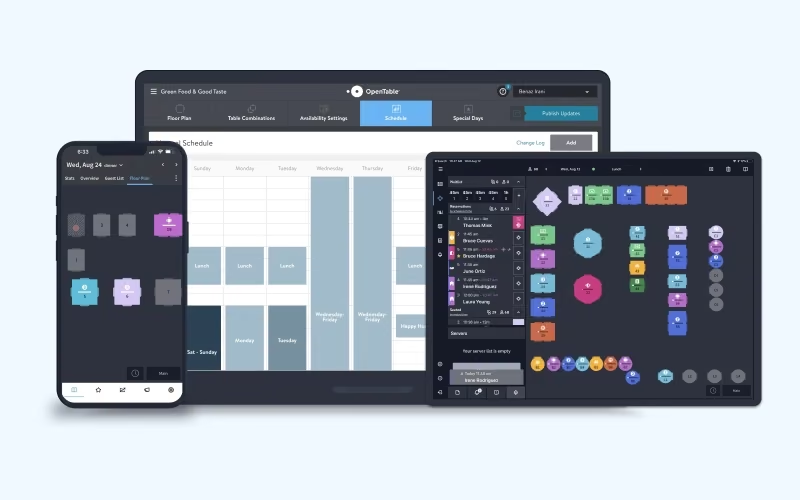
Among different OpenTable features, it is best known for its “Table Management” capabilities. It gives restaurants the flexibility to tailor floor plans, manage different table types, and adjust availability accordingly. As it supports integration with the restaurant's POS system, table status remains updated automatically. Furthermore, it has waitlist tools that help fill tables as they open up.
How Much Does OpenTable Cost?
OpenTable price starts at $149/month for its Basic plan. It comes with multiple features, with notable ones being OpenTable profile and listing, booking widget, review management, and digital advertising.
Further pricing tiers of the software are as follows:
- Core: $299/month
- Pro: $499/month
Apart from the base subscription cost, restaurants should also budget for the following additional expenses:
- Per Network Cover Fee: Between $1.50/cover and $1/network cover, depending on the plan
- Reservations From Your Website: $0.25/cover or $49/month flat (Basic plan only)
- Prepaid Experiences: 2% service fee
- Prepaid Ticketing: 2% service fee
Users cite OpenTable pricing as relatively high. Particularly, it may not suit independent and small to mid-sized restaurants with limited budgets. Concerns are raised for per-cover fees that can add up over time. However, some feel its capabilities justify the higher cost.
Disclaimer: The pricing is subject to change.
OpenTable Integrations
OpenTable integrates with several third-party apps, including:
- Mailchimp software
- Loyalist
- Oracle Opera
- Cendyn CRM
- Stripe
How Does OpenTable Work?
Here’s how you can get started with OpenTable:
- Log in to your OpenTable restaurant account
- Set up your restaurant profile with details such as location, menu, photos, and booking information
- Create custom floor plans, table types, and availability settings based on your dining room
- Manage reservations, waitlists, and real-time table inventory as guests book or arrive
- Assign tables and adjust seating arrangements while using POS updates to keep table statuses current
- Coordinate each shift by reviewing upcoming reservations, guest notes, events, covers, and revenue information
- Engage guests by maintaining profiles, preferences, reviews, surveys, and targeted communications
- Review reports on reservations, turn times, covers, revenue, and marketing activity to evaluate each shift and plan ahead
Who Is OpenTable For?
OpenTable suits different businesses within the hospitality industry. These include:
- Restaurants
- Hotels and casinos
- Bars and wineries
OpenTable Use Cases
Based on our analysis of OpenTable features, user reviews, and common restaurant workflows, we identified the following situations where the platform is a good fit:
1. Busy Restaurants Managing High-Volume Service
Restaurants handling a steady mix of reservations and walk-ins can use OpenTable to organize seating during peak hours. Using the software, teams can make adjustments to table availability, manage waitlists, and keep track of expected covers and guest notes. This is especially useful for full-service restaurants where table turnover impacts how much they can serve during a shift.
2. Restaurants Trying To Make Better Use Of Available Tables
OpenTable works well for restaurants that regularly need to handle different table types and seating areas. It lets managers adjust floor plans and table availability as demand changes during the day. Users particularly highlight its capability to customize table turns and pacing.
3. Bars And Wineries Managing Tastings, Tours, And Regular Reservations
Bars and wineries can use OpenTable to manage everyday dining alongside bookable experiences such as tastings and winemaker dinners. It enables teams to adjust seating areas and floor plans to accommodate different group sizes. This setup is particularly useful for venues that need to manage regular guests and generate revenue from scheduled experiences at the same time.
4. Multi-Location Restaurant Groups Managing Consistent Operations
OpenTable provides restaurant groups with a shared way to manage guest information, reporting, bookings, and workflows across multiple locations. Each restaurant can still handle its day-to-day service according to its needs. That said, group teams get a clearer view of what is happening across the portfolio. This suits hospitality businesses managing several locations or brands.
Is OpenTable Right For You?
OpenTable could be the right choice if your restaurant handles a steady volume of reservations, walk-ins, or multiple dining experiences. From reservations to inventory control and table management, it covers all aspects of managing a restaurant.
The platform also helps bars, wineries, and restaurant groups serve their guests better by supporting custom profiles creation and setting automating guest preferences.
It is GDPR, PCI DSS, and SOC 2 Type 2 compliant and trusted by leading names, such as Marriot International, BOYD, and White Lodging.
Still doubtful if OpenTable is the right fit for you? Connect with us at (661) 384-7070 for further guidance.
OpenTable Features
Online Waitlist
This feature lets guests join the queue before arriving at the restaurant. This means they don’t have to gather at the premises, rather they can wait remotely. When their table is ready, guests receive automated text notifications. This way, they remain updated on their real-time position in the queue. Staff can manage online and in-house parties from one list, adjust wait estimates, and pause the online waitlist when needed.
Benchmark Reporting
OpenTable gives restaurant managers a clearer view of how each shift is performing and where there may be room for improvement. Managers can review metrics such as covers, guest spend, revenue, no-shows, and table turn times. POS integration adds spending and revenue data. This feature also lets restaurants compare selected metrics with aggregated data from nearby OpenTable restaurants. They can use these analytics to identify slower periods and emerging local dining trends.
Direct Messaging
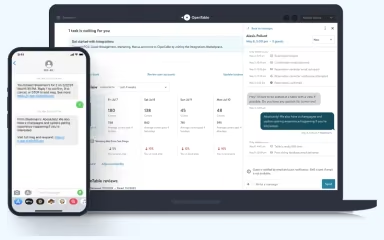
Using this feature, restaurants can directly communicate with guests before and after their visits through a centralized inbox. Staff can confirm reservations, discuss preferences, or special occasions. They can also leverage it to reduce no shows by sending customized reminders. Messages can be managed from the web or iPad, with status indicators helping staff keep track of ongoing conversations.
Real-Time Inventory
OpenTable keeps reservation inventory updated as bookings and cancellations occur. This gives restaurants a current view of available tables. It also helps staff accept last-minute reservations while reducing the risk of double-booking or taking reservations for unavailable tables.
Restaurant Marketing
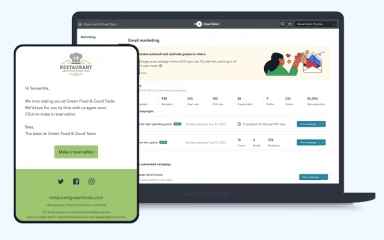
The platform comes with marketing tools to help restaurants promote their listings and target specific groups of diners based on booking behavior. It enables managers to run campaigns and attract first-time guests, fill slower shifts, or respond to last-minute cancellations. They can also extend offers such as bonus points for off-peak bookings. Its marketing capabilities come with capabilities to track campaign spend, seated covers, and bookings generated through connected advertising channels to assess marketing performance.
Pros And Cons of OpenTable
Pros
Comes with table management, pacing, and turnover tools
Effective reach and visibility through the OpenTable network
Guest profiles for understanding returning diners
Real-time data for staffing and service decisions
Special offers and promotions can be created easily
Cons
Lacks advanced reporting capabilities
Menu building feature can be complex
Reservation and exception settings can be complicated to configure
OpenTable Pricing
Basic
$149 per month


View Price
What's Included
OpenTable profile and listing
Review management
Digital advertising
Experiences
Deposits and credit card holds
Automated reservation messages
Direct messaging
360 guest profiles
Guest database, tags and notes
Pre-shift report
Core
$299 per month
View Price
What's Included
All Basic features, plus:
Ad tracking
Ticketing
Premium SMS messaging (add-on)
Smart assign
Customizable floor plans
In-house and online waitlist
Access rules
Advanced inventory controls
POS integration
Pro
$499 per month
View Price
What's Included
All Core features, plus:
Customizable booking widget
Premium SMS messaging (included in the plan)
Advanced guests insights for pre-shift report & 360 guest profiles
Disclaimer: The pricing details were last updated on Aug 14, 2026 from the vendor's website. Please contact us for a tailored pricing list.
OpenTable Reviews

No reviews yet!
Be the first to review this product
Frequently Asked Questions
Does OpenTable have a mobile app?
Yes, it offers a mobile app for Android and iOS devices.
What level of support does OpenTable offer?
OpenTable offers customer assistance via support portal, phone, and OpenTable academy.
Who are the typical users of OpenTable?
The platform is used by restaurants, bars and wineries, and hotels.
What other apps does OpenTable integrate with?
OpenTable integrates with different third-party systems such as Stripe, Mailchimp, Loyalist, and Oracle Opera.
What types of pricing plans does OpenTable offer?
The vendor offers multiple plans. These include Basic ($149/month), Core ($299/month), and Pro ($499/month). Get in touch for a tailored OpenTable cost estimate.
What language does OpenTable support?
OpenTable software is available in multiple languages, including English, Spanish, Mexican, and Italian.
Does OpenTable offer an API?
Yes, it offers API access.