


Firm Central
Last Updated
Overview
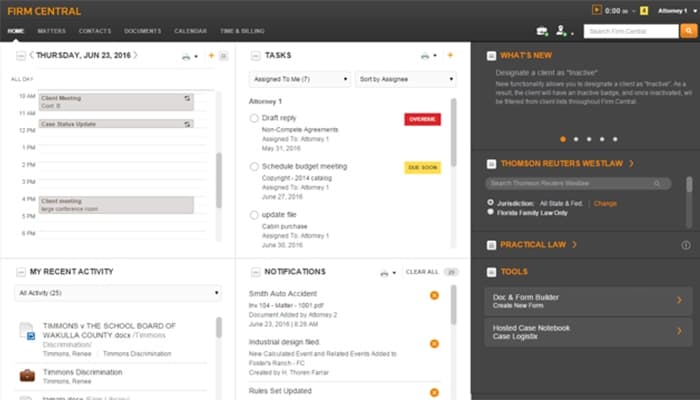
Firm Central is tailored for the legal profession and is used by small and medium-sized law firms and legal professionals looking to streamline operations. Some users have faced challenges with Mac integration; however, it also efficiently simplifies time management. Firm Central helps transform legal practice with ease.
Firm Central Specifications
- Case Management
- Document Management
- Client Management (CRM)
- Billing & Invoicing
Firm Central Features
Matter Management
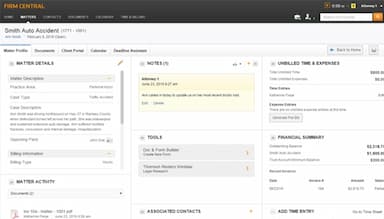
This feature empowers users to manage tasks, deadlines, and client files from any device. It centralizes matter handling, streamlines document storage, and enhances team collaboration. Furthermore, it facilitates secure client communication, ensuring all case-related activities are organized and easily accessible.
Legal Time And Billing
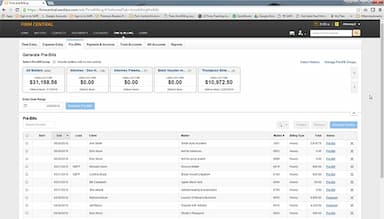
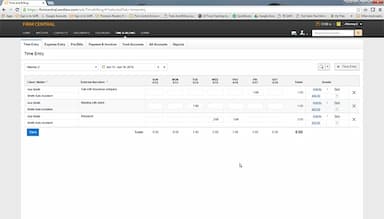
This powerful feature enables users to record time, track expenses, and manage billing effortlessly. It provides customizable invoices, financial reports, Trust Account tracking, and online payment options, speeding up payments and improving financial oversight.
Accounting
This important feature helps law firms manage finances within an integrated platform. Users can simplify accounting, eliminate double data entry, and receive real-time financial insights. It further ensures compliance and accuracy while maintaining a clear overview of the firm’s financial health.
Legal Calendaring
This robust feature allows users to manage legal deadlines and appointments accurately. Deadline Assistant calculates deadlines using legal rules and synchronizes with Outlook, keeping teams updated with automatic alerts and facilitating collaboration through multiple calendar views.
Security
This feature ensures top-tier data protection with encrypted data, SOC 2 compliance, and 24/7/365 support. Firm Central offers bank-grade encryption and nearly continuous uptime, safeguarding sensitive information and maintaining security standards trusted by leading industries.
Pros And Cons of Firm Central
Pros
Accessible via the cloud
Simplified time management
Reliable and glitch-free
Effectively organizes tasks
Cons
Issues with Mac integration according to some users
Long process for adding users
Costly for multiple subscriptions
Firm Central Reviews
Total 16 reviews
3.3
All reviews are from verified customers
Rating Distribution
5
Stars31%
4
Stars19%
3
Stars13%
2
Stars19%
1
Stars19%
Share your experience
Accounting, 11-50 employees
More than a year
“decent overall and app feels buggy”
Pros
For what I use it for it accomplishes what I need and since I don�t have many alternatives to compare it to it gets the job done within its lane. Given the limited scope in which I employ it I�d say it�s fairly average in my view but it doesn�t wow me with extra features but it also doesn�t let me down on the basics.
Cons
I find the phone app to be sluggish and prone to frequent glitches and when I've reached out for help the support team hasn't been helpful.
Rating Distribution
Ease of use
6
Value for money
5
Customer Support
6
Functionality
6
Legal Services, 11-50 employees
More than a year
“An abandoned and trapped system”
Pros
Back when it launched there really wasn't anything comparable available besides the then-clunky, server-only Amicus Attorney. It was the very first cloud-based practice management system and the fact that it ran in the cloud is what tempted me to adopt it over nine years ago.
Cons
Sadly it feels like West has essentially abandoned this program. They tied every bit of access to our Westlaw subscription so whenever our firm grew and we needed to add a user it took a minimum of two to three business days just to get that person added. The delay comes because someone has to contact our sales rep who then has to draft a new contract to extend the Westlaw agreement to include the additional seat. Meanwhile we have been asking them for new features for years, yet I can't think of anything meaningful that's been added since the product first launched. We eventually switched to Clio but although we were able to export clients, contacts and matters, the documents stored inside each matter couldn't be exported. For that reason we can't completely abandon it because they effectively hold ownership of our clients' documents as well as our firm's emails and files indefinitely. We've asked repeatedly what happens to the data if we close the firm, retire or die and nobody provides a clear answer. It's not even as forgiving as a Facebook account which can be archived and downloaded for perpetual access if needed. The frightening reality is that when you stop paying, thousands of documents, records and gigabytes of data can simply disappear. Because of this alone I strongly advise people to avoid FirmCentral.
Rating Distribution
Ease of use
6
Value for money
3
Customer Support
2
Functionality
4
International Trade and Development, 11-50 employees
Less than 6 months
“simple & works well with Westlaw”
Pros
I find the interface pretty simple and easy to use so we didn't have to spend much time on training and I also like that it integrates neatly with the Westlaw features.
Cons
We had no problem integrating this tool with the other software we were already using which made rolling it out across our team much easier.
Rating Distribution
Ease of use
10
Value for money
10
Customer Support
10
Functionality
10
Frequently Asked Questions
Does Firm Central offer an API?
Yes, Firm Central offers an API.
Who are the typical users of Firm Central?
Typical users of Firm Central are small to medium-sized law firms and legal professionals.
What other apps does Firm Central integrate with?
Firm Central integrates with Windows Explorer, Microsoft Outlook, Westlaw Form Builder, Westlaw Legal Research, and Practical Law.
Does Firm Central support mobile devices?
Yes, Firm Central supports Android and iOS devices.
What language does Firm Central support?
Firm Central supports only the English language.
What types of pricing plans does Firm Central offer?
Firm Central cost consists of five plans: Core: $40, Essential: $65, Premier: $105, Essentials with Accounting: $102, and Premier with Accounting: $142 (all prices are given per user per month).
What level of support does Firm Central offer?
Firm Central provides phone, chatbot, FAQs/forum, and knowledge base support.