


Jarvis Legal
Last Updated
Overview
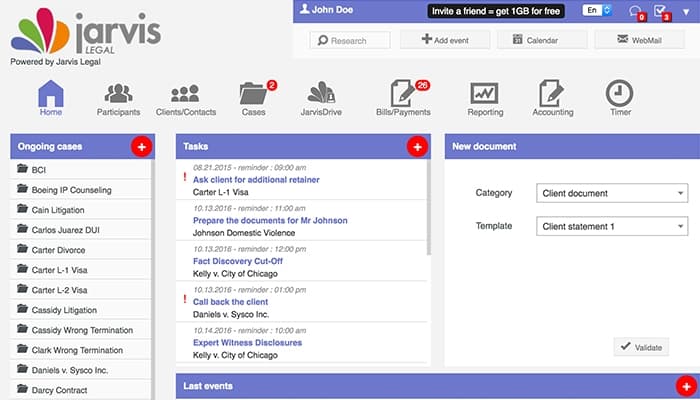
Jarvis Legal simplifies case management, time tracking, and billing for law firms. While it can be complicated to set up initially, it quickly proves its value with streamlined processes and centralized document management. The software’s ease of use makes it a reliable tool for legal professionals handling multiple cases.
Jarvis Legal Specifications
- Case Management
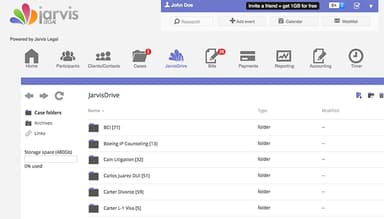
- Document Management
- Client Management (CRM)
- Billing & Invoicing
What Is Jarvis Legal?
Overview
Jarvis Legal software is a cloud-based platform designed for law firms to manage casework and collaboration. It caters specifically to legal professionals, offering solutions that help firms centralize their workflow, reduce administrative burdens, and ensure compliance with regulations. By integrating tools for document management, invoicing, and time tracking, Jarvis Legal helps firms eliminate the complexities of managing multiple platforms. It alleviates issues like disorganized case files, billing errors, and inefficient task management.
Jarvis Legal Pricing
Jarvis Legal price comes in four main packages:
- Essential: €35/user/month
- Essential+: €45/user/month
- CoPilote: €65/user/month
- CoPilote+: €110/user/month
Disclaimer: The pricing is subject to change.
Jarvis Legal Integrations
Who Is Jarvis Legal For?
Jarvis Legal is designed for businesses of all sizes across the legal and real estate industries.
Is Jarvis Legal Right For You?
Recognized for its practicality, Jarvis Legal is a valuable resource in legal technology, supporting firms of various sizes. The software optimizes teamwork, simplifies workflows, and enhances productivity. It is scalable, secure, and GDPR-compliant.
Is Jarvis Legal right for you? Contact our customer support team at (661) 384-7070, and they will help you make the best decision.
Jarvis Legal Features
TONI Legal AI
TONI Legal AI automates routine legal tasks like document drafting and review, helping lawyers save time on manual work. By using AI, Jarvis Legal ensures greater accuracy and consistency, reducing human errors and allowing legal professionals to focus on more complex cases.
Invoices
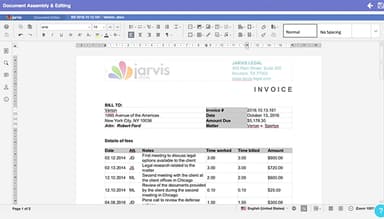
The software streamlines the billing process by generating professional invoices and tracking payments. This reduces errors and delays, ensuring accurate billing and timely payments, which improves cash flow and saves time on administrative tasks for law firms.
Time Tracking
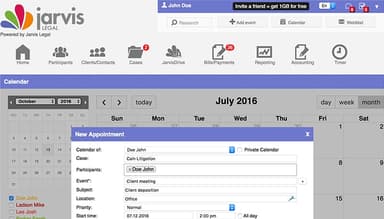
This feature helps legal professionals log billable hours efficiently, ensuring no time is lost. It provides real-time insights into time spent on cases, enabling accurate billing and improving overall productivity and transparency for clients and firms.
Electronic Signature
With electronic signature functionality, Jarvis Legal enables users to sign legal documents digitally, speeding up the approval process. This enhances security and efficiency, helping law firms manage contracts and agreements faster while remaining compliant with industry standards.
Document Workflow Validation
Law firms can create and approve documents through structured workflows. It ensures that each document passes through the necessary legal checks and approvals, minimizing errors and improving accountability within the firm.
Pros And Cons of Jarvis Legal
Pros
Regular updates
Comprehensive suite of tools
Customizable
Mobile app
Cons
Limited integrations
Migration process can be tedious, according to software users
Mobile app could be more intuitive, according to software users
Jarvis Legal Reviews
Total 1 reviews
4
All reviews are from verified customers
Rating Distribution
5
Stars0%
4
Stars100%
3
Stars0%
2
Stars0%
1
Stars0%
Share your experience
Law Practice, 1-10 employees
Less than a year
“affordable legal management tool”
Pros
As a newer attorney Jarvis Legal has been a budget friendly choice. It combines matter management with contacts and calendars and having all of that available on a smartphone is really convenient.
Cons
Once the workload starts getting heavier it did not perform the best. Also the app isn't especially user friendly so I end up entering information manually in places where it seems like it should auto-fill.
Rating Distribution
Ease of use
8
Value for money
8
Customer Support
8
Functionality
8
Frequently Asked Questions
Does Jarvis Legal offer an API?
Yes, Jarvis Legal offers an API.
What language does Jarvis Legal support?
Jarvis Legal supports English, Italian and Spanish.
What other apps does Jarvis Legal integrate with?
Jarvis Legal integrates with Microsoft Office 365.
Does Jarvis Legal support mobile devices?
Jarvis Legal supports Android and iOS devices.
What type of pricing plans does Jarvis Legal offer?
Jarvis Legal price starts at €35/user/month. Users can get pricing for a tailormade plan.
Who are the typical users of Jarvis Legal?
The typical users of Jarvis Legal are those in the legal and real estate industries.
What level of support does Jarvis Legal offer?
Jarvis Legal offers email, chat, phone support, Knowledge Base, and FAQs.