


LawMaster
Last Updated
Overview
LawMaster is a fully integrated system for legal practice management that streamlines various processes. While its comprehensive features significantly enhance productivity, the software’s complexity can require training. Overall, LawMaster’s powerful features enable law firms to manage cases efficiently.
Overall Rating
Based on 7 users reviews
4.1
Rating Distribution
Positive
86%
Neutral
14%
Negative
0%
Starting Price
$220
per user per month
LawMaster Specifications
- Case Management
- Document Management
- Client Management (CRM)
- Billing & Invoicing
What Is LawMaster?
LawMaster is a legal practice management platform that automates day-to-day administrative tasks while managing complex legal matters and firm finances. Rather than relying on separate third-party add-ons for accounting, CRM, and file storage, LawMaster brings these tools into a single database. It serves practices by handling tasks like cost recording, electronic document management, deadline tracking, time tracking, and general ledger operations from a central interface, giving teams a shared source of truth across matters and finances.
What Is LawMaster Best Known For?
LawMaster is best known for its financial management solution, which comes with trust accounting and legal practice payroll management. This feature delivers a fully integrated general ledger and certified accounting system that allows firms to track their legal billing procedures. It saves legal organizations from the added headache of accounting plug-ins by consolidating time tracking and regulatory-compliant trust management into a single source of truth on their interface. This also lets law firms automate tasks such as fee posting, run financial reporting as hearings and client consultations are ongoing, and manage client funds directly within their core practice workflows.
LawMaster Pricing
LawMaster pricing starts at $220/user/month and can differ based on the features needed and the size of the organization in question.
Legal teams should also be prepared for the following additional costs that might be associated with the platform:
- Implementation And Setup: $720–$3,600+
- Covers initial system configuration, account setup, permissions, workflows, and getting the firm ready to use LawMaster
- Data Migration And Import: $360–$2,160+, potential cost for transferring existing client, matter, document, financial, and other practice data into LawMaster
- Custom Configuration And Workflow Development: $720–$7,200+, covers tailoring workflows, processes, automation, and system functionality to match the firm's specific requirements
- Staff Training And Onboarding: $360–$2,160+, may include administrator training, user training sessions, onboarding materials, and assistance during initial adoption
- Custom Reporting And Dashboard Configuration: $360–$2,160+, covers creation or customization of management reports, financial reports, dashboards, and other firm-specific analytics
Disclaimer: Pricing references are based on publicly available third-party information and industry benchmarks. Actual costs may vary.
LawMaster Integrations
The software integrates with a range of third part systems, including:
- InfoTrack
- SAI Global
- Microsoft Office
- Outlook
- Microsoft Power BI
How Does LawMaster Work?
Once you log in to your LawMaster platform dashboard, you can follow these steps to manage daily operations:
- Create a new client profile and set up an associated matter file within the Matter Management center
- Run automated conflict checks against existing database contacts to confirm compliance
- Import or generate legal correspondence with briefs and contracts using central document templates
- Schedule your court dates, client appointments, and task deadlines in the integrated calendar
- Capture billable hours automatically by using built-in timers and log matter-related disbursements
- Generate invoices and reconcile trust accounts within the built-in financial accounting module.
- Share updates, forms, and case files securely with clients via the interactive client portal
Who Is LawMaster For?
LawMaster software is designed for businesses across the legal industry. These include:
- Small firms
- Mid-sized legal teams
- Government legal teams
- Corporate legal departments
LawMaster Use Cases
Based on what we know about the feature set of the platform, we have arranged some use cases where LawMaster can be a good fit:
Practice Managers That Need Oversight For Firm-Wide Performance
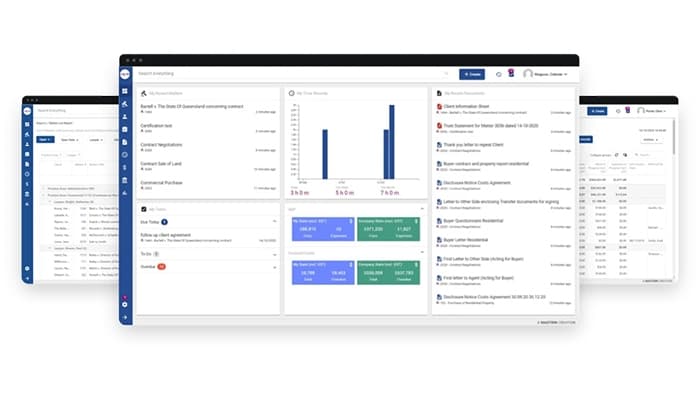
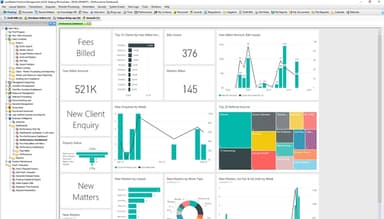
Growing legal practices can struggle with fragmented performance metrics and missed employee records spread across disparate tools. LawMaster addresses this through its Practice Management Center feature. Practice managers can use the feature to gain visibility into individual fee-earner budgets and marketing campaign ROI from a single business intelligence dashboard. The system also runs entity conflict-of-interest checks and manages employee records, allowing firm leadership to maintain compliance and optimize firm capacity without manual report consolidation.
Legal Teams Coordinating Complex Case Files
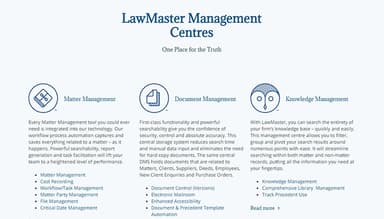
LawMaster's Matter Management Center feature is a good fit for this use case as it can help organize and coordinate different firm operations. The system aggregates every case note, client contact record, critical calendar date, and fee posting into an indexed, single-screen workspace layout. Integrated workflow process automation captures time entries and triggers automated task sequences as case milestones occur, keeping legal teams organized without extra administrative steps.
Administrative Staff Eliminating Physical File Chaos
Law firm administrative teams sometimes waste billable hours sifting through local network drives or physical paper archives to locate updated document drafts. LawMaster can solve this issue with its Document Management Center feature. The platform centralizes all electronic correspondence and briefs within a unified database featuring full-text indexing and version control. Staff use multi-window navigation to view, edit, and re-assign files simultaneously.
Legal Bookkeepers Needing Automated Trust Accounts And Billing
Firm accountants face strict regulatory standards and time-consuming manual data entry when managing client trust accounts via external accounting plug-ins. LawMaster's Financial Management Center feature can help with that. The software embeds general ledgers and automated payroll directly into the core platform. Time records and client disbursements automatically post directly to client invoices and financial ledgers, ensuring accurate fee recovery and streamlined billing cycles without third-party integrations.
Is LawMaster Right For You?
If you run a legal practice, corporate legal department, or government agency that needs better operational access and document repositories, then LawMaster might be right for you. The platform supports strict regulatory and security compliance through multi-layered permission controls and dedicated trust accounting frameworks. Enterprise, corporate, and government organizations can deploy LawMaster via private cloud hosting or maintain full on-site infrastructure control using their own internal networks and security protocols.
Still not sure if LawMaster is right for you? Contact our team at (661) 384-7070, and they will help you make the best decision.
LawMaster Features
Practice Management
This feature is an intelligence module providing firm leaders with real-time oversight of firm-wide performance. It features business development tools, client relationship management (CRM), fee-earner capacity tracking, employee records management, and automated conflict-of-interest checking. Practice managers can use this feature to monitor individual lawyer performance against revenue targets, manage marketing leads, and assess firm productivity without needing to combine separate departmental reports.
Matter Management
The platform offers a single-screen workspace overlooking every document, email thread, file note, task deadline, contact record, and financial transaction linked to an active case file. Integrated with event-driven workflow automation, this feature triggers automated task sequences and logs billable fee entries in as actions are performed. Legal teams use this feature to maintain a central source of truth for complex litigation.
Document Management
This central storage engine organizes and indexes all electronic correspondence and precedent templates within a useable database. It provides full text searchability and multi-window navigation that lets staff view, edit, and move files across multiple open windows at the same time. Legal secretaries and administrative staff can reduce hard-copy paperwork and locate updated file drafts instantly with this feature.
Knowledge Management
LawMaster comes with a search and data-mining framework that indexes the firm’s complete digital repository of intellectual property and research files. Users can filter, group, and pivot search results around custom metadata parameters to quickly locate relevant historical legal work. Research teams and senior associates use this feature to reuse firm precedents and accelerate drafting for new client matters.
Pros And Cons of LawMaster
Pros
Offers regular case updates keeping lawyers up to date
Comes with a comprehensive set of legal tools for full case management
Allows for custom workflows fitting all practices
Has a mobile app for on-the-go case management
Cons
May not handle paid parental leave efficiently
Initial training is needed
Billing features may require improvements
LawMaster Reviews
Total 7 reviews
4.1
All reviews are from verified customers
Rating Distribution
5
Stars29%
4
Stars57%
3
Stars14%
2
Stars0%
1
Stars0%
Share your experience
Law Practice, 1-10 employees
More than a year
“Practical and user-friendly tool”
Pros
The software is user friendly and well laid out. It's also easy to work with and transferring, moving, creating a new version or shifting a document to another matter number is simple enough to do without confusion.
Cons
Honestly after you get the basics down, it's hard to point to any real downside. As it handles a wide range of functions and once you understand how it works, those features feel logical and user friendly.
Rating Distribution
Ease of use
10
Value for money
10
Customer Support
10
Functionality
10
Legal Services, 11-50 employees
More than a year
“handy workflow and great navigation”
Pros
Overall it is very easy to use and the multi-window setup works really well. Entering accounting data is excellent and overall the program is very simple to use.
Cons
One downside is that it lets you overdraw the trust account. It would be much better if, when finalizing a bill, the system stopped you from allocating more money than is actually being held for that matter. The payroll module also does not manage paid parental leave particularly well so sometimes journals have to be done manually in the background to correct things. And I feel lik eit could also be much clearer about how processes work behind the scenes. When something goes wrong, it's frustrating having to figure out how to fix it yourself. So more detailed help notes instead of just basic explanations would really improve it.
Rating Distribution
Ease of use
9
Value for money
8
Customer Support
8
Functionality
8
Law Practice, 11-50 employees
More than a year
“Perfect fit for legal firms”
Pros
Having everything in one program is a real plus especially with Accounting, Payroll and the specific features and requirements a legal firm needs all built into the same system.
Cons
The Accounting and Payroll side is quite basic and I wouldn't consider it very user friendly.
Rating Distribution
Ease of use
7
Value for money
8
Customer Support
8
Functionality
9
Frequently Asked Questions
Does LawMaster offer an API?
Yes, LawMaster offers an API.
What language does LawMaster support?
LawMaster supports the English language.
What other apps does LawMaster integrate with?
LawMaster integrates with Google, Microsoft Outlook, and Power BI.
Does LawMaster have a mobile app?
Yes, LawMaster has a mobile app.
What type of pricing plans does LawMaster offer?
LawMaster pricing starts at $220/user/month. Request a LawMaster cost quote for your firm today!
Who are the typical users of LawMaster?
The typical users of LawMaster are those in the legal industry.
What level of support does LawMaster offer?
LawMaster offers email, phone support, and Knowledge Base.