



Last Updated
Overview
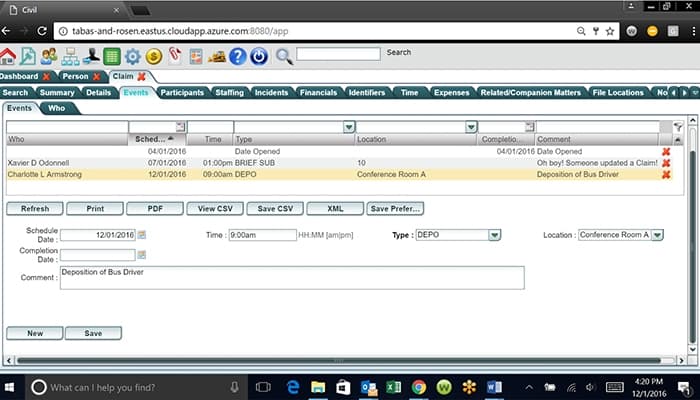
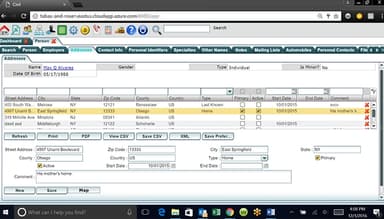
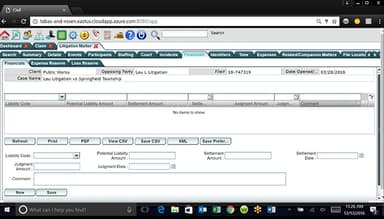
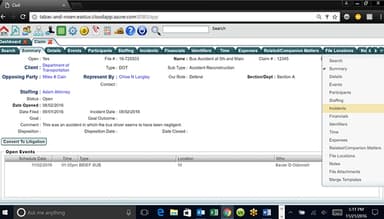
LegalEdge Specifications
- Case Management
- Document Management
- Client Management (CRM)
- Billing & Invoicing
LegalEdge Features
Smart Merge Facility
This feature automates document merging, pulling relevant case data into templates. This reduces manual data entry and errors, ensuring consistent, accurate documentation, saving time, and improving document management efficiency.
Anything Search
Anything Search lets users quickly search through all data, including cases, documents, and contacts. This speeds up information retrieval, instantly helping users find necessary details and improving overall productivity and case-handling efficiency.
Custom Case Intake
The software lets agencies tailor their intake forms to collect necessary information. It ensures that all relevant data is captured from the outset, improving case organization and accuracy and ensuring smoother workflows from the initial stages.
Closing Workflows
LegalEdge helps automate and standardize case closure processes. It ensures that all necessary steps are followed, streamlining the closing phase and reducing the chance of overlooked tasks, resulting in more efficient case resolutions.
Dashboards
Dashboards provide real-time visibility into case metrics, enabling users to monitor key performance indicators immediately. This feature helps agencies monitor case progress and workload, leading to more informed decisions and better resource allocation.
Roadmapping
A customizable and powerful workflow management tool. allowing users to create triggers and automate processes and actions within LegalEdge Software. Reducing time spent on manual tasks.
Integrations
Seamlessly integrate with tools like Gmail, Google Calendar, Microsoft 365, Microsoft Outlook, Laserfiche, AXON and Spillman.
Pros And Cons of LegalEdge
Pros
Customizable
Critical information is shared timely
Excellent customer support
Modern interface offering flexibility
Interfaces very well with other work products
Cons
Reporting feature can be complicated, according to software users
Initial training might be required
No drag and drop feature
LegalEdge Reviews
Total 7 reviews
4.9
All reviews are from verified customers
Rating Distribution
5
Stars86%
4
Stars14%
3
Stars0%
2
Stars0%
1
Stars0%
Share your experience
Legal, 11-50 employees
More than a year
“A great asset for our firm”
Pros
This software has been a great asset to our office. What I appreciate most is that we can reach out with an issue and there's always someone available to assist and resolve it. We're also able to make suggestions and get either a workaround or an adjustment to improve performance. The team is always very friendly and accommodating.
Cons
At times, it feels like there's a bit of excessive clicking involved to complete a task or input information, but the good thing is you don't have to fill out every single field to make the software function properly. I think a drag-and-drop feature for uploading documents would be a great addition, as it would streamline the process and save time when handling documents.
Rating Distribution
Ease of use
8
Value for money
10
Customer Support
10
Functionality
8
Legal, 500+ employees
More than a year
“Increased our productivity”
Pros
Before we started using LegalEdge, we didn't have any kind of electronic database. Setting it up was easy, and I found it simple to teach others how to use it. The support from the LegalEdge team has been exceptional. Whenever we report an issue, they respond almost immediately. There are tons of different types of reports available, and the team has gone out of their way to customize reports to meet our needs. For an Administrator, LegalEdge is incredibly easy to navigate. It's also integrated with the Pennsylvania Unified Judicial System, which significantly cuts down on data entry time and improves data accuracy.
Cons
The reporting feature could definitely use some updates when it comes to identifying what each report does. With so many different reporting options available, it can be challenging to distinguish between them and figure out which ones are the most relevant for specific needs. It would be really helpful if there was a clear way to highlight the reports that we use on a monthly basis, making them easier to find and access without sifting through all the other options.
Rating Distribution
Ease of use
10
Value for money
10
Customer Support
10
Functionality
10
Legal, 1-10 employees
More than a year
“LegalEdge is a superb platform”
Pros
LegalEdge really takes the time to collaborate with us, making sure the software's features align with our specific work processes. Honestly, if I can imagine it, they find a way to bring it to life. The most valuable part of the case management system is how it integrates with the various other tools we rely on, allowing for timely and automatic information sharing that's crucial for our agency. The software is efficient, always operational, and dependable. On top of that, the customer support is phenomenal.
Cons
I honestly can't think of anything specific I dislike. If there's ever an issue that comes up, we address it and it gets resolved quickly, so nothing really stays as a problem for long.
Rating Distribution
Ease of use
9
Value for money
10
Customer Support
10
Functionality
9
Frequently Asked Questions
Does LegalEdge offer an API?
Yes, LegalEdge offers an API.
What language does LegalEdge support?
LegalEdge supports English.
What other apps does LegalEdge integrate with?
Schedule a free demo to learn about the software’s integrations.
Does LegalEdge support mobile devices?
LegalEdge supports Android and iOS devices.
What type of pricing plans does LegalEdge offer?
LegalEdge price will differ depending on your business needs. Users can get pricing for a tailormade plan.
Who are the typical users of LegalEdge?
The typical users of LegalEdge are those in the legal and government administration industries.
What level of support does LegalEdge offer?
LegalEdge offers email and phone support.