


Luminance Software
Last Updated
Overview
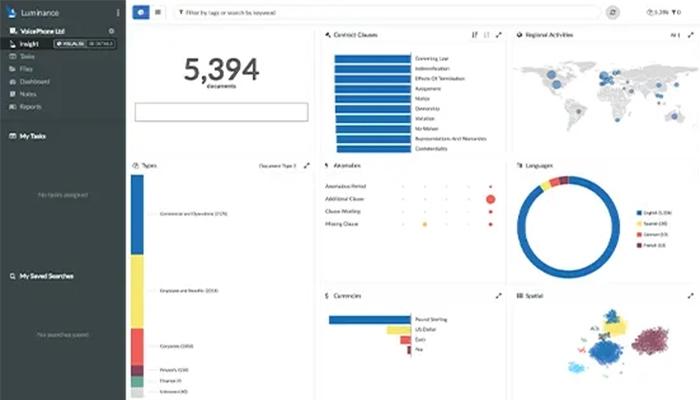
Luminance software helps legal teams review contracts, identify risks, and apply negotiation terms across large contract portfolios. Organizations may need to configure their playbooks and organizational standards. Once established, its AI can draw on contract precedent to support faster, more consistent reviews and help teams manage higher contract volumes.
Luminance Software Specifications
- Document Management
- Document Automation/Assembly
- Workflow Automation
- Compliance & Security Features
What Is Luminance Software?
Luminance software is a contract intelligence platform that helps enterprises turn the knowledge contained in their contracts into usable business insight. It uses AI designed for legal language to understand agreements in their broader contractual context, rather than treating each document as an isolated file. Its proprietary Luna Crescent models are trained on contract data to recognize legal language, contract structure, and the relationships between clauses, obligations, and commercial terms.
The software carries this knowledge across the contract lifecycle, allowing users to draw on previous negotiations, approved terms, and past decisions instead of starting from scratch with each contract. Legal teams can use these references when reviewing new agreements, while business units such as finance, HR, and sales can access relevant terms, commitments, and risks when making business decisions.
For enterprises managing large contract portfolios, Luminance brings together commercial and legal information that may otherwise remain scattered across agreements. It gives them a more consistent basis for managing their contractual obligations, assessing exposure, and identifying opportunities across their portfolio.
What Is Luminance Software Best For?
The platform stands out for its Model-Opinionated AI, which selects the most suitable AI model for each contract task rather than relying on a single model. Luminance evaluates models for each task based on accuracy, speed, reliability, and cost. It can combine proprietary legal models with models from different AI providers, allowing the platform to change models when another performs better for a particular task. The feature supports legal teams handling varied contract work, where complex legal reasoning, high-volume extraction, and classification may require different levels of model capability.
How Much Does Luminance Software Cost?
Luminance software's starting price is estimated at $30,000/year. Pricing can vary based on contract volume, deployment scope, modules, and enterprise requirements.
Organizations should also consider the following potential additional costs when estimating the total investment:
- Implementation: $15,000-$50,000
- Data Migration: $5,000-$25,000
- Integrations/Custom Configuration: $5,000-$25,000+
- Training: $3,000-$10,000
- Premium/Ongoing Services: $5,000-$20,000+/year
Disclaimer: Pricing references are based on publicly available third-party information and industry benchmarks. Actual costs may vary.
Luminance Software Integrations
The platform integrates with the following third-party applications:
- Docusign
- Microsoft Outlook
- Microsoft Word
- LexisNexis
How Does Luminance Software Work?
Here’s how users can access Luminance and start using its features:
- Log in with your credentials to access the platform and its contract intelligence tools
- Upload contracts and related documents to build a searchable contract portfolio and establish the context needed for analysis
- Search across the contract portfolio or ask questions to find relevant terms, obligations, renewals, risks, and other contract information
- Review agreements using your organization's preferred terms, precedent, and established positions to identify deviations and support contract negotiations
- Analyze contract findings and source-backed answers to understand the implications of terms, commitments, and potential risks
- Manage contracts from intake through execution, with stakeholders able to track progress, bottlenecks, and next steps
- Act on identified risks, obligations, and commercial opportunities as contracts progress through review and execution
Who Is Luminance Software For?
Luminance is suitable for companies across various industries and sectors, including:
- Manufacturing
- Financial services
- Insurance
- Technology
- Pharmaceuticals
- Telecommunications
- Professional services
- Food and beverage
Luminance Software Use Cases
Based on our analysis of Luminance's existing functionalities, these are key scenarios where the platform can fit:
1. Scaling Contract Review With A Lean Legal Team
When a small legal team is responsible for reviewing a steady stream of Non-Disclosure Agreements (NDAs), Master Service Agreements (MSAs), supplier agreements, or other routine contracts, review capacity could become a constraint. Luminance can perform an initial review against the organization’s standards, flagging non-standard or risky language, enabling lawyers to focus on issues that require their legal judgment. This can help a lean team handle higher contract volumes without giving every routine agreement the same level of manual review.
2. Giving Departments Self-Service Access To Contract Information
Departments such as IT, procurement, or finance may regularly need information from existing contracts, including renewal dates, invoicing terms, liabilities, and contractual obligations. Finding this information may create a recurring dependency on the legal team. Luminance’s conversational search lets users ask questions about contracts and trace the answers back to the relevant documents. It allows business users to find routine contract information themselves, while more complex questions could still be handled by the legal department.
3. Assessing Contractual Risk Across Large Agreement Portfolios
A regulatory change, sanctions requirement, or internal policy change may require an organization to determine where its existing contracts may create exposure. Manually reviewing a large portfolio for specific clauses, jurisdictions, or contractual positions can take substantial time. Luminance analyzes large contract sets and identifies relevant provisions, parties, governing laws, and other data points for targeted risk analysis. This makes it useful for organizations that need to assess risks and contract terms across their entire portfolio, rather than reviewing agreements one at a time.
4. Consolidating Contracts And Evaluating Risk After An Acquisition
After an acquisition, legal teams may inherit contracts stored across different repositories, business units, and jurisdictions, making it difficult to establish a clear picture of the combined contract portfolio. Luminance can bring those agreements into a centralized contract database. Furthermore, it uses AI to identify key terms, obligations, and potential risks across the inherited portfolio. As a result, legal personnel get a consolidated view of the contractual landscape, helping them identify where further reviunaew is needed.
Is Luminance Software Right For You?
Luminance may be a suitable fit if your organization is struggling to manage a growing volume of contracts with a lean legal department, particularly when contract reviews span multiple business functions or jurisdictions. It can also be a good fit for firms operating in industries where teams often manage complex contracts and regulatory requirements.
For organizations handling sensitive contractual data, the platform uses AES-256 encryption for data at rest, role-based access controls, multi-factor authentication, and single sign-on (SSO). It is ISO 27001 certified and undergoes regular SOC 2 Type II examinations. Independent third parties also carry out regular penetration testing of its application and operational systems. Moreover, customer-specific learning remains private to each organization and is not distributed across other software users.
In April 2026, the platform announced a strategic partnership with LexisNexis to integrate citation-backed legal AI into contract review. Its notable clients include; Hitachi, TotalEnergies, Staples, and LG Chem.
Still not sure if Luminance software is right for you? Contact us at (661) 384-7070, and we will guide you towards the best decision.
Luminance Software Features
Document Search Engine
Luminance's Document Search Engine analyzes and organizes the legal content in contracts, including key concepts, clauses, entities, and metadata. It uses different search methods to find relevant information even when the user’s question does not use the exact wording found in the contract. Its Context Graph connects contracts, amendments, and related agreements, so users can look beyond a single document and find information in related agreements. The search method also adapts to the question, whether the user needs a specific clause or wants to analyze information across a large contract portfolio.
Differential Validation
Differential Validation checks important AI-generated answers before they are treated as reliable. The software uses separate AI models to review an answer, either by comparing their conclusions or checking the answer against the original contract and the requirements of the task. If the models agree or the answer meets the required checks, it is verified. If not, Luminance flags it for human review and can retry the answer by addressing the issue it identified. This helps legal teams distinguish between answers that have been checked and those that need further review.
AI Contract Negotiation
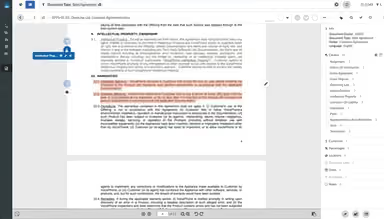
This feature compares incoming contracts with previous negotiations, approved playbooks, preferred terms, fallback language, and standard clauses. It can identify terms that differ from these standards, apply approved language, and create redlines directly in Microsoft Word. It can also use past negotiations with the same counterparty and similar agreements to provide relevant precedent. Structured checklists help review contracts against defined negotiation standards, while non-standard terms and exceptions can be flagged for review by legal personnel.
Automated Workflows
The platform's Workflows functionality automates the movement of contracts between teams, tasks, and approval stages. It can send contracts and approvals to the right people based on set rules, move them forward when certain conditions are met, and create workflow templates using natural language instructions. The feature allows users to track each contract’s status, see who needs to act next, spot delays, and keep a record of actions and decisions. It can help teams reduce manual handoffs, spot delays sooner, and keep track of contract progress.
Repository
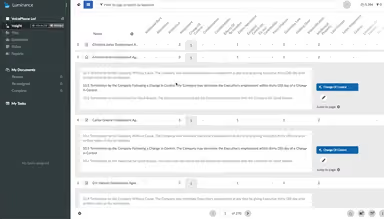
Luminance's Repository brings contract information into one place, making it easier to search and review large contract portfolios. It can identify upcoming renewals, financial exposure, risks, missed payments, and obligations, with each key detail linked to the relevant contract. It also connects related agreements and amendments and sends alerts when a contract or clause needs attention. Additionally, it provides filters and reports to help users find specific information or patterns. The feature assists teams in responding to important risks, deadlines, and opportunities sooner.
Pros And Cons of Luminance Software
Pros
Supports high-volume contract volumes without needing full manual reviews of every agreement
Gives users access to relevant contract precedent when handling similar negotiations
Helps users identify deviations and potential risks across large contract portfolios
Cons
Users may need training to make effective use of the platform’s AI capabilities
Complex contracts may still require human review when AI findings involve significant risk or judgment
Luminance Software Reviews
Total 5 reviews
4.8
All reviews are from verified customers
Rating Distribution
5
Stars80%
4
Stars20%
3
Stars0%
2
Stars0%
1
Stars0%
Share your experience
Enterprise, N/A employees
“Simple contract drafting support”
Pros
From my experience this tool has been useful for drafting contracts across different member firms working on multiple projects. I'm able to support agreements and legal documentation in one place which saves me time and keeps things organized.
Cons
So far everything's been going well and I don't have any complaints.
Rating Distribution
Ease of use
9
Value for money
9
Customer Support
9
Functionality
9
Enterprise, N/A employees
“Legal-grade AI for confident decisions”
Pros
The legal-grade AI is easily my favorite part. It helps me make faster calls and keeps tasks moving without unnecessary slowdowns or second-guessing.
Cons
There are times when I notice the legal-grade AI tends to repeat similar outputs and ends up doing redundant work but this is a small thing in the larger scope of things it can do.
Rating Distribution
Ease of use
9
Value for money
9
Customer Support
9
Functionality
9
Small-Business, N/A employees
“Highly accurate and transparent tool”
Pros
Over time I've been impressed by how accurate and dependable the legal-grade AI has been. I'm honestly surprised at how well it manages complicated trademark workflows automatically while still maintaining a high level of accuracy. For someone working in the legal space, this has become something I rely on heavily because it reduces compliance stress and provides clear, evidence-backed insights that help guide my decisions. I also feel confident using it for high-stakes matters since the reasoning behind the results is transparent and can be reviewed when needed.
Cons
My main worry about the Legal-Grade AI is how steep the learning curve can be. Even though the system packs a lot of power, its complexity has been intimidating for me and other newcomers and it can take a significant amount of time and effort to get up to speed before you can use it effectively.
Rating Distribution
Ease of use
9
Value for money
8
Customer Support
9
Functionality
9
Frequently Asked Questions
Can Luminance software review contracts in Microsoft Word?
Yes, it integrates with Microsoft Word, allowing users to review contracts, generate AI-assisted markups, and apply approved language without moving to a separate document editor.
What is Luminance software used for?
The platform can be used for contract review, negotiation, search, analysis, due diligence, and contract portfolio management.
Can Luminance software use previous negotiations when reviewing a new contract?
Yes, the platform can draw on previous approaches, concessions, and approved terms when reviewing or negotiating new agreements. This also includes precedents involving the same counterparty or comparable contracts.
How much does Luminance software cost?
Luminance software's pricing starts at approximately $30,000/year. The actual price depends on factors such as contract volume, deployment scope, and module selection. You can request a customized Luminance software cost quote for your firm today.
What firms use Luminance software?
It can be used by enterprises across multiple industries including technology, manufacturing, food and beverage, financial services, and more.
Does Luminance software replace legal review?
Luminance is designed to support legal review rather than remove the need for legal judgment. It can flag risks, generate first-pass markups, and identify non-standard terms, while complex or high-risk matters may still require review by legal professionals.
Can Luminance software be used by teams outside legal?
Yes. Luminance provides access to contract information for business functions such as procurement, HR, sales, finance, and IT, among others.