


Outlaw Practice
Last Updated
Overview
Outlaw Practice simplifies legal case management with tools to streamline document handling, client interactions, and billing. While initial training is required, its wide array of features helps law firms stay organized and efficient. Outlaw Practice simplifies all legal tasks and saves time, allowing more focus on client work.
Outlaw Practice Specifications
- Case Management
- Document Management
- Client Management (CRM)
- Billing & Invoicing
Outlaw Practice Features
Task Automation
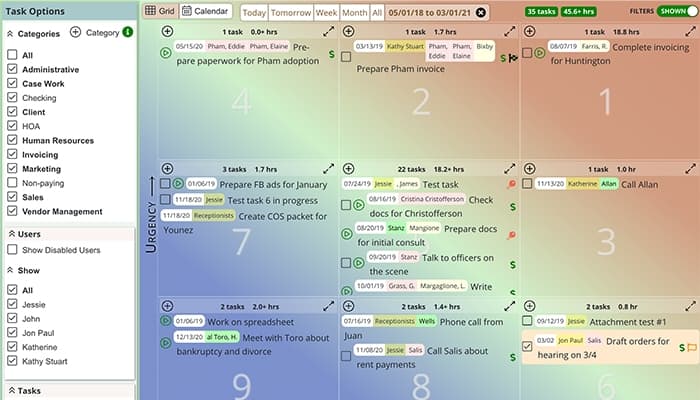
Outlaw Practice streamlines repetitive tasks through automation and enhances productivity by reducing manual effort. It minimizes human error, ensures consistency, and frees time for legal professionals to focus on more strategic work.
Document Management
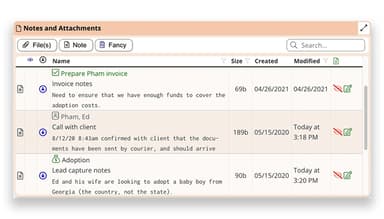
This feature enables users to securely store, organize, and retrieve legal documents. It supports version control and easy sharing capabilities. Also, it enhances collaboration among team members and everyone with access to the most up-to-date information.
Time And Expense Tracking
The software helps legal professionals accurately log billable hours and expenses in real-time. By simplifying the tracking process, users can enhance billing accuracy, reduce the risk of lost revenue, and ensure that all work is appropriately compensated.
Business Intelligence
Outlaw Practice offers analytics and reporting tools to help firms make informed decisions. It supports leveraging data insights to identify trends, measure performance, and optimize resource allocation. This leads to enhanced strategic firm planning and business growth.
Client Portal
The solution provides a secure platform for clients to access their case information and communicate with their attorneys. It enhances client engagement and satisfaction, fostering transparency and trust.
Pros And Cons of Outlaw Practice
Pros
Regular updates render a seamless experience
Double and triple entries are prevented
Customizable tools and templates
Efficient suite of features covering all legal tasks
Simple and user-friendly interface, according to many software users
Cons
Limited integrations
Some initial training is needed
No mobile app
Outlaw Practice Reviews
Total 1 reviews
5
All reviews are from verified customers
Rating Distribution
5
Stars100%
4
Stars0%
3
Stars0%
2
Stars0%
1
Stars0%
Share your experience
Law Practice, 1-10 employees
Less than a year
“Good tool”
Pros
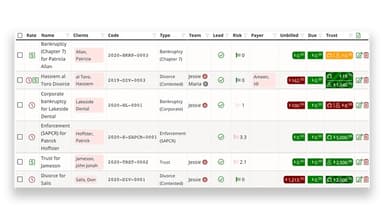
Outlaw has become something I can't picture my workday without. The full bird's-eye view of every client, along with the great connection between task management and invoicing, makes everything feel organized and efficient. On top of that it's simple to use and I honestly don't think there is a better option out there at this price point.
Cons
The one area that could really use attention is the visual design. Functionally the product performs almost flawlessly but the plain color schemes and dated, almost Windows 98-style look make it feel more utilitarian than polished. That said my complaints are entirely about appearance rather than how the software actually works.
Rating Distribution
Ease of use
10
Value for money
10
Customer Support
10
Functionality
10
Frequently Asked Questions
Does Outlaw Practice offer an API?
The official website does not explicitly disclose its API integrations.
What language does Outlaw Practice support?
Outlaw Practice supports the English language only.
What other apps does Outlaw Practice integrate with?
Outlaw Practice integrates with LawPay.
What type of pricing plans does Outlaw Practice offer?
The Outlaw Practice price is $50/user/month. Users can get a tailored pricing estimate for you.
Who are the typical users of Outlaw Practice?
The typical users of Outlaw Practice are those in the legal industry, especially small law firms and solo legal practitioners.
What level of support does Outlaw Practice offer?
Outlaw Practice offers email, chat, and a knowledge base.