Last Updated
Overview
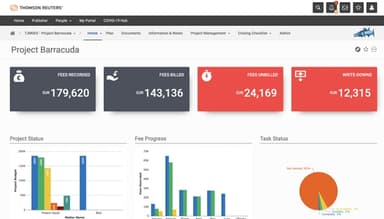
ProLaw helps law firms and corporate legal departments manage complex legal operations through a single platform covering matter management. While its reporting and customization options can take time to configure, its data control capabilities and financial tracking tools are well-regarded among firms handling high-volume caseloads.
Overall Rating
Based on 2 users reviews
4.5
Rating Distribution
Positive
100%
Neutral
0%
Negative
0%
Starting Price
Custom
ProLaw Specifications
- Case Management
- Document Management
- Client Management (CRM)
- Billing & Invoicing
What is ProLaw?
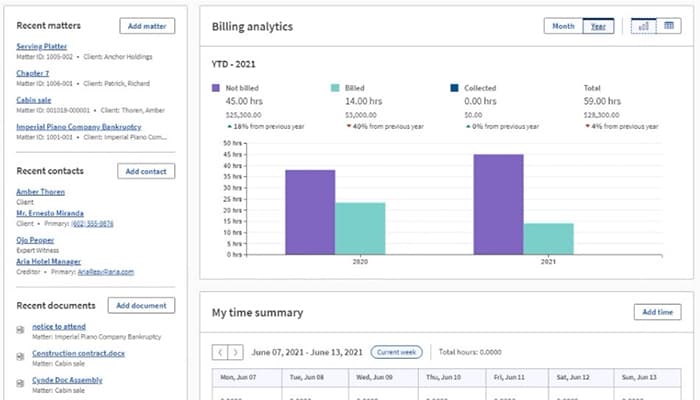
ProLaw by Thomson Reuters Elite is a legal practice management platform built for medium- to large-size firms, corporate legal departments, and government offices. It brings matter management, docketing, time tracking, billing, accounting, and document organization into a single system. The platform includes mobile app for time entry and case access outside the office. Its customizable reporting tools give firm leadership visibility into case status and financial performance, while integrated billing and accounting capabilities handle complex invoicing arrangements and trust accounting within the same environment.
What Is ProLaw Best For?
The system is well known for its document management and automated document generation capabilities, particularly the ability to auto-populate legal templates from matter data and keep all case-related files, notes, and correspondence organized within a single system. Practices dealing with manual template drafting, version control issues or case records spread across disconnected systems tend to get the most consistent value from this functionality.
How Much Does ProLaw Cost?
The ProLaw price is estimated to range between $150–$300/user/month for core legal management capabilities. Mid-sized firms may spend approximately $1,500–$6,000/month, while larger legal organizations requiring advanced financial management, document automation, and enterprise-grade reporting can exceed $50,000–$100,000+ annually.
However, users must consider additional cost considerations as well, including but not limited to the following:
- Implementation And Data Migration: Estimated at $5,000–$25,000+ one-time depending on legacy data complexity and firm size
- Training And Onboarding: Typically ranges from $2,000–$10,000+ for attorney and staff onboarding programs
- Customization And Workflow Setup: Usually costs around $3,000–$20,000+ based on reporting and workflow requirements
- Third-Party Integrations: Estimated at $2,000–$15,000+ for integrations with other systems
- Premium Support Plans: Often priced between $500–$3,000+ per month for priority enterprise support
- Additional User Licenses: Commonly estimated at $75–$250+ per user/month for expanded staff access
Disclaimer: Pricing references are based on publicly available third-party information and industry benchmarks. Actual costs may vary.
ProLaw Integrations
The platform integrates with multiple third-party applications, such as:
How Does ProLaw Work?
Log in to the ProLaw account to access a centralized legal practice management platform and follow the given steps:
- Access the centralized dashboard to review firm activity, pending matters, and financial updates
- Configure user roles and permissions to manage access across attorneys, paralegals, and support staff
- Organize client and matter records through the matter management portal for easier case tracking
- Monitor billing activities, trust accounting, and invoices using the integrated financial workspace
- Schedule hearings, deadlines, and appointments through the calendaring and docketing tools
- Generate operational and financial reports to evaluate productivity and matter performance
- Assign tasks and workflows to internal teams for streamlined collaboration and accountability
- Retrieve and manage legal documents using the searchable document management interface
- Track communications, notes, and case-related updates from a unified matter view
Who Is ProLaw For?
ProLaw is for a range of facilities in the legal industry, such as:
- Law firms
- Government offices
- Corporate legal departments
ProLaw Use Cases
Based on our analysis of ProLaw’s capabilities and common legal industry workflows, we have identified several scenarios where the software is particularly well-suited for law firms and legal departments managing operational complexity, financial oversight, and matter coordination.
Mid-Sized Law Firms Managing High Volumes Of Active Matters
Growing law firms often struggle to maintain consistency across case management, client communication, and billing as their workload expands. In these environments, disconnected systems can create delays and reduce visibility into matter progress. ProLaw software is commonly suited for firms that need a centralized operational structure to coordinate legal, administrative, and financial tasks across multiple teams, particularly where leadership needs oversight across several active matters without relying on manual tracking.
Litigation Practices Handling Deadline-Driven Workflows
Litigation-focused firms operate under strict timelines where missed court dates or filing deadlines can create significant operational risk. Attorneys and support staff frequently need a reliable way to coordinate calendars, documents, and case updates without duplicating administrative work. ProLaw may fit well in these scenarios by supporting structured matter oversight and helping teams maintain organization throughout lengthy litigation cycles. Firms managing complex caseloads often benefit from having case-related activity consolidated into a single workflow environment.
Legal Organizations Requiring Integrated Financial Oversight
Many legal practices rely on separate accounting tools that make it difficult to connect financial data with ongoing matters and billing activity. This challenge becomes more pronounced for firms handling trust accounting, expense allocation, and multi-client invoicing simultaneously. The platform is often adopted by organizations seeking closer alignment between legal operations and financial management without depending heavily on external systems. It is particularly relevant for firms prioritizing billing accuracy and operational accountability.
Multi-Office Firms Standardizing Internal Processes
Law firms operating across multiple offices frequently face inconsistencies in documentation standards, reporting structures, and workflow management. Maintaining operational alignment between locations can become difficult when teams follow different administrative practices. The system is a practical fit for firms looking to centralize information access and create more uniform processes across departments and office locations. This approach supports stronger collaboration while giving management greater visibility into firm-wide operations.
Corporate Legal Departments Managing Internal Case Work
In-house legal teams often oversee contracts, compliance matters, disputes, and internal requests while coordinating with multiple business units. These departments require structured workflows that help legal staff track activity without creating unnecessary administrative burden. ProLaw is well-suited for corporate legal environments that need organized matter tracking and centralized record management for internal legal operations. Its workflow-oriented structure can help departments improve response times and maintain clearer documentation across ongoing legal matters.
Is ProLaw Right For You?
ProLaw software might be the right choice for organizations looking for a legal solution that integrates financial management, case and matter management, and document organization into one comprehensive solution. The platform is trusted by various firms, such as Hurley Law and Yukevich | Cavanaugh, for its reliability and security. The software is GDPR compliant, ensuring confidentiality of sensitive user data.
Are you still unsure about ProLaw? Contact us at (661) 384-7070 and get guidance and support from our team of experts.
ProLaw Features
Legal Data And Document Management
The feature centralizes all legal documents and data within a secure and easily accessible channel. It supports organized workflows and promotes collaboration within the firm. The software ensures that all important documents are readily available and stored securely.
Financial Management
The platform handles financial tasks by automating time tracking, billing, and accounting. It allows users to maintain accurate financial records, send timely invoices, and manage cash flow effectively. The software contributes to better financial health and operational efficiency for a legal firm.
Drafting Software, Service And Guidance
The software integrates with Microsoft Office, making document drafting more structured. It provides templates and guidance and ensures that documents are created quickly and accurately. With this feature, users can reduce the drafting time and minimize errors.
Trial Readiness, Process And Case Guidance
The feature helps manage cases, schedule, and track deadlines. It also allows attorneys to stay organized and prepared for trial. It ensures all case-related activities are in one place and easy to manage and access.
Business Development
ProLaw supports business development efforts by managing client relationships and marketing activities. It maintains a comprehensive database of clients and prospects, increasing client acquisition and retention.
Legal Research And Guidance
The solution connects with legal research tools and provides access to comprehensive legal databases, case law, and statutes. It saves time and improves the efficiency and effectiveness of legal research. These capabilities ensure well-preparedness for legal arguments.
Evidence Store
ProLaw consolidates the storing and organizing of case-related materials and evidence, including documents, photos, and videos. This feature supports easy access and efficient evidence management. It assists attorneys in building strong cases and staying prepared with secure digital access.
Pros And Cons of ProLaw
Pros
Unifies legal operations for faster team collaboration
Improves productivity through centralized case and document access
Helps firms operate efficiently with paperless file management
Cons
Reporting features can be improved
Remote access capabilities can feel limited
ProLaw Reviews
Total 2 reviews
4.5
All reviews are from verified customers
Rating Distribution
5
Stars50%
4
Stars50%
3
Stars0%
2
Stars0%
1
Stars0%
Share your experience
Constantine H.
Law Practice, 500+ employees
More than a year
“All tools in one place
Pros
Having case management features like time and expense tracking alongside tools tied directly to the substance of litigation all in one system is a big advantage.
Cons
Navigation can be challenging and it takes a while to become proficient because there are so many features to learn.
Rating Distribution
Ease of use
10
Value for money
10
Customer Support
10
Functionality
10
Robert P.
Law Practice, 51-100 employees
More than a year
“reliable core features
Pros
The features they do offer work really well. So yes it is a great tool I would say!
Cons
However they seem a bit behind other products when it comes to newer and more exciting features.
Rating Distribution
Ease of use
8
Value for money
8
Customer Support
8
Functionality
9
Frequently Asked Questions
Does ProLaw offer an API?
Yes, ProLaw provides an API.
What other apps does ProLaw integrate with?
ProLaw integrates with NetDocuments, HighQ, iManage, and Microsoft SharePoint.
What language does ProLaw support?
ProLaw primarily supports the English language.
Who are the typical users of ProLaw?
Typical users of ProLaw are from the legal industry, such as law firms, corporate legal departments, and government offices.
What level of support does ProLaw offer?
ProLaw provides support through phone, live chat, a knowledge base, and a customer portal.
Does ProLaw have a mobile app?
No, ProLaw does not have a mobile app.
How much does ProLaw cost?
The starting price of the software is estimated to start from $150/user/month and go up to $300/user/month. The total cost of ownership depends on factors such as data migration, onboarding, and implementation. Get a personalized ProLaw cost tailored to your firm’s needs.