


Last Updated
Overview
EnRoute is a specialized CAD/CAM software for CNC production, offering tools for 2D, 2.5D, and 3D routing and engraving. While its interface appears dated compared to modern design tools, it is exceptionally fast and hardware-friendly, running smoothly on standard computers. EnRoute streamlines cutting and creative design workflows.
Be the first one to leave a review!
No review found

Starting Price
Custom
EnRoute Specifications
- Production Planning
- Inventory Management
- Quality Control
- Work Order Management
What Is EnRoute?
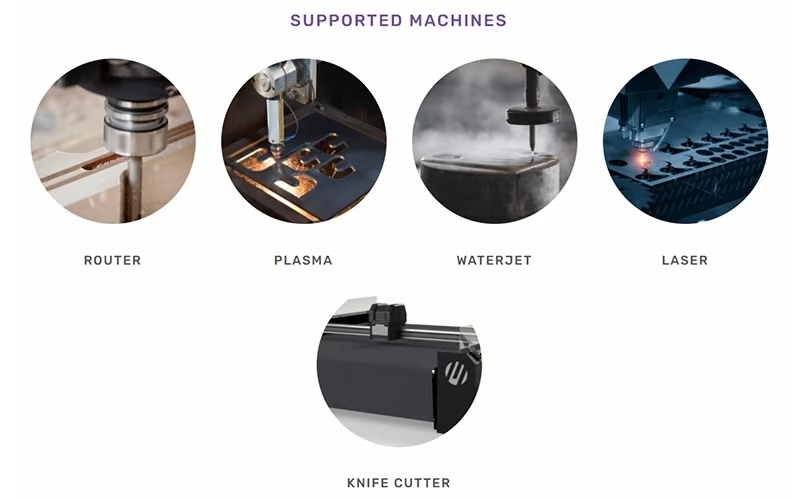
EnRoute is a complete computer-aided design/computer-aided manufacturing software (CAD/CAM) solution designed specifically for use with computer numerical control (CNC) machines, including routers, lasers, plasma cutters, waterjet, and knife cutters. It provides a unique combination of 2D and 3D design capabilities with a powerful toolpath engine, simplifying the production workflow from initial concept to final output. It is the go-to software for industries like woodworking, sign making, and nested-based manufacturing.
EnRoute Pricing
EnRoute pricing consists of the following plans:
- EnRoute Design: €38.99/month
- EnRoute Fabrication: €49.99/month
- EnRoute Plus: €61.99/month
- EnRoute Complete: €107.99/month
Disclaimer: The pricing is subject to change.
EnRoute Integrations
The vendor has not provided details about third-party integrations for this software.
Who Is EnRoute For?
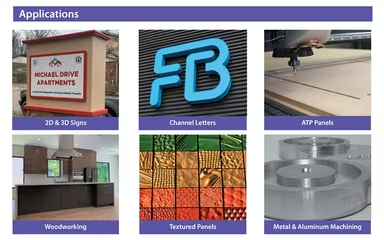
EnRoute is a versatile CAD/CAM solution primarily used by professionals who rely on CNC machinery for specialized design and manufacturing.
- Woodworking and cabinetry
- Sign making (2D and 3D Dimensional)
- Metal fabrication (CNC cutting)
- Architectural millwork
- General part cutting
- Creative design applications
Is EnRoute Right For You?
EnRoute is an excellent choice if you require high-speed performance and specialized 3D design and texturing capabilities (like Rapid Texture and Parametric Textures) for your CNC work. Users appreciate its fast-processing speed and its ability to manage True Shape Nesting algorithms to maximize material savings. SAi provides comprehensive support, including instant access to the latest updates via subscription, full phone and email support, and the ability to create new machine drivers if needed.
Still not sure about EnRoute? Contact our support team at (661) 384-7070 for further guidance.
EnRoute Features
First-Class Vectorization Engine
The first-class vectorization engine allows users to turn images or artwork into clean lines and contours, simplifying the process of converting graphic concepts into machinable data. This ensures high-quality input for toolpathing.
Unique Texturing Capabilities
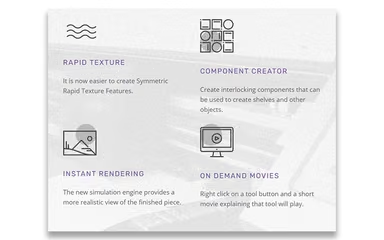
The unique texturing capabilities include 3D and texture design tools such as parametric textures and a rapid texture tool. These tools enable the creation of highly detailed and unique surface reliefs for signage and woodworking applications.
Material Saving Nesting Algorithms
EnRoute features material-saving nesting algorithms, notably true shape nesting and advanced nesting algorithms. This feature automatically optimizes the arrangement of parts on the material sheet to minimize waste and reduce production costs.
Automatic Toolpathing And Output
The software provides automatic toolpathing (ATP), which includes advanced toolpath and output capabilities. This streamlines the manufacturing process by automatically calculating tool movements for 2D, 2.5D, and 3D routing and engraving. These EnRoute features simplify the workflow from design to output.
Comprehensive 3D Design And Routing
The comprehensive 3D design and routing tools include capabilities for 3D routing and engraving and 3D mesh creation. This allows the software to handle complex 3D surfacing and model creation, necessary for architectural millwork and dimensional signage.
Pros And Cons of EnRoute
Pros
Unparalleled toolpathing for processing multiple parts quickly
Best-in-class simulation engine verifies final product design
Combines 2D and 3D design with CAM capabilities
Cons
Support documentation may not cover all complex scenarios
Software interface may seem dated and requires updates
EnRoute Reviews

No reviews yet!
Be the first to review this product
Frequently Asked Questions
Who are the typical users of EnRoute?
EnRoute is ideal for professionals using CNC machinery for custom design and manufacturing, including woodworking and cabinetry, sign making (2D and 3D), metal fabrication, architectural millwork, general part cutting, and creative design applications.
What other apps does EnRoute integrate with?
The vendor has not provided details about third-party integrations for this software.
Does EnRoute offer an API?
Yes, EnRoute software offers an API.
What language does EnRoute support?
EnRoute supports more than a dozen languages. The software offers versions to accommodate regional requirements, including English, Dutch, Spanish, French, and Italian.
Does EnRoute have a mobile app?
No, EnRoute does not offer a mobile app.
What level of support does EnRoute offer?
EnRoute offers world-class support and technical services. This includes access to the SAi help center, video tutorials, how-tos, and a knowledge base. Full phone and email support is included with the subscription.
What types of pricing plans does EnRoute offer?
EnRoute pricing consists of four plans: EnRoute Design (€38.99/month), EnRoute Fabrication (€49.99/month), EnRoute Plus (€61.99/month), and EnRoute Complete (€107.99/month). You can request a personalized EnRoute cost quote for your business.